
This is the print version of this page. All content is copyright Indezine.com 2000-2026.
Thoughts and impressions of happenings in the world of PowerPoint and presentations, continuously updated since 2003.
See Also:
PowerPoint and Presenting Notes
PowerPoint and Presenting Glossary
You might have experienced this scenario: you have created a presentation within PowerPoint 2016, but you are not sure whether your client, boss, friend, or colleague, who has an earlier version of PowerPoint will be able to view and edit this presentation using the same options that you have used? And, if you save this presentation as a file compatible with an earlier version of PowerPoint, there are chances that you could lose some attributes of the presentation that are not available in previous versions. Or worse, your editable content could just change to flat, non-editable pictures!

Learn to check compatibility with other PowerPoint versions in PowerPoint 2016 for Windows.
Filed Under:
PowerPoint 2016
Tagged as: Compatibility, Microsoft Windows, Office 2016, PowerPoint 2016, Tutorials
Comments Off on Check Compatibility in PowerPoint 2016 for Windows
Bauhaus 93 is a typeface originally owned by font foundry, URW, which stood for Unternehmensberatung Rubow Weber, representing the names of the foundry’s founders. It is now owned by URW , the successor of the original company. Although there are many other versions of Bauhaus available, we are exploring Bauhaus 93 since this is the version included in many versions of Microsoft Office.

Learn about Bauhaus 93, a decorative font included with some versions of Microsoft Office.
Filed Under:
Fonts
Tagged as: Bauhaus, Fonts, PowerPoint, Safe Fonts, Tutorials
Comments Off on Explore Fonts: Bauhaus 93
An understanding has grown over the years to make all kinds of computer-generated content available to people with disabilities. PowerPoint is no stranger to this accessibility concept and has many options up its sleeve that help your slides be more relevant to those with accessibility impairments. PowerPoint’s built-in Accessibility Checker works similar to the spell checker. It highlights potential accessibility issues in your presentation so that you can fix these potential problems and make your content accessible to everyone.
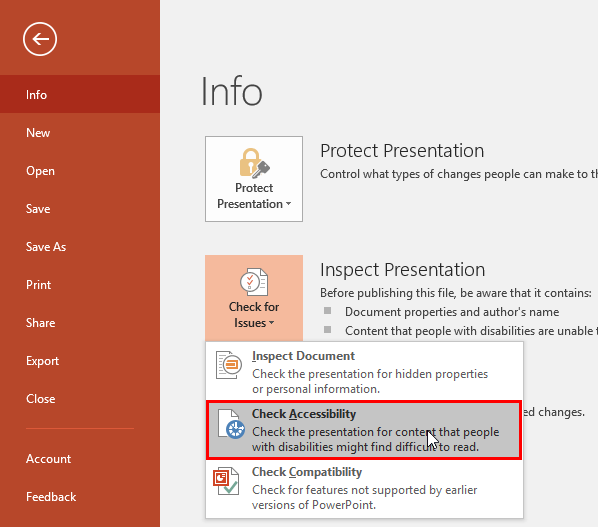
Check accessibility options in PowerPoint 2016 for Windows.
Filed Under:
PowerPoint 2016
Tagged as: Accessibility, Microsoft Windows, Office 2016, PowerPoint 2016, Tutorials
Comments Off on Check Accessibility in PowerPoint 2016 for Windows
There’s a new fear in the air about being infected by a PowerPoint file. Fortunately, this is not as fearful as it seems–although it is best to be careful. We talk about the new PowerPoint mouseover scare. We then look at Kasper Langmann’s post on Pivot Tables in PowerPoint.
PowerPoint 2016 for Windows users will learn video compression options, and inserting videos from OneDrive, Facebook, YouTube and embed codes. Finally, do not miss the press releases and templates of this week.

Stay informed about updated tutorials and happenings on Indezine.
Filed Under:
Ezine
Tagged as: Ezine, PowerPoint
Comments Off on PowerPoint and Presenting News: June 20, 2017
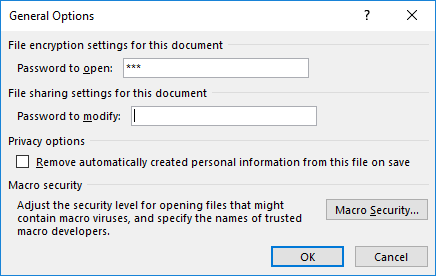
There are various reasons why you would want to encrypt your PowerPoint file with a password. There are two password levels you can implement within a PowerPoint file: a password to open and a password to edit. However, even if you add a password to your presentation, there may come a time when you want to remove it. Or, you may want to change the password.
Filed Under:
PowerPoint 2016
Tagged as: Microsoft Windows, Office 2016, Password, PowerPoint 2016, Share, Tutorials
Comments Off on Remove and Change Passwords in PowerPoint 2016 for Windows
Microsoft and the Office logo are trademarks or registered trademarks of Microsoft Corporation in the United States and/or other countries.