
This is the print version of this page. All content is copyright Indezine.com 2000-2026.
Thoughts and impressions of happenings in the world of PowerPoint and presentations, continuously updated since 2003.
See Also:
PowerPoint and Presenting Notes
PowerPoint and Presenting Glossary
PowerPoint provides various sources which allow you to insert online video within your slide. We have already explained how to insert video from OneDrive. In this tutorial, we’ll cover how you can insert video from YouTube. Follow these steps to learn how to use the YouTube option to insert a video within PowerPoint 2016.

Learn how you can insert YouTube videos in PowerPoint 2016 for Windows.
Filed Under:
PowerPoint 2016
Tagged as: Microsoft Windows, Office 2016, PowerPoint 2016, Tutorials, Video, YouTube
Comments Off on Insert Video from YouTube in PowerPoint 2016 for Windows
We begin by exploring the concept of Presentation Management. AlexAnndra Ontra of Shufflrr shares some thoughts that will help you evolve a strategy. For chart users, do you get frustrated by seeing a grayed out Switch Row/Column button? We explore a solution. And have you wanted to scan hand-filled forms that could automatically have their data extracted to a spreadsheet? Our review product, PDFelement 6 Pro lets you do so.
PowerPoint 2016 for Windows users will learn about inserting local on online video clips. We also explore trimming video clips and recovering new, unsaved presentations manually. PowerPoint 2016 for Mac users can learn to set the default version. Finally, do not miss the press releases and templates of this week.

Stay informed about updated tutorials and happenings on Indezine.
Filed Under:
Ezine
Tagged as: Ezine, PowerPoint
Comments Off on PowerPoint and Presenting News: June 13, 2017
Our next option within the Insert Online Video series is inserting video from OneDrive. OneDrive is an online service which allows you to store files online – it also allows you to work on Microsoft Office web applications such as PowerPoint Online, where you can create and edit presentations. Remember that you will have to first sign in with your Microsoft account.

Learn how you can insert videos from OneDrive in PowerPoint 2016 for Windows.
Filed Under:
PowerPoint 2016
Tagged as: Microsoft Windows, Movies, Office 2016, OneDrive, PowerPoint 2016, Tutorials, Video
Comments Off on Insert Video from OneDrive in PowerPoint 2016 for Windows
Recent versions of PowerPoint accept more video file formats than previous versions and can do a lot more with videos, including trimming of video clips. However, it also embeds all inserted video clips by default, and this can result in huge presentations that contain huge video files! This ultimately occupies oodles of disk space and may also make PowerPoint work a wee bit slower. To tackle this problem, you can explore media compression abilities built right inside PowerPoint. You no longer need any third-party media compression tool since PowerPoint’s native Media Compression options make this task very easy indeed.
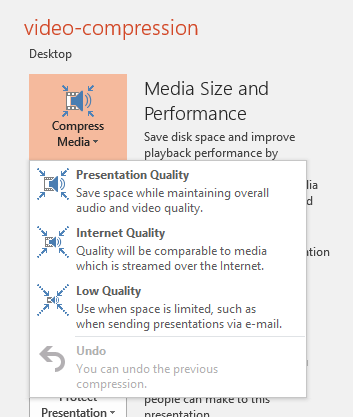
Learn about video compression options in PowerPoint 2016 for Windows.
Filed Under:
PowerPoint 2016
Tagged as: Compression, Microsoft Windows, Office 2016, PowerPoint 2016, Tutorials, Video
Comments Off on Video Compression Options in PowerPoint 2016 for Windows
Do you have a desk full of paper forms that need to be filled-up, scanned, saved, and emailed? Do you also need to automatically extract all data? Or do you have actual PDF forms that you must print, fill-up, scan, save, and email! Clearly, you don’t have it easy, and the monotonous work may also be boring and repetitive. Our review product, PDFelement 6 Pro can change your life for the better. Even if you do not have to fill in too many forms, you will find that PDFelement 6 Pro brings forth a fundamental change in the way you approach filling, saving, and sharing forms.

Comments Off on Automatically Extract Data in PDF Forms with PDFelement 6 Pro
Microsoft and the Office logo are trademarks or registered trademarks of Microsoft Corporation in the United States and/or other countries.