
This is the print version of this page. All content is copyright Indezine.com 2000-2026.
Thoughts and impressions of happenings in the world of PowerPoint and presentations, continuously updated since 2003.
See Also:
PowerPoint and Presenting Notes
PowerPoint and Presenting Glossary
Like many other users of PowerPoint, you might have also faced this situation: you have been working on a presentation for hours, and suddenly PowerPoint or even the computer crashes! This crash may happen due to a power outage, instability of the system or even PowerPoint itself may crash due to a bug or glitch. You then realize that you had not saved the presentation for a long time and may have lost most of your work. Although you can keep your programs updated, system secure, and even save your file often, there is no guarantee that you will never see a crash again and lose all or some of your work.

Learn how to work with AutoRecover and AutoSave options in PowerPoint 2016 for Windows.
Filed Under:
PowerPoint 2016
Tagged as: Microsoft Windows, Office 2016, Options, PowerPoint 2016, Save, Tutorials
Comments Off on AutoRecover and AutoSave Options in PowerPoint 2016 for Windows
Although default colors within a SmartArt graphic may work great, you may want to explore changing colors of individual shapes contained inside the SmartArt graphic. You change colors of everything within the SmartArt graphic at one go or change colors of individual shapes within the SmartArt graphic. Follow these steps to learn how you can change colors of your SmartArt graphic in PowerPoint 2016.
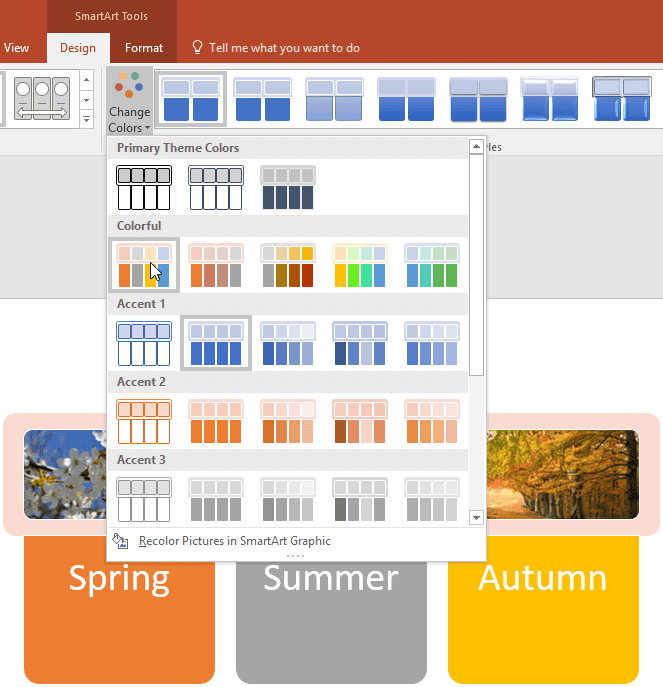
Learn how to change colors for a SmartArt graphic in PowerPoint 2016 for Windows.
Filed Under:
PowerPoint 2016
Tagged as: Color, Diagrams, Infodiagram, Infographics, Microsoft Windows, Office 2016, PowerPoint 2016, SmartArt, Tutorials
Comments Off on Change Colors for a SmartArt Graphic in PowerPoint 2016 for Windows
After inserting a SmartArt graphic within PowerPoint or converting some bulleted text to SmartArt, you might want to change the layout of the SmartArt. You can choose from various SmartArt graphics variations available within PowerPoint 2016. In this tutorial, we’ll show you how to change any existing SmartArt graphic to any other layout. Follow these steps to explore more.

Learn how to change from one SmartArt graphic layout to another in PowerPoint 2016 for Windows.
Filed Under:
PowerPoint 2016
Tagged as: Diagrams, Infodiagram, Infographics, Layouts, Microsoft Windows, Office 2016, PowerPoint 2016, SmartArt, Tutorials
Comments Off on Change between SmartArt Graphic Layouts (Types) in PowerPoint 2016 for Windows
Imagine this scenario: you have created a specialized, medical presentation that’s full of squiggly, red, underlined words! These squiggly underlines indicate what PowerPoint considers to be as a misspelled word! Don’t blame PowerPoint, because its medical terminology is somewhat limited. We do know that almost all the words in your medical presentation are perfectly valid as far as spelling is concerned. The silver lining here though is that you can teach PowerPoint to spell those words, and enhance PowerPoint’s custom dictionary.

Learn how to edit custom dictionaries in PowerPoint 2016 for Windows.
Filed Under:
PowerPoint 2016
Tagged as: Dictionaries, Microsoft Windows, Office 2016, PowerPoint 2016, Proofing, Spelling, Tutorials
Comments Off on Edit Custom Dictionaries in PowerPoint 2016 for Windows
Alan Meeks and Philip Kelly created Algerian. Initially, Algerian comprised only capital letters, but some font houses created a complete typeface that included small letters. Since Microsoft Office 4.3, Algerian has been bundled with each version of Office until Microsoft Office 2010. This abundant availability of Algerian probably resulted in its over-use.

Explore Algerian, a decorative font family with thick, large characters.
Filed Under:
Fonts
Tagged as: Algerian, Fonts, PowerPoint, Tutorials
Comments Off on Explore Fonts: Algerian
Microsoft and the Office logo are trademarks or registered trademarks of Microsoft Corporation in the United States and/or other countries.