
This is the print version of this page. All content is copyright Indezine.com 2000-2026.
Thoughts and impressions of happenings in the world of PowerPoint and presentations, continuously updated since 2003.
See Also:
PowerPoint and Presenting Notes
PowerPoint and Presenting Glossary

Mike Parkinson (Microsoft MVP, CPP APMP Fellow) is an internationally recognized visual communication and presentation expert and a multi-published, award-winning author. He regularly contributes articles and conducts educational seminars to companies like Microsoft, Motorola, Dell, Xerox, and Lockheed Martin as well as at learning institutions, government agencies, and conferences around the world. Mike owns a design education company, Billion Dollar Graphics, a creative services firm, 24 Hour Company, and authored a successful visual communication book, Do-It-Yourself Billion Dollar Graphics.
In this conversation, Mike discusses his sessions at the upcoming Presentation Summit 2016 series.
Geetesh: You are doing at least three sessions at this year’s Presentation Summit: Do-it-Yourself Graphics, Special Delivery, and Better Presenting through Psychology. Tell us more about these three diverse topics, and how will attendees benefit from your sessions?
Mike: Making and delivering great presentations requires a spectrum of skills such as design theory, rendering skills, storytelling, and an understanding of how audiences learn and are influenced. These three workshops tap into the key skill sets professionals use to create powerful presentations for companies, learning institutions, and government agencies.
Do-It-Yourself Graphics shares step-by-step instructions to make professional PowerPoint graphics. Special Delivery shows attendees how to deliver engaging presentations. Better Presenting through Psychology uses the latest behavioral psychology to improve understanding, recollections, adoption, and persuasion. All sessions give attendees a hands-on experience.
The sessions are fast-paced and interactive. Each workshop is architected to help attendees add new presentation skills to be successful both professionally and personally.
Geetesh: You were recently awarded as an MVP (Most Valuable Professional) by Microsoft for PowerPoint. Can you tell us more about your MVP Award?
Mike: It is such an honor. I’m so excited that I can share my experiences and influence future versions of the software. I use PowerPoint as both a presentation tool (for educations and sales) as well as a design tool (for infographics and marketing). My clients see PowerPoint as a graphics tool too. My hope is that I can help Microsoft, in some small way, improve the “PowerPoint as a design tool” experience without sacrificing what the software was made to do—presentations.

The company’s latest version of the tool is an evolutionary leap forward and I credit Microsoft PowerPoint’s amazing development team and the input they are receiving from users and MVPs around the world.
I will continue to be a champion for software best practices and defer to Microsoft for answers to my client’s toughest questions. (I apologize in advance to Microsoft’s PowerPoint developers. I get some tough questions.)
Used with permission from Sharyn Fitzpatrick/PresentationXpert
The views and opinions expressed in this blog post or content are those of the authors or the interviewees and do not necessarily reflect the official policy or position of any other agency, organization, employer, or company.
Filed Under:
Events
Tagged as: Events, Interviews, Mike Parkinson, MVP, PowerPoint, Presentation Summit
Comments Off on Presentation Summit 2016: Conversation with Mike Parkinson

Jon Schwabish is an economist, writer, teacher, and creator of policy-relevant data visualizations. He is considered a leading voice for clarity and accessibility in how researchers communicate their findings. His new book about presentation design and techniques, Better Presentations: A Guide for Scholars, Researchers, and Wonks, is now available for preorder. You can find out more about Jon and his work on his site, PolicyViz.
In this conversation, Jon discusses his session at the upcoming Presentation Summit 2016 series.
Geetesh: You are doing the Unlocking the Value of Data session – can you tell us more about your session, and also what you believe the attendee will take away from this session?
Jon: It’s no secret that the value and availability of data has grown swiftly over the past few years. People who work with data and conduct analysis often seem to use a presentation as an excuse to simply move a written report into slides. But that approach typically results in text-, data-, and bullet-point laden slides that don’t deliver real value to the audience.
In this session, I’ll talk about strategies presenters can use to more effectively present their data to their audience. I’ll talk about good and bad data visualization practices and how to effectively present data to an audience, and how to strategically use data in a presentation. I’ll also do some hands-on data visualization work in Microsoft Excel to teach attendees a few ways to extend the capabilities of that software to make better, more effective visualizations.
Geetesh: Can you tell us more about your work with data, how that translates to presentations—and also about your upcoming book?
Jon: My background is in economics and I spent the first 9 years of my professional career working at the Congressional Budget Office (CBO), providing support and analysis to Members of Congress and their staffs. My research at CBO covered Social Security, income inequality, immigration, food stamps, and disability issues. But at some point, it became clear to me that our work wasn’t getting the attention I thought it deserved and I realized that we were probably thinking too hard about publishing the work instead of communicating the work. I started reworking graphic types in traditional reports, help design new report types, and started creating new graphic types.
So it felt like a natural pivot to not only think about better communication in written form, but also in verbal form, in front of an audience. Over the past few years, then, I’ve helped researchers and scholars and analysts improve the way they present to an audience. My new book, Better Presentations: A Guide for Scholars, Researchers, and Wonks—will be published in the fall by Columbia University Press—is geared for people who work with data and present their analysis to an audience, be it in around the office, in a seminar room, or to a large audience. The book will help researchers and analysts—who too often pack their slides full of tables and numbers and bullet points—improve the way they think about a presentation and how to deliver their content so that it will be remembered and acted upon. I tried to make my approach very practical and easy to implement. Deep down, I’m still a researcher, so my goal was to write a practical book that others could use to design, create, and deliver great presentations.
Overall, improving the way people communicate their data and their analysis has become my mission, because if you can’t communicate your research, then it helps no one.
Used with permission from Amy Winner/Socrata
See Also: Jon Schwabish on Indezine

For many years now, Rick Altman has been hosting the Presentation Summit, a highly popular event that is geared towards users of PowerPoint and other presentation platforms.
Date: October 23 to 26, 2016
Location: Green Valley Ranch, Las Vegas, United States
The views and opinions expressed in this blog post or content are those of the authors or the interviewees and do not necessarily reflect the official policy or position of any other agency, organization, employer, or company.
Filed Under:
Events
Tagged as: Events, Interviews, Jon Schwabish, Presentation Summit
Comments Off on Presentation Summit 2016: Conversation with Jon Schwabish
Creating outlines for PowerPoint in various external applications lets you stay away from distractions in PowerPoint-land and concentrate on the structure of your slides rather than their appearance. Once you have the outline created, it’s very easy to import it in the form of slides into PowerPoint. While this import process works the same way in all versions of PowerPoint, there are small interface changes. In this tutorial, we’ll show you how to import outlines in PowerPoint 2016 for Windows.
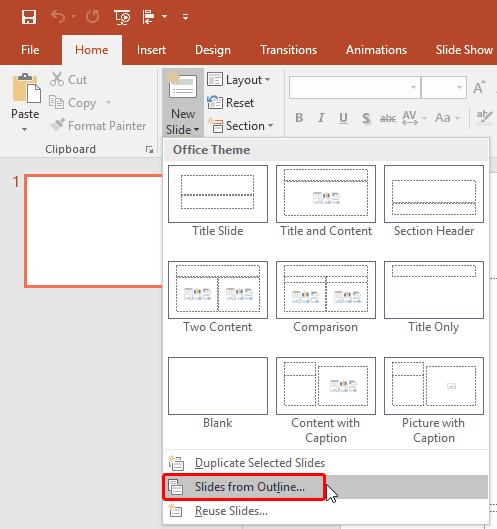
Learn how to import outlines in PowerPoint 2016 for Windows.
Filed Under:
PowerPoint 2016
Tagged as: Microsoft Windows, Office 2016, Outline, PowerPoint 2016, Text, Tutorials
Comments Off on Import Outlines in PowerPoint 2016 for Windows

Heather Ackmann is a Microsoft MVP and full-time author and trainer for AHA Learning Solutions, specializing in Microsoft Office, business professional, and soft skills training videos and educational materials. In her spare time, she enjoys blogging at Heather Ackmann and crocheting hats and scarves for her children who refuse to wear hats and scarves.
In this conversation, Heather discusses her sessions at the upcoming Presentation Summit 2016 series.
Geetesh: Can you tell us more about your Present Like a Hottie session at this year’s Presentation Summit?
Heather: Sure. Looking for images about web conferencing or the like, you might notice a bit of a disconnect between how people expect you to look from a home webcam versus what you actually look like.
The session is for anyone who presents in less than ideal environments, like their homes or trendy “open space” offices, in front of a webcam in real-time or recorded with or without a camera (in other words, with just the sound of their voice over PowerPoint or Keynote slides or video).
Geetesh: How did you come up with the title and idea for this session? What takeaways can attendees anticipate from your talk?
Heather: Actually, the title for this session was a collaborative effort between Rick Altman and myself. I still can’t say the title of my own session without giggling a bit. I’ll have to practice that before show time.
The idea for this session came from a very personal experience. You see, back in January, I was laid off from my dream job. Overnight, I went from a full-time employee of a large corporation with every resource you could possibly imagine to it being just me, doing the same job I’ve always done—doing webinars and making computer training videos—only now from the guest bedroom [cough…junk room] in my home. I needed to buy a lot of equipment and fast but couldn’t afford a lot right away. But, I did it and rather successfully, I might add.
The fact is, corporate America is going 1099 and it is up to us as contractors to research, purchase, and maintain the equipment and environment for all this technical stuff: microphones, cameras, lighting, backdrops, software, pop filters, acoustical foam, you name it. This session is designed to teach attendees what to buy on a budget to create a simple home studio to look and sound like the hot, sexy professionals they are.
Here are some of the key takeaways:
Geetesh: You’ve attended several Presentation Summit conferences, and now you are part of the speaker team. What message do you have for new attendees to the conference? What can they do to maximize their time while attending?
Heather: First off, to new attendees, I have to say do not treat this conference like other conferences. Usually, there is this distance or separation between the audience and the presenters. The presenters do their thang, if the audience wants to ask a question, they line up after the sessions, ask their one carefully crafted question, and then that audience member may never see that speaker again during the conference. Not at the Presentation Summit. Attendees, presenters, Microsoft staff and developers, sponsors—everyone will be mingling throughout the conference in one big awesome story-telling and educational community. It will be fun, loud, and awesome. Don’t expect to sleep much. So, pack comfortable shoes. Stay hydrated. And plan for a day off after the conference is over for sleep. You’ll need it.
For many years now, Rick Altman has been hosting the Presentation Summit, a highly popular event that is geared towards users of PowerPoint and other presentation platforms.
Date: October 23 to 26, 2016
Location: Green Valley Ranch, Las Vegas, United States
The views and opinions expressed in this blog are those of the authors and do not necessarily reflect the official policy or position of any other agency, organization, employer, or company.
Filed Under:
Events
Tagged as: Events, Heather Ackmann, Interviews, Presentation Summit
Comments Off on Presentation Summit 2016: Conversation with Heather Ackmann
Do you wish there was a better, more accessible view for you to see Sway presentations? Sway does have an Accessibility view that displays high-contrast styles for easier reading. This view also disables any animations and supports keyboard navigation for use with screen readers. You can also use your browser’s Find box to search text in the Sway.

Explore Accessibility view in Microsoft Sway.
Filed Under:
Sway
Tagged as: Accessibility, Online Presentations, Sway, Tutorials
Comments Off on Accessibility View in Microsoft Sway
Microsoft and the Office logo are trademarks or registered trademarks of Microsoft Corporation in the United States and/or other countries.