
This is the print version of this page. All content is copyright Indezine.com 2000-2026.
Thoughts and impressions of happenings in the world of PowerPoint and presentations, continuously updated since 2003.
See Also:
PowerPoint and Presenting Notes
PowerPoint and Presenting Glossary

Having spent his early career in a variety of sales and marketing roles, Rob Bailey successfully transitioned into managing sales teams’ growth across a variety of industries before joining Eyeful Presentations as a senior consultant in 2011. Over the past 5 years, Rob has developed a deep understanding of Eyeful’s proposition and people whilst managing a significant number of strategic Eyeful clients. In his new role as Managing Director, his passion for the business will further establish Eyeful’s position as the most innovative, exciting and influential consultancy in the presentation sector.
In this conversation, Rob explores the changes at Eyeful, and also how Brexit influences the EU’s presentation industry. Simon Morton, the founder of Eyeful Presentations, joins Rob in this conversation.
Filed Under:
Interviews
Tagged as: Eyeful, Interviews, PowerPoint, Presentations, Prezi, Rob Bailey, Simon Morton
Comments Off on Eyeful Presentations, Brexit, and EU: Conversation with Rob Bailey
Although you can change bullet styles in PowerPoint, there may be times when you want to make changes to other characteristics of the bullet characters. You might want to alter the size of the bullet character so that it is somewhat smaller or larger than the text before which it is placed. Or maybe you just need to change the color of the bullet characters. Most of the time, the defaults work best. However, just in case you want to make these changes, this is how you will go about the whole process in PowerPoint 2016 for Windows.

Learn how to change the bullet size and the color attributes in PowerPoint 2016 for Windows.
Filed Under:
PowerPoint 2016
Tagged as: Bullets, Color, Formatting, Microsoft Windows, Office 2016, PowerPoint 2016, Size, Text, Tutorials
Comments Off on Customize the Bullet Size and Color in PowerPoint 2016 for Windows

Simon Morton founded Europe’s leading presentation design company Eyeful Presentations in 2004. His goal was big but simple—support businesses to create more powerful, engaging and effective presentations that make the most of the opportunities and deliver results. Twelve years, thousands of presentations, and millions of engaged audience members later, Eyeful’s mission continues.
Simon’s book, The Presentation Lab continues to make waves and has been released around the world in six languages. He is globally recognized as a thought leader in the field of presentations and now dedicates much of his time to speaking, writing or coaching businesses on how to make the most of every presentation opportunity.
In this conversation, Simon discusses the state of the presentation industry. Rob Bailey, Managing Director at Eyeful Presentations, joins Simon in this conversation.
Filed Under:
Interviews
Tagged as: Eyeful, Interviews, Opinion, PowerPoint, Presentations, Prezi, Rob Bailey, Simon Morton
Comments Off on Presentation Industry Standards: Conversation with Simon Morton

A Microsoft PowerPoint MVP since 2000, Echo Swinford began her PowerPoint career in 1997. She holds a Master’s degree in New Media from the Indiana University School of Informatics and is the owner of Echosvoice, a PowerPoint consulting firm specializing in custom template development, presentation creation, makeovers and cleanup, and training for large and small corporate clients. Echo has written and co-written five PowerPoint books, developed a number of video publications, and has a string of tech editing credits to her name. She is the President of the Presentation Guild, a not-for-profit trade association for the presentation industry.
In this conversation, Echo discusses her sessions at the upcoming Presentation Summit 2016 series.
Geetesh: You are doing the Template Creation Workshop, which is an optional Sunday crash course. Additionally, you are doing the fun session called Life is Full of Crop(ping) and another template oriented session called Learning to Love Layouts. Tell us more about what you believe attendees will take away from these sessions?
Echo: In the Template Creation Workshop, Julie Terberg and I will discuss best practices when building templates—especially when you’re building templates for other people to use. The patrons will hear about some of the most common issues we see in the templates that cross our desks every day, and they’ll get some tips on how to avoid those problems. Of course, the attendees will also have a chance to ask questions about their own templates and processes.
Life is full of Crop(ping) is a quick and dirty tour of PowerPoint’s cropping tools, which are way more powerful and flexible than most people realize. Patrons will become awesome croppers in one 20-minute session!
In the Learning to Love Layouts session, I’ll show attendees how to leverage PowerPoint’s custom layout feature in any file, not just in a template, to make repetitive production tasks faster and easier. I’ll be demonstrating how custom layouts work—and how you can make them work for you.
Geetesh: Can you share an experience from previous Presentation Summit conferences—and have you indeed attended all the previous 13 conferences?
Echo: Yes, I was there in the very beginning—actually as far back as when the conference was just an idea, and I’ve made it to everyone since! I think you, Ric Bretschneider and I (and Rick Altman and Sheila McGurin, of course) are the only ones with that distinction, right? I love that we’re a part of something that’s become such a lasting influence.
I think one of my favorite memories happened on the first morning at one of those early conferences—maybe 2005 or so. I spent a few minutes in the Help Center with a patron who needed to learn how to create a specific type of animation technique. When we finished and she felt she had a solid solution, she ended our conversation with, “This just made the whole conference worthwhile; everything else is a bonus!” Heck, the conference hadn’t even really begun! And I’m betting it paid for itself a few times over.
See Also: Echo Swinford on Indezine

For many years now, Rick Altman has been hosting the Presentation Summit, a highly popular event that is geared towards users of PowerPoint and other presentation platforms.
Date: October 23 to 26, 2016
Location: Green Valley Ranch, Las Vegas, United States
 Twitter Hashtag: Presum16
The views and opinions expressed in this blog post or content are those of the authors or the interviewees and do not necessarily reflect the official policy or position of any other agency, organization, employer, or company.
Filed Under:
Events
Tagged as: Echo Swinford, Events, Interviews, PowerPoint, Presentation Summit
Comments Off on Presentation Summit 2016: Conversation with Echo Swinford
PowerPoint 2007 and higher versions include several built-in Theme Fonts sets. Additionally, you can also create custom Theme Fonts sets from within PowerPoint. Yes, all Theme Fonts sets comprise a few lines of code within an Open XML file. You can open any Theme Fonts file with the .XML extension, and then edit them within a text editor such as Notepad. Save this file with a new name in a designated folder and you actually end up creating your own custom Theme Fonts set!
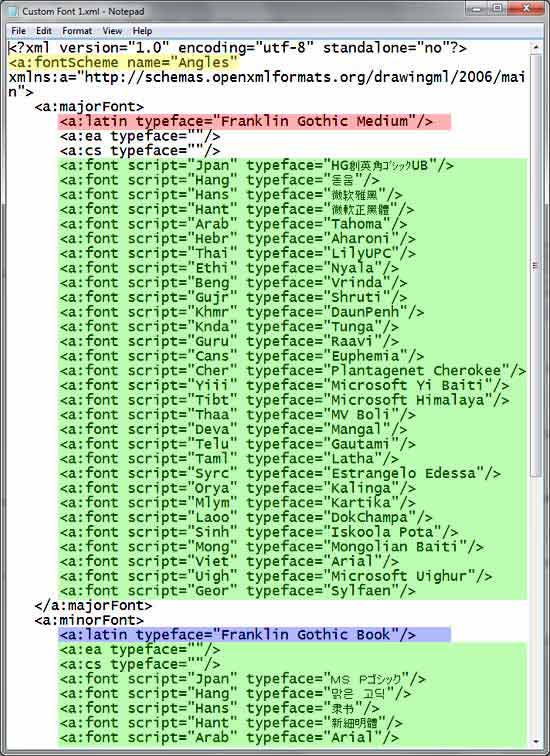
Learn how to create custom Theme Fonts using XML in PowerPoint for Windows.
Filed Under:
PowerPoint All Versions
Tagged as: Microsoft Office, Microsoft Windows, PowerPoint, Theme Fonts, Themes, Tutorials, XML
Comments Off on Create Custom Theme Fonts Using XML in PowerPoint for Windows
Microsoft and the Office logo are trademarks or registered trademarks of Microsoft Corporation in the United States and/or other countries.