
This is the print version of this page. All content is copyright Indezine.com 2000-2026.
Thoughts and impressions of happenings in the world of PowerPoint and presentations, continuously updated since 2003.
See Also:
PowerPoint and Presenting Notes
PowerPoint and Presenting Glossary
As a presentation designer, do you need to buy stock photos to use in your client presentations? But did you know that you may be breaking the rules, without being aware—even if you are paying to license the photos?
Thanks to Nancy Duarte for highlighting this area in a recent conversation. Here is what she said:
There’s a little-known clause in terms of stock photo houses that states that agencies cannot buy images on behalf of others (we can’t transfer rights of images to others). So, we have to open individual accounts in each client’s name and the stock houses don’t let you know this. We spent tons-o-time on the phone with them trying to explain that this is standard practice for agencies to buy images and bill them back but they confirmed that those are not in the terms (and other large agencies confirmed that they avoid many stock photo houses like the plague due to the liability). Look closely at the terms of your favorite stock photo houses because you contractually cannot act as an agency on behalf of clients.

You May Also Like: Illuminate: Conversation with Nancy Duarte
Filed Under:
Thoughts
Tagged as: Duarte Design, Nancy Duarte, Opinion, Photos, Pictures, Presentation Design, Stock Photos
Comments Off on Do You Buy Stock Photos for Clients?
Imagine this situation: You started working on a presentation, saved it couple of times, then got so much involved in your work that you spent an inordinate amount of time working on it without saving it. Then, your computer unexpectedly crashes or just shuts off due to some unexpected crisis. Or maybe just PowerPoint crashes for some reason. Does it mean you are now left with your presentation in the status when you last saved it and lost all your work? Not really because you can restart PowerPoint, and one of two occurrences may happen.

Learn how to recover unsaved presentations in PowerPoint 2013 for Windows.
Filed Under:
PowerPoint 2013
Tagged as: Microsoft Windows, Office 2016, PowerPoint 2016, Tutorials
Comments Off on Recovering Unsaved Presentations in PowerPoint 2013 for Windows
Another wrong picture choice? Not again. Jullietta Stoencheva of Pickit discusses how you can choose the right picture for your slides.
PowerPoint 2016 and 2013 for Windows users can learn about the new Screen Recording feature. We also explore other features for PowerPoint 2013 such as Inspect Document, Check Accessibility, and Check Compatibility. Finally, do not miss the new press releases and templates of this week.

Read Indezine’s PowerPoint and Presenting News.
Filed Under:
Ezine
Tagged as: Ezine, Indezine, News, PowerPoint
Comments Off on PowerPoint and Presenting News: July 26, 2016
Have you ever created a new presentation in PowerPoint and then closed it without saving it for even once? This scenario seems to be little strange and impossible since even if you accidentally close your presentation, PowerPoint prompts you whether you want to save your presentation. Yet, you can be in a similar scenario if you lose all your file changes to a system or PowerPoint crash. Fortunately, there are chances that your unsaved presentation is safe in some state! Most of the time, PowerPoint will salvage your file and offer to open it for you the next time you launch the program. Alternatively, even if you don’t see any files being offered for recovery, you can set the process in action manually.
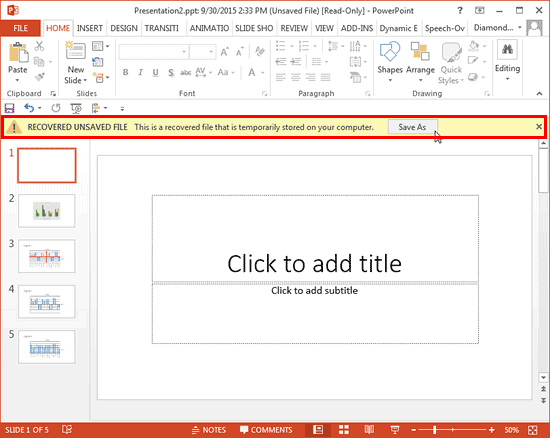
Learn to recover new, unsaved presentations manually in PowerPoint 2013 for Windows.
Filed Under:
PowerPoint 2013
Tagged as: Microsoft Windows, Office 2013, PowerPoint 2013, Recovery, Save, Tutorials
Comments Off on Recovering New Unsaved Presentations Manually in PowerPoint 2013 for Windows
You might have experienced this scenario: you have created a presentation within PowerPoint 2013, but you are not sure whether your client, boss, friend, or colleague, who has an earlier version of PowerPoint will be able to view and edit this presentation using the same options that you have used? And, if you save this presentation as a file compatible with an earlier version of PowerPoint, there are chances that you could lose some attributes of the presentation that are not available in previous versions. Or worse, your editable content could just change to flat, non-editable pictures!

Learn to check compatibility with other versions in PowerPoint 2013 for Windows.
Filed Under:
PowerPoint 2013
Tagged as: Compatibility, Microsoft Windows, Office 2013, PowerPoint 2013, Tutorials
Comments Off on Check Compatibility in PowerPoint 2013 for Windows
Microsoft and the Office logo are trademarks or registered trademarks of Microsoft Corporation in the United States and/or other countries.