
This is the print version of this page. All content is copyright Indezine.com 2000-2026.
Thoughts and impressions of happenings in the world of PowerPoint and presentations, continuously updated since 2003.
See Also:
PowerPoint and Presenting Notes
PowerPoint and Presenting Glossary
There are so many different types of shapes that PowerPoint provides you with, and you can format these shapes by resizing, rotating, flipping, etc. Other than these basic formatting tasks, you must explore what you can achieve with the special yellow round handles. Most shapes in PowerPoint 2016 for Windows when selected, display eight resizing handles and a single rotation handle. In addition, some shapes also have one or more yellow round handles. These yellow round handles enable you to change some facets of the selected shape, or in some cases, you can change the entire shape.

Learn about the special handles that allow you to manipulate shapes in PowerPoint 2016 for Windows.
Filed Under:
PowerPoint 2016
Tagged as: Microsoft Windows, Office 2016, PowerPoint 2016, Shapes, Tutorials
Comments Off on Manipulating Shapes by Dragging Yellow Handles in PowerPoint 2016 for Windows
We start by looking at the circle in the sun. You may wonder what this has got to do with presenting? As this series evolves, we will explore how circles play an important part in presenting. We also bring you another installment of our Timelines that are Different series—this week we look at an offering from infoDiagram. And then we feature Vikas Agrawal in a guest column, where he talks about infographics and the presentation revolution.
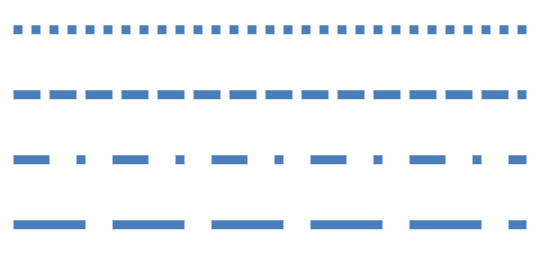
PowerPoint 2016 for Windows users can learn about different formatting options for lines, such as dashes, thickness, arrowheads, and even gradients. We also look at the new Tell Me feature, introduced in PowerPoint 2016, that gets quick access to help. Finally, do not miss the new press releases and templates of this week!
Read Indezine’s PowerPoint and Presenting News.
Filed Under:
Ezine
Tagged as: Ezine, Indezine, News, PowerPoint
Comments Off on PowerPoint and Presenting News: June 28, 2016
Creative freedom may require no aligning of objects on a slide geometrically. Indeed, you may want everything placed in an organic, non-aligned manner. Ultimately, the decision to align can differ on a case-by-case basis. Sometimes, alignment works, and at other times, an unaligned bunch of shapes looks perfectly natural and organic.

Learn how to align shapes in PowerPoint 2016 for Windows.
Filed Under:
PowerPoint 2016
Tagged as: Align, Distribution, Microsoft Windows, Office 2016, PowerPoint 2016, Shapes, Tutorials
Comments Off on Align Shapes in PowerPoint 2016 for Windows

Motti Nisani is the CEO of emaze, a company that produces a tool of the same name. With emaze, you can create presentations in virtual 3D worlds or simply in slides. Motti has a B.Sc. degree in Engineering from Tel-Aviv University, Israel.
In this interview, Motti discusses the new Android app for emaze.
Geetesh: Motti, tell us more about your new emaze Android app. What motivated you to create this app?
Motti: Our new Android app is something that we have been wanting to implement for some time now. We felt that clearly there was a need for something that lets users watch their own presentations, share presentations with others or explore millions of emaze presentations by topic.
The motivation to create the Android app came from our users. Most of Internet consumption today done via mobile devices. In order to give to emaze users a smooth and slick experience to use emaze, we created this mobile application.

Geetesh: Do you plan to build this app for other platforms such as iOS?
Motti: Yes indeed. Our iOS app is coming in a few weeks’ time.

See Also: emaze Announces New Android App! | Automaze in emaze: Conversation with Motti Nisani
The views and opinions expressed in this blog post or content are those of the authors or the interviewees and do not necessarily reflect the official policy or position of any other agency, organization, employer, or company.
Filed Under:
Interviews
Tagged as: Android, Emaze, Interviews, Motti Nisani, Online Presentations, Presentation Design
Comments Off on emaze Android App: Conversation with Motti Nisani
Long, long ago I talked about circles and had wanted to bring up this amazing shape back to focus again. It has been a while, but the circle is as important as ever, and will always be.
Why have people, over the years, played around with circles? What is it about a circle that draws people across lands? Probably, the circle was the most important shape known to ancient man and represented the sun. And the sun showed up brightly in the sky, and represented a new beginning, every single day!

Copyright: Image by StockUnlimited
Many ancient cultures, including the Egyptians and the Indians, revered the sun as God. And in turn, these cultures also respected the circle, which represented the sun! In fact, the sun provided inspiration that gave birth to the mandala in India, and we will talk about mandalas in another post. For now, let us look at the relationship between the sun and the circle.
The Egyptians worshipped Ra, the Sun God who is often showed balancing the sun on his head. Over the sun, there is typically a serpent. The picture below shows Ra carved in the tomb of Ramses IV, found in the Valley of the Kings.

Creative Commons: Image by Riccardov
In India, the Sun God was rarely shown as a circle—rather he was shown in a human form. Yet, there were always circles in many forms wherever the Sun God was worshipped. In the Sun Temple at Konark, Odisha, the temple itself was built as a large chariot with 12 pairs (24) of wheels. Of course, the wheel is again a circle.

Creative Commons: Image by Kiranraj120
In future posts of this series, we will look at other cultural and design aspects that represent and refer to the circle shape.
Filed Under:
Presentation Skills
Tagged as: Circle, Concepts, Design, Ideas, Opinion, Shapes
Comments Off on Design Shapes: The Circle, The Sun
Microsoft and the Office logo are trademarks or registered trademarks of Microsoft Corporation in the United States and/or other countries.