
This is the print version of this page. All content is copyright Indezine.com 2000-2026.
Thoughts and impressions of happenings in the world of PowerPoint and presentations, continuously updated since 2003.
See Also:
PowerPoint and Presenting Notes
PowerPoint and Presenting Glossary
The trio from PresentationXpert comprising Dave Zielinski, Sharyn Fitzpatrick, and Kristin Baier video-interviewed several speakers, exhibitors, and attendees at the recently concluded Presentation Summit in New Orleans. They kindly sent me embed codes for my interview segments.
Filed Under:
Events
Tagged as: Geetesh, Interviews, PowerPoint, Presentation Summit, PresentationXpert
Comments Off on PresentationXpert Video Interviews at the Presentation Summit
If you have a bunch of commands that you use frequently, you may want to keep them more accessible within PowerPoint 2016 by customizing your Quick Access Toolbar. You populate the QAT with commands you use often. Over a period, these customizations may become a valuable asset you want to save or share.
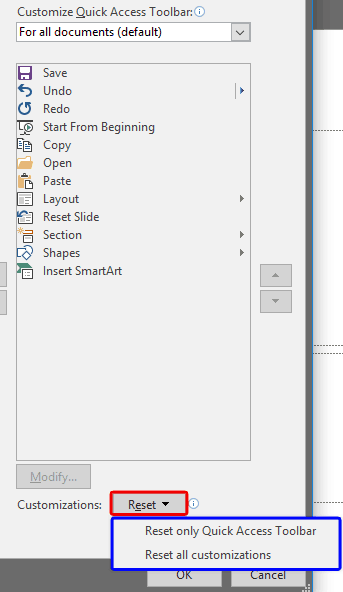
Learn how to reset, export, and import QAT customizations in PowerPoint 2016 for Windows.
You May Also Like: Customize Quick Access Toolbar in PowerPoint 2016 for Windows | Add and Rename Ribbon Tabs in PowerPoint 2016 for Windows | Reordering and Removing Ribbon Tabs in PowerPoint 2016 for Windows
Filed Under:
PowerPoint 2016
Tagged as: Customizations, Interface, Office 2016, PowerPoint 2016, QAT, Quick Access Toolbar, Tutorials
Comments Off on Reset, Export, and Import QAT Customizations in PowerPoint 2016 for Windows

Dale Ludwig is President & Founder of Turpin Communication. He has a Ph.D. in Communication and, prior to Turpin, taught at the University of Illinois at Urbana-Champaign. He founded Turpin Communication in 1992. Since then he has worked to keep Turpin focused on providing the best presentation and facilitation skills training available. He spends most of his time delivering live workshops and writing. He also appears in Turpin’s online courses.
In this conversation, he discusses his book, The Orderly Conversation that he co-authored with Greg Owen-Boger.
Geetesh: Compared to other presenters’ books, The Orderly Conversation is a book that’s not so much about a sequential series of improvement steps one needs to take. Rather, your book is filled with your personal experiences. These experiences are valuable since they help others overcome so many problems. Can you share some thoughts about this observation?

Dale: You’re right, The Orderly Conversation grew out of our experience working with many different presenters with many different challenges. Over the years, we realized that there is no single path for improvement appropriate for everyone. “Rules” of delivery, for example, only work when the right “rule” is used to fill a very personal need. And everyone’s “rules” are slightly different. We work hard to find the root cause of a particular challenge a presenter faces. Once we understand that, we can help people develop the skills required to overcome the challenge. It is our hope that readers will recognize themselves in the business presenters we write about. Basically, we’re asking our readers to:
Geetesh: How did this book evolve, and what roles did you and your co-author Greg Owen-Boger play in its creation?
Dale: When I started writing, I was going to be the sole author. After I had written a few chapters, I showed them to Greg. (He and I have been delivering workshop together for about 20 years.) Greg’s response to the chapters was that they were theoretically sound, but did not focus enough on the practical application of the theory. To solve that problem, we decided we would share the writing responsibilities in a unique way. Greg would write about a fictional group of business presenters going through one of our workshops (people with very typical problems and strengths). He would focus on the individual coaching process they would go through. In that way, I was free to write in a broader way because he was focusing on the nuance, of how individuals improve in different ways.
See Also: The Orderly Conversation: Conversation with Greg Owen-Boger
The views and opinions expressed in this blog post or content are those of the authors or the interviewees and do not necessarily reflect the official policy or position of any other agency, organization, employer, or company.
Filed Under:
Interviews
Tagged as: Books, Dale Ludwig, Greg Owen Boger, Interviews, PowerPoint, Presentation Skills
Comments Off on The Orderly Conversation: Conversation with Dale Ludwig
After quite a while, we are bringing to you one of our most detailed and easy-to-use graphic effects — the effect of Hole in the Paper! We then feature Mike Parkinson, who discuss his recently concluded webinar.
We continue our tutorial series about the Info pane of Backstage view in PowerPoint 2013 — in this series we explore “Marking as Final”, password protection and digital certificates. Finally, don’t miss the new discussions and templates of this week!

Read Indezine’s PowerPoint and Presenting News.
Filed Under:
Ezine
Tagged as: Ezine, Indezine, News, PowerPoint
Comments Off on PowerPoint and Presenting News: October 13, 2015
The Quick Access Toolbar or QAT is the only toolbar available in PowerPoint. This toolbar can be customized and can contain your most-used commands so that they are accessible to you with just a single click. There are two ways in which you can add your favorite commands to the QAT. The easier way is to right-click any button on the Ribbon tabs and choose the Add to Quick Access Toolbar option.

Learn how to customize the Quick Access Toolbar in PowerPoint 2016 for Windows.
You May Also Like: Add and Rename Ribbon Tabs in PowerPoint 2016 for Windows | Reordering and Removing Ribbon Tabs in PowerPoint 2016 for Windows | Working with Custom Groups in Ribbon Tabs in PowerPoint 2016 for Windows
Filed Under:
PowerPoint 2016
Tagged as: Interface, Office 2016, PowerPoint 2016, QAT, Quick Access Toolbar, Tutorials
Comments Off on Customize Quick Access Toolbar in PowerPoint 2016 for Windows
Microsoft and the Office logo are trademarks or registered trademarks of Microsoft Corporation in the United States and/or other countries.