
This is the print version of this page. All content is copyright Indezine.com 2000-2026.
Thoughts and impressions of happenings in the world of PowerPoint and presentations, continuously updated since 2003.
See Also:
PowerPoint and Presenting Notes
PowerPoint and Presenting Glossary
Imagine this scenario — you have created a specialized, medical presentation that’s full of squiggly, red, underlined words! These squiggly underlines indicate what PowerPoint considers to be as a misspelled word! Don’t blame PowerPoint, because its medical skills are somewhat limited — we do know that almost all the words in your medical presentation are perfectly valid as far as spelling is concerned. Of course, not only can you teach PowerPoint how to spell medical words, but you can also teach the program how to spell words that enhance lexicons in various other subjects such as research, law, computing, etc.

Learn how to edit custom dictionaries in PowerPoint 2013 for Windows.
Filed Under:
PowerPoint 2013
Tagged as: PowerPoint 2013, Text, Tutorials
Comments Off on Learn PowerPoint 2013 for Windows: Edit Custom Dictionaries
These circles have a polygon center! You get 4 variations: triangle center, square center, pentagon center, and hexagon center! And based on the sides of the polygon, the rest of the circle has that many segments. You can use these Polygon Center Circles in any slide that needs to show 3, 4, 5, or 6 segments. Suitable themes for such multiple segments include Unity, Continuity, Synchronization, etc. Remember that the individual shapes within the entire graphic are all individually selectable – they break the monotony of text heavy slides, and help you explain concepts better to your audiences.

Download and use these shapes and slides.
Filed Under:
Presentation Bank
Tagged as: Design, Graphics, PowerPoint, Presentation Samples
Comments Off on PowerPoint Concept Slides: Polygon Center Circles
SmartArt in PowerPoint 2007 and 2010 has replaced the diagram options in previous versions of PowerPoint. SmartArt also allows you to replace bullet points with info-graphic content using text-within-shapes that’s more logical to view and present. All available SmartArt is available in different SmartArt categories — in addition to these categories, you can also add an additional SmartArt category that shows content from Office.com.

Learn how to add Office.com SmartArt Graphics to PowerPoint 2010 for Windows.
Filed Under:
PowerPoint 2010
Tagged as: Diagrams, Graphics, PowerPoint 2010, SmartArt, Tutorials
Comments Off on Learn PowerPoint 2010 for Windows: Add Office.com SmartArt Graphics
The AutoCorrect feature is dependent on a small list of words and phrases — this list contains two columns called Replace and With — for example the Replace entry for teh will correspond to the With entry containing the word the. Although this list works for PowerPoint users, what you must know is that this AutoCorrect list is global across all Microsoft Office programs such as Word, Excel, Outlook, etc. If you add, edit, or delete entries within this AutoCorrect list, all changes will be reflected beyond PowerPoint.
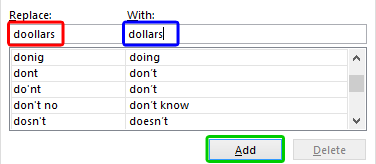
Learn how to create and edit AutoCorrect entries in PowerPoint 2013 for Windows.
Filed Under:
PowerPoint 2013
Tagged as: PowerPoint 2013, Text, Tutorials
Comments Off on Learn PowerPoint 2013 for Windows: Creating and Editing AutoCorrect Entries
As part of the recent launch of Hillary Clinton’s campaign for the presidency, her team introduced a new logo that drew as much highly-opinionated chatter in the design community as did her candidacy in the political arena.

The Creative Bloq website listed five negative comments one day and followed it with five alternative designs the next day.
Filed Under:
Guest Posts
Tagged as: Design, Guest Post, Jerry Weissman, Opinion
Comments Off on One Plus and Two Minuses for Hillary Clinton’s Logo
Microsoft and the Office logo are trademarks or registered trademarks of Microsoft Corporation in the United States and/or other countries.