
This is the print version of this page. All content is copyright Indezine.com 2000-2026.
Thoughts and impressions of happenings in the world of PowerPoint and presentations, continuously updated since 2003.
See Also:
PowerPoint and Presenting Notes
PowerPoint and Presenting Glossary

Peter Arvai loves technologies that enable world-changing stories to be shared. In 2008, he joined forces with Adam Somlai-Fischer and Péter Halácsy, an architect, and an innovator, to create a more memorable and engaging way for people to share stories. Today, their creation is known as Prezi. Before co-founding Prezi, Peter was already active in the information-sharing realm. In Sweden, he founded omvard.se, a company that aggregates data on treatment outcomes for hospital patients. Soon after, he developed the world’s first mobile newsreader so people could follow TED Talks from their mobile devices.
In this conversation, Peter discusses the findings of the Prezi/Harris Interactive Survey, which looks at how critical presentations are for success.
Geetesh: In your recent survey, it was found that most presenters are not effective – and audiences are not receptive! What do you think about this scenario?
Peter: Part of the reason people aren’t paying attention is related to presenters “winging it” and not taking the time to make their content relevant to their audience. Thinking through the presentation beforehand enables you to connect the dots and make sure the presentation is as succinct as possible. Mark Twain’s commonly referenced quote, “I didn’t have time to write a short letter, so I wrote a long one instead,” applies to presentations as well. Remember, humans are programmed to engage, and not only to listen. An overly long data list and bullet point-heavy presentation will put an audience to sleep and will be hard for everyone to get through. Create an overarching story and a few main points that back it up.
Geetesh: How can Prezi help in creating a better environment for presenting?
Peter: Prezi helps the presenter formulate a conversation with the audience by showing them the big picture and the fine details, putting the message in the context which makes content more memorable and engaging. If a small business owner is explaining their company overview, for example, they could navigate between categories and details, pulling back to reveal the big picture that shows how everything relates at the end. Visually depicting the relationships between main points provides context and reinforces the larger story, helping the audience understand and remember better. Zooming in on details and zooming out to show the big picture is a powerful way to emphasize your main point, something linear slides cannot provide.

You May Also Like: Peter Arvai on Indezine | Prezi/Harris Interactive Survey: Conversation with Carmine Gallo
The views and opinions expressed in this blog post or content are those of the authors or the interviewees and do not necessarily reflect the official policy or position of any other agency, organization, employer, or company.
Filed Under:
Interviews
Tagged as: Interviews, Peter Arvai, Presentation Skills, Prezi, Survey
Comments Off on Prezi/Harris Interactive Survey: Conversation with Peter Arvai
There is no doubt that a presentation with relevant pictures is more effective than just a plain text presentation. Although pictures enhance the look of your presentation, they can also phenomenally increase the size of your presentation file. PowerPoint 2013 and some previous versions are better in that respect compared to the much older versions because they do some compression even if you may not be aware — yet there is an option to make the compression even more effective.
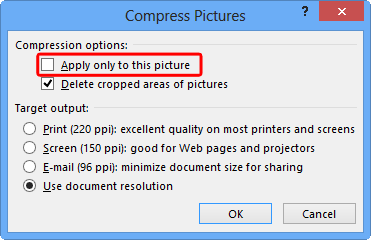
Learn how to compress pictures in PowerPoint 2013 for Windows.
Filed Under:
PowerPoint 2013
Tagged as: Pictures, PowerPoint 2013, Tutorials
Comments Off on Learn PowerPoint 2013 for Windows: Compress Pictures
Do you want to add a video clip to your PowerPoint slide so that it continues to play across subsequent slides? This actually means that when you move from one slide to another, the video continues playing without any interruption. In PowerPoint 2007, Play Across Slides option was available in interface — but in PowerPoint 2010 and 2013 it has been removed within the interface — however, we found a workaround to get this option back, as explained in this tutorial.

Learn how to play a video clip across slides in PowerPoint 2013 for Windows.
Filed Under:
PowerPoint 2013
Tagged as: PowerPoint 2013, Tutorials, Video
Comments Off on Learn PowerPoint 2013 for Windows: Playing Video Across Slides
Once a picture is inserted within PowerPoint, any manipulations you make to that picture are strictly only on the surface. The appearance of the picture changes on the slide, but the unaltered picture is stored within your PowerPoint presentation. Essentially that’s good because if you make many changes to a picture — and then regret experimenting — then you can just reset your picture rather than starting all over again! There’s one caveat though — the option to reset any picture back to its original form works only if you have not run any compression options for pictures within your presentation.

Learn how to reset pictures in PowerPoint 2013 for Windows.
Filed Under:
PowerPoint 2013
Tagged as: Pictures, PowerPoint 2013, Tutorials
Comments Off on Learn PowerPoint 2013 for Windows: Reset Pictures
Within our better charts series, we look at how you can encourage yourself to practice often, or even hire a chart designer. We have an exclusive conversation with Irwin Hipsman of Brainshark, who discusses the amazing animated content slides that his company is giving away. We also bring you a new series of animated gears.
PowerPoint 2013 users can learn about Pictures, Video and Charts.
And finally, do not miss the new discussions and templates of this week!

Read Indezine’s PowerPoint and Presenting News.
Filed Under:
Ezine
Tagged as: Ezine, Indezine, News, PowerPoint
Comments Off on PowerPoint and Presenting News: September 30, 2014
Microsoft and the Office logo are trademarks or registered trademarks of Microsoft Corporation in the United States and/or other countries.