
This is the print version of this page. All content is copyright Indezine.com 2000-2026.
Thoughts and impressions of happenings in the world of PowerPoint and presentations, continuously updated since 2003.
See Also:
PowerPoint and Presenting Notes
PowerPoint and Presenting Glossary
We bring you a giveaway this time — you can win one of 5 copies of Ppted’s Mother’s Day PowerPoint templates. We then explore the microphones that work best for PowerPoint users. We then start our new series on Color — the first two parts are live on an introduction to Color, and on Contrast.
PowerPoint 2013 for Windows users can learn about Chart Area options and also about Connectors
And finally, do not miss the new discussions and templates of this week!

Read Indezine’s PowerPoint and Presenting News.
Filed Under:
Ezine
Tagged as: Ezine, Indezine, News, PowerPoint
Comments Off on PowerPoint and Presenting News: May 6, 2014
When a connector is drawn to link two shapes together, it gets attached to a certain point on each of the shapes. On each shape, this point is one of those blue circle handles that appear when you are attaching the shape to a connector. Sometimes you may attach your connector to the wrong handle, and may need to detach it from that point, and attach it somewhere else. Or maybe you connected to the wrong shape altogether, and now want to detach the connector from one shape and attach it to another.

Learn how to detach, re-attach, and delete connectors in PowerPoint 2013 for Windows.
Filed Under:
PowerPoint 2013
Tagged as: PowerPoint 2013, Shapes, Tutorials
Comments Off on Learn PowerPoint 2013 for Windows: Detach, Re-attach, and Delete Connectors
Yes, it’s quite easy to create a presentation and then export it entirely to a video clip in PowerPoint 2013. If you are lucky, you may face no problems at all. However, if you do hit a roadblock – and there can be several roadblocks – then here are some caveats we have found along with solutions and workaround for them.

Learn about the caveats in exporting videos from PowerPoint 2013 for Windows.
Filed Under:
PowerPoint 2013
Tagged as: PowerPoint 2013, Tutorials, Video
Comments Off on Learn PowerPoint 2013 for Windows: Caveats in Exporting Videos
When you insert a chart, the position of the Chart Area on the slide depends upon the layout of the slide. If your slide layout is Blank, then the Chart Area is located at the center of the slide. If the chart is inserted within an existing placeholder on the slide, it occupies the entire placeholder. To reposition the Chart on the slide, you can either just select and drag it to the new position on the slide, or reposition it accurately as explained in this tutorial. This tutorial will also teach you to how to add alternative, supporting text to the chart to help people with visual disabilities.
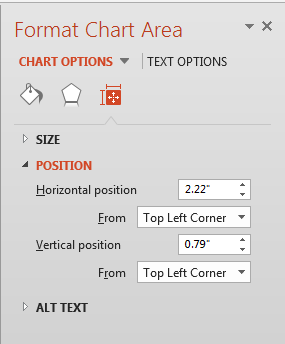
Learn about the Size & Properties options for the Chart Area in PowerPoint 2013 for Windows.
Filed Under:
PowerPoint 2013
Tagged as: Charting, PowerPoint 2013, Tutorials
Comments Off on Learn PowerPoint 2013 for Windows: Size & Properties Options for Chart Area
You can export your presentation slides created within PowerPoint 2013 into a video clip in either WMV or MP4 formats. This is probably the easiest way to create quick videos from your slides, and is best suited for converting photo slides to video clips. You can also use this technique to create video clips from PowerPoint that can be uploaded to YouTube or other video sharing sites.

Learn how to export a presentation to a video clip in PowerPoint 2013 for Windows.
Filed Under:
PowerPoint 2013, Uncategorized
Tagged as: PowerPoint 2013, Tutorials, Video
Comments Off on Learn PowerPoint 2013 for Windows: Export a Presentation to a Video Clip
Microsoft and the Office logo are trademarks or registered trademarks of Microsoft Corporation in the United States and/or other countries.