
This is the print version of this page. All content is copyright Indezine.com 2000-2026.
Thoughts and impressions of happenings in the world of PowerPoint and presentations, continuously updated since 2003.
See Also:
PowerPoint and Presenting Notes
PowerPoint and Presenting Glossary
Many times when you draw connectors between shapes, the connector may use the shortest path to link between two shapes. This might mean that your connector overlaps other shapes, text boxes, or any other object that is positioned between the connected objects. You might have another reason to use a longer connector between two shapes as well. Whatever your reason may be, the good news is that you can easily reroute your connectors, either automatically or manually.
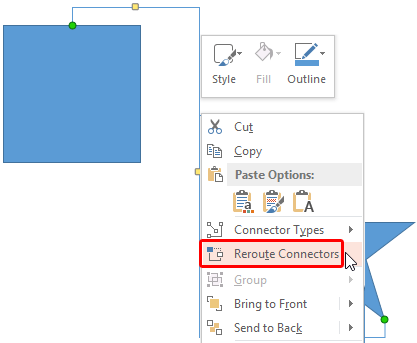
Learn how to reroute connectors automatically and manually within PowerPoint 2013 for Windows.
Filed Under:
PowerPoint 2013
Tagged as: PowerPoint 2013, Shapes, Tutorials
Comments Off on Learn PowerPoint 2013 for Windows: Reroute Connectors
Xara Web Designer 10 Premium is an easy template based solution that gives you total page design freedom, with no HTML or coding skills required. It comes in 2 versions: Web Designer and Web Designer Premium. Web Designer Premium offers advanced web design features over and above the features available within Web Designer.

Comments Off on Xara Web Designer 10 Premium: Indezine Review
 For more than 12 years, Marco Montemagno has dedicated his career to informing people about the opportunities offered by the Internet and technology by incorporating unconventional presentation tactics into his presentations. This includes ping-pong tables brought onto the stage, giving out rings to marry the Internet and handing out tennis balls to the audience to throw onto the stage, among others.
In this conversation, Marco discusses his upcoming Presentation SuperSummit, an online event with an impressive line of speakers.
Geetesh: Tell us more about your upcoming virtual Presentation SuperSummit — what motivated you to do this event, and why should one attend?
Marco: Let’s start saying that this is the first official Global SuperSummit event!
Let me give you some context about SuperSummit first. SuperSummit is creating a new market space in the lifelong learning sector…it spotted a gap in the market and has constructed a new space in the learning area that we are calling a MOVE – (Massive Open Virtual Events). Unlike a MOOC (Massive Open Online Course…currently in the press a lot as many studies are being done on the effect of virtual courses on higher education…), SuperSummit doesn’t offer courses, qualifications or degree alternatives but instant shots of learning, free and live in an event/conference format.

For people with busy lifestyles, SuperSummit is the perfect way to get updated fast on a topic of interest, be that business or personal.
Instead of attending a 2 day conference for example, users can log on to a SuperSummit event of their choice and update their knowledge and skills in a very practical, intimate way with top experts offering immediately actionable tips from the frontline. This is of course live with the expert and the audience can interact with them, ask questions and get feedback from the community live while it is on.
Often people will attend conferences and events to get refreshed on a topic and immerse themselves in all the latest progress key players in the field have been making, keeping yourself up to date. SuperSummit does this but online.
Essentially SuperSummit is a network of education-focussed MOVEs (massive open virtual event).
SuperSummit’s international launch will be marked by a free five-day online “Presentation SuperSummit” taking place between May 12 – 16, 2014.
Geetesh: Can you tell us about the speakers lined up for the Presentation SuperSummit?
Marco: This remarkable virtual conference will bring together a league of extraordinary experts under one roof; typifying the events we can expect from the network in the future. Each day, users can engage with 2+ hours of live chat between an expert host and an expert in the field of presentation. The ability to present effectively is a vital skill in a both a professional and a broader social context. Whether you need to communicate ideas to a colleagues on a regular basis, sell products or services, represent your company at conferences or if you would just like to represent yourself in a brighter light when socializing or pursuing group-based hobbies, there is much to learn from this world-class event.
The list of presenters includes:
Peter Arvai, CEO & CoFounder of Prezi; one of the biggest presentation platforms with 50 million users, Amit Ranjan, CoFounder of SlideShare; the no.1 platform for users to upload and share publicly or privately, PowerPoint presentations, Word documents and Adobe PDF Portfolios plus Jeremey Donovan, Group Vice President of Marketing at Gartner Inc. and author of Amazon’s no.1 bestseller “How to Deliver a TED Talk”; Oren Klaff author of PitchAnything, Bill Hoogterp, OwnTheRoom CEO.
But the list is really long and all the speakers are simply amazing so please check the website to see the complete killer lineup
Again: it will be live, free and interactive via chat.
Users can register free here: http://supersummit.co/events/presentation
The views and opinions expressed in this blog post or content are those of the authors or the interviewees and do not necessarily reflect the official policy or position of any other agency, organization, employer, or company.
Filed Under:
Interviews
Tagged as: Events, Interviews, PowerPoint, Presentation Skills
Comments Off on Presentation SuperSummit: Conversation with Marco Montemagno
Text used within a chart is not really formatted by default, and looks very simple. Note that the font style used is derived from the information available within the Theme or template used for the slides. Now you really should not change the text formatting within your chart unless you have a compelling reason to do so. Even though this default format looks consistent, at times you may want to change the text formatting.
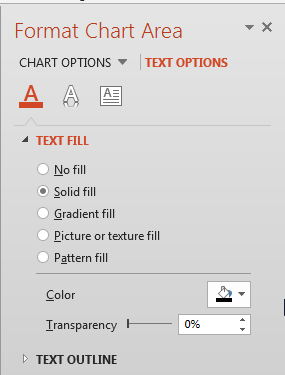
Learn about the Fill and Outline options for the Chart text in PowerPoint 2013 for Windows.
Filed Under:
PowerPoint 2013
Tagged as: Charting, PowerPoint 2013, Text, Tutorials
Comments Off on Learn PowerPoint 2013 for Windows: Text Fill & Outline Options for Chart Area
Office Timeline is an add-in for PowerPoint that helps you create a project timeline or Gantt chart, or any other timeline graphic. These timeline graphics provide an easy way to present your project plans to team members, management, and clients. The Office Timeline wizard lets you pick the type of timeline you want to create. Pick from 10 Timeline templates, enter the data, personalize the Timelines to suit your project needs, and finally click Finish. You can even copy and paste data from Microsoft Excel or Microsoft Project to quickly create timelines.

Learn how to make timelines right within PowerPoint.
Filed Under:
Add-ins
Tagged as: Add-in, PowerPoint
Comments Off on Office Timeline: The Indezine Review
Microsoft and the Office logo are trademarks or registered trademarks of Microsoft Corporation in the United States and/or other countries.