
This is the print version of this page. All content is copyright Indezine.com 2000-2026.
Thoughts and impressions of happenings in the world of PowerPoint and presentations, continuously updated since 2003.
See Also:
PowerPoint and Presenting Notes
PowerPoint and Presenting Glossary
Microsoft Office 2007 is one of the most popular Office suites released so far by Microsoft. Even after so many years, it continues to be one of the major programs still in use. However, after years of use, your installation of Office 2007 may not run too well. You may encounter crashes or even some corrupted files. Additionally you may see some error messages when you launch PowerPoint 2007 or some of the other Office 2007 programs. As a result, you may feel frustrated and might want to do something magical that will solve these issues.

Learn how to repair PowerPoint and Office 2007 for Windows.
Filed Under:
PowerPoint 2007
Tagged as: Microsoft Office, PowerPoint 2007, Troubleshooting, Tutorials
Comments Off on Learn PowerPoint 2007 for Windows: Repair Office
The Edit Points option gives you control over how you want a shape to look, but sometimes you might find it difficult to edit a certain segment in a shape because there are no points available to manipulate — or maybe there are far too many points! PowerPoint provides a simple solution for this problem — you can add and delete vertexes from a shape.
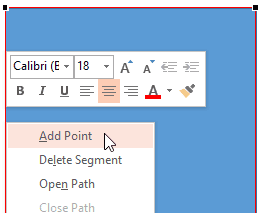
Learn how to add or delete points (vertexes) for a shape in PowerPoint 2013 for Windows.
Filed Under:
PowerPoint 2013
Tagged as: PowerPoint 2013, Shapes, Tutorials
Comments Off on Learn PowerPoint 2013 for Windows: Add or Delete Points (Vertexes) for Shapes
Have you ever applied a new Slide Master to existing slides in PowerPoint – and then found that the old Slide Master just disappeared! Poof – how did that happen? The typical answer to that question is your existing Slide Master was not “preserved”, and since no slides used it anymore, PowerPoint just decided to clean it up altogether. So if you don’t want this to happen again, then you must preserve your Slide Masters.
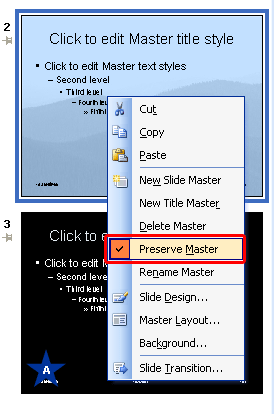
Learn how to preserve Slide Masters in PowerPoint 2003 for Windows.
Filed Under:
PowerPoint 2003
Tagged as: PowerPoint 2003, Templates, Tutorials
Comments Off on Learn PowerPoint 2003 for Windows: Preserving Slide Masters
Wanted to create diagonal callouts in PowerPoint — we teach you how! And then we show how you can just edit some code using free programs to change quite a bit within your PowerPoint file — with some help from Echo Swinford. We also have an exclusive conversation with Torben Laustsen of OfficeReports, who explains how his product can help you add a live survey with results on your PowerPoint slide! We then explore keyboard sequences for PowerPoint 2011 (Mac) and 2003 (Windows).
PowerPoint 2013 for Windows users can learn about tables, editing points, and callouts. PowerPoint 2003 users can discover working with Masters. And PowerPoint 2011 users can learn about steps they need to take if their PowerPoint menus are no longer accessible using the keyboard.
And finally, do not miss the new discussions and templates of this week!

Read Indezine’s PowerPoint and Presenting News.
Filed Under:
Ezine
Tagged as: Ezine, Indezine, News, PowerPoint
Comments Off on PowerPoint and Presenting News: April 1, 2014
Insert a table on your PowerPoint slide and then populate the table with content — and, what comes next? Probably you need to add or remove rows and columns. Also, the table cells can be made larger or smaller without influencing the entire row or column — and that’s something that can be easily achieved by merging or splitting cells in your existing table. This is essentially true for tables that have two header rows, or even with tables that have a long phrase in the header row.

Learn how to merge and split table cells in PowerPoint 2013 for Windows.
Filed Under:
PowerPoint 2013
Tagged as: PowerPoint 2013, Tables, Tutorials
Comments Off on Learn PowerPoint 2013 for Windows: Merge and Split Table Cells
Microsoft and the Office logo are trademarks or registered trademarks of Microsoft Corporation in the United States and/or other countries.