
This is the print version of this page. All content is copyright Indezine.com 2000-2026.
Thoughts and impressions of happenings in the world of PowerPoint and presentations, continuously updated since 2003.
See Also:
PowerPoint and Presenting Notes
PowerPoint and Presenting Glossary
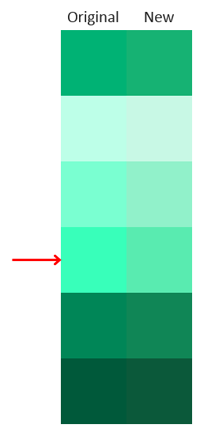
Theme colors are an integral part of a PowerPoint template. These colors appear in all of the Ribbon galleries and will influence the look of graphics and charts created with the template. But what about the tints and shades that populate the rest of the gallery? PowerPoint automatically generates these values based on the Theme colors. You cannot manually set any of the tints or shades. You’ve probably seen a few tints that were so bright that they hurt your eyes! How can you adjust these screamingly intense tints so the full color palette is usable?
Filed Under:
Color
Tagged as: Color, PowerPoint, Themes, Tutorials
Comments Off on Can I Get a Better Green?
In this set of tutorials, we will explore how you can use Microsoft Office applications within a touch device such as the Microsoft Surface. Remember that these tutorials explain techniques that are devoid of a physical keyboard (or a keyboard equipped cover).

Filed Under:
PowerPoint 2013
Tagged as: PowerPoint 2013, PowerPoint Touch, Tutorials
Comments Off on PowerPoint on Touch Devices
PowerPoint 2013 provides so many basic shapes within the Shapes gallery. All of these shapes can be used in many ways, and that in itself works most of the time. Yet there are plenty of other shapes that are not provided within the Shapes gallery but you can easily modify an existing shape a wee bit to end up with something you need. A semi-circle is a perfect example of such a shape.

Learn how to create a semi-circle in PowerPoint 2013 for Windows.
Filed Under:
PowerPoint 2013
Tagged as: PowerPoint 2013, Semi-Circle, Shapes, Tutorials
Comments Off on Creating Semi-Circles in PowerPoint 2013 for Windows
With the help of tables in PowerPoint you can make your numerical data or other content look organized, and make it easier for your audiences to quickly comprehend this data. You can make this task even more effective by selecting particular cells in the table, or the entire table, and then using Fill and Effects options — these options are located within the Tables tab of the Ribbon.

Learn about Table Fill and Effects options in PowerPoint 2011 for Mac.
Filed Under:
PowerPoint 2011
Tagged as: Office for Mac, PowerPoint 2011, Tables, Tutorials
Comments Off on Learn PowerPoint 2011 for Mac: Fills and Effects for Tables
In this issue, we have an exclusive interview with Bhavneet Chahal who discusses the new PowerPoint training videos available as part of the GoSkills online training courses. Then we have Damith Rajapakse from the National University of Singapore who discusses PowerPointLabs, a new free add-in for PowerPoint that promises to do some awesome tricks with your slides. Herb Rubinstein next looks at PowerPoint 2013 and discusses what this version offers for courtroom presentations. PowerPoint 2013 for Windows users can learn about recoloring picture backgrounds, inserting online pictures, and using textures as slide backgrounds. PowerPoint 2011 for Mac users can learn about creating jigsaw puzzles within PowerPoint, and also how you can set line styles for table borders. And finally, do not miss the new discussions and templates of this week!
Read Indezine’s PowerPoint and Presenting News.
Filed Under:
Ezine
Tagged as: Ezine, Indezine, News, PowerPoint
Comments Off on PowerPoint and Presenting News: February 4, 2014
Microsoft and the Office logo are trademarks or registered trademarks of Microsoft Corporation in the United States and/or other countries.