
This is the print version of this page. All content is copyright Indezine.com 2000-2026.
Thoughts and impressions of happenings in the world of PowerPoint and presentations, continuously updated since 2003.
See Also:
PowerPoint and Presenting Notes
PowerPoint and Presenting Glossary
For many users, the Merge Shape commands may be assumed as a new feature in PowerPoint 2013. However these were available in PowerPoint 2010 through the Combine Shapes commands. Yes, these were not available by default from any of the Ribbon tabs in PowerPoint 2010, but you could customize the QAT to get these commands. In PowerPoint 2013, Microsoft gave the new Merge Shapes name to these commands and also gave them a place right within the Ribbon. And now, these commands are no longer limited to shapes as they also work with text and pictures.
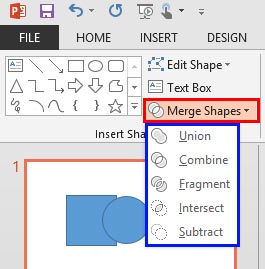
Explore the new Merge Shape commands in PowerPoint 2013 for Windows.
Filed Under:
PowerPoint 2013
Tagged as: Graphics, PowerPoint 2013, Shapes, Tutorials
Comments Off on Learn PowerPoint 2013 for Windows: Merge Shape Commands
In this issue, we first bring you a set of animated Christmas slides. We then look at another callout sample. These callout ideas will help you create better Callout graphics for your slides. Thereafter, we have an an exclusive conversation with Mike Power who talks about the new version 6 of NXPowerLite, a PowerPoint file compression tool. We have some awesome snowflake graphics for you as well, and we make a small detour to the world of Photoshop to explore a plug-in that lets you create oil painted effects. PowerPoint 2013 for Windows users can learn about Slide Background Styles — and also the benefits of solid one-color backgrounds. PowerPoint 2011 for Mac users can explore inserting and populating tables. And finally, do not miss the new discussions and templates of this week!

Read Indezine’s PowerPoint and Presenting News.
Filed Under:
Ezine
Tagged as: Ezine, Indezine, News, PowerPoint
Comments Off on PowerPoint and Presenting News: December 24, 2013
Gradient fills are typically blended fills between two or more colors that graduate and merge from one color to another — they are sometimes also called fountain fills or blended fills in other programs. Other than applying gradients as shape fill, you can also apply Gradient fills to your Slide Background. However, make sure that the two or more colors that you use for your Gradient work well with text and other foreground elements on all your slides.

Learn how to apply gradient fills as Slide Backgrounds in PowerPoint 2013 for Windows.
Filed Under:
PowerPoint 2013
Tagged as: Background, PowerPoint 2013, Tutorials
Comments Off on Learn PowerPoint 2013 for Windows: Gradient Fills for Slide Backgrounds
We all use tables in our slides to present numeric data in an organized way so that the audience can easily comprehend or compare values, trends, or even messages. Inserting a new table on your PowerPoint slide and then entering content within this table is an easy task. You can also import an Excel table into PowerPoint just by copying and pasting. However, what if you need to take a Word table into PowerPoint? Unfortunately, that’s not an easy task to accomplish — but there are still two ways you can go with.

Filed Under:
PowerPoint 2011
Tagged as: Office for Mac, PowerPoint 2011, Tables, Tutorials, Word
Comments Off on Learn PowerPoint 2011 for Mac: Use Word Table Content
It’s easy to insert a new table on your PowerPoint slide and then enter content within this table as required. However, as it happens in most offices or other work places, the table content may already be populated in a bunch of contiguous Excel cells. Whether you have a ready-made table, or just a group of in contiguous cells in Excel, it is very easy to use it in PowerPoint as a table.

Learn how to use content from your Excel sheet as tables in PowerPoint 2011 for Mac.
Filed Under:
PowerPoint 2011
Tagged as: Excel, Office for Mac, PowerPoint 2011, Tables, Tutorials
Comments Off on Learn PowerPoint 2011 for Mac: Use Excel Content as Tables
Microsoft and the Office logo are trademarks or registered trademarks of Microsoft Corporation in the United States and/or other countries.