
This is the print version of this page. All content is copyright Indezine.com 2000-2026.
Thoughts and impressions of happenings in the world of PowerPoint and presentations, continuously updated since 2003.
See Also:
PowerPoint and Presenting Notes
PowerPoint and Presenting Glossary
PowerPoint’s Text Fill gallery provides you with plenty of text fill options which work similar to the fills for shapes within the Shape Fill gallery. In this tutorial, we will explore how you can use a picture as a fill for your selected text. Although picture fills can look awesome on text and make it stand apart, you must use some caution — first, never use a busy, confused picture as a fill — a picture that has too many colors will rarely look good. Secondly, always remember that picture fills work best with text that’s a little thicker and larger — so picture fills for the body text on your slides is certainly a no-no!

Learn how to add a picture fill to the selected text in PowerPoint 2010 for Windows.
Filed Under:
PowerPoint 2010
Tagged as: Fills, PowerPoint 2010, Text, Tutorials
Comments Off on Learn PowerPoint 2010 for Windows: Picture Fill for Text
This Segment Octagon graphic containing 8 equal segments is a part of our Segment Polygons series that provides various segmented polygons that can enhance the impact of your presentations. This Segment Octagon graphic can be used to illustrate an “eight-in-one” – or a “one-for-eight” theme. In the example slide, we have used festive pictures to fill all eight segments of the octagon – similarly, try and use pictures that have a common theme to support your idea. Each segment of this Segment Octagon graphic is a separate triangle shape you can edit them to suit your need with the help of PowerPoint’s shape editing options.


Download and use these slides in your presentations.
Filed Under:
Presentation Bank
Tagged as: Graphics, PowerPoint, Presentation Samples
Comments Off on PowerPoint Concept Slides: Segment Octagon
Jim Endicott started his keynote with a video clip shown during the Presentation Summit 2008. The video showed the conference host, Rick Altman as a candidate for the post of the US President. He suggested Rick could do it again for the upcoming 2012 election. Be it 2008, 2012, or even all the years that this conference has existed, Jim admitted that one of the important things of being in this conference for so many years is that you gain perspective. Over the years, the conversation in the conference has started to evolve beyond basic PowerPoint to advanced stuff and evolving presenting technologies. He then wondered if presenters are communicating better today? They may have these great visuals, but do they have something substantial to say?
Jim mentioned that Life is a series of presentations, much like the name of the book by Tony Jeary. When you are sitting one-on-one with an audience, that is indeed a presentation, even if you haven’t planned it before — or even if there are no slides.
Jim then mentioned that he would take the audience on a personal journey. He explored applications that affected almost any relationship you have in your life. Jim reminded the audience that if they lacked outstanding skills, then, their careers can come to a screeching halt. He then provided examples of 3 business communicators:
So what does it take to be heard today? You need all of these:
And you also need to observe differences in your audience members, specifically for individuals within your audience. Each individual is different, and the way they approach, grasp, and assimilate information is different. These style differences in individuals pervade beyond our business lives. They invade our personal lives too. Jim then referred to well known US sitcom, Everybody Loves Raymond, about an anecdote when different characters act and react differently to a situation.
Clearly there is a need for a tool to measure these differences—and in fact, there are two such tools:
This explores perceptions.
This explores perceptions and also provides some insight.
Jim explored DiSC behaviors for the rest of his session.
He added that identifying these styles is an important part of life, and how you react:
Jim explained several ways in which you can identify your personal behavioral style, and how you can attempt to find out about other people’s behavioral styles.
He then suggested that everyone in the audience do this exercise with the person next to them:
Tell them what you believe you are
Tell them how do you like others to communicate information and ideas to you?
Tell them what a good day looks like to you?
Jim ended by exploring behavioral qualities of all four styles of people:
Be on time
Stick to business
Be ready to wrap up any time
Focus on results / impact
Minimize busy PowerPoint
Be prepared to back up claims
Be credible / confident
Provide eye contact
Relationship more important than task at hand
Allow time for interaction / discussion
Emphasize personal stories vs. facts
Be passionate and interesting
Provide testimonials and case studies
Buying you as much as your idea
Ask for their opinion
Provide assurances through change / performance guarantees
Honesty / integrity over anything else
More inclined to partner
Don’t force decision making
Strong need for consensus
Avoid overselling ideas
Don’t get too personal
Provide depth of tangible evidence
Don’t force decision making
Stress slows or stop the process
Provide time to discuss details
Guide follow-up scheduling

Jim Endicott is an internationally-recognized management consultant, executive coach and author. Jim’s company, Distinction Communication Inc., works with clients ranging from Fortune 500 executives to small business start-ups to help them enhance the personal communication effectiveness of those tasked with communicating high-stakes, high-profile messages.
Jim has also been a Jesse H. Neal award‐winning columnist for Presentations magazine and has also contributed presentation‐related content to magazines like Business Week, Consulting, Selling Power and the Portland Business Journal.
The views and opinions expressed in this blog post or content are those of the authors or the interviewees and do not necessarily reflect the official policy or position of any other agency, organization, employer, or company.
Filed Under:
Events
Tagged as: Events, Jim Endicott, PowerPoint, Presentation Summit
Comments Off on Jim Endicott at the Presentation Summit 2012
The font typeface, styles, and even the size for text in your presentation are dictated by the active Theme or Theme Fonts set. You can certainly override these defaults, and select another font typeface and also change the font size. Beyond changing the typeface and size, you can also make a certain word or phrase stand apart by formatting it bold, italic, underlined, etc. Typically, text is formatted bold to attract attention; and italicized to add emphasis or to mark foreign words. You can also underline, and even strike through any selected text. All these format choices such as bold, italics, underline, strikethrough, etc. are part of a larger font formatting feature called Font Styles.
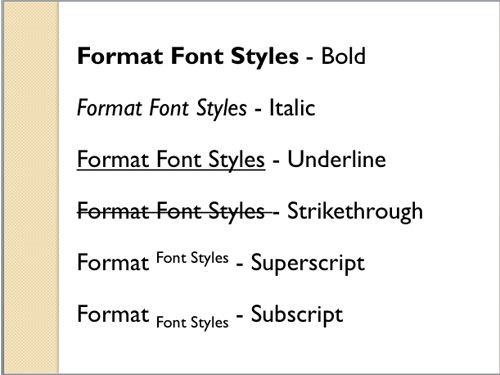
Learn about applying various font styles in PowerPoint 2011 for Mac.
Filed Under:
PowerPoint 2011
Tagged as: Fonts, Office for Mac, PowerPoint 2011, Text, Tutorials
Comments Off on Learn PowerPoint 2011 for Mac: Format Font Styles
Wow, there are three PowerPoint concept slide sets this week — you get segmented polygons such as squares, pentagons, and hexagons. You then explore guidelines that will help you create effective and useful animation on your slides. You also learn how to change slide aspect ratios in the upcoming PowerPoint 2013, and how you can set a default aspect ratio. There are plenty of other tutorials – learn about how you can set advanced Properties for a presentation and get started with WordArt. For PowerPoint’s Mac users, look at how you can use dummy text, change fonts, and explore Font Collections.
Filed Under:
Ezine
Tagged as: Ezine, Indezine, News, PowerPoint
Comments Off on Indezine News: October 9, 2012
Microsoft and the Office logo are trademarks or registered trademarks of Microsoft Corporation in the United States and/or other countries.