
This is the print version of this page. All content is copyright Indezine.com 2000-2026.
Thoughts and impressions of happenings in the world of PowerPoint and presentations, continuously updated since 2003.
See Also:
PowerPoint and Presenting Notes
PowerPoint and Presenting Glossary
Do you want a visual of businesspeople in a meeting environment? And do you want this visual to be neutral? Then you should explore these silhouettes — when you are presenting to a multi-racial or an international audience, silhouettes are the best options to be used in the place of people’s pictures. Silhouettes are essentially outlined graphics with fills and effects applied which makes them neutral. Here are some Business Meetings silhouettes ready to use within your PowerPoint slides. The sample PowerPoint presentation that you will download contains these silhouettes in both black and white colors, within two separate slides. We have also included few more variations with some pre applied fills, styles and effects to help you to start with. You can use PowerPoint’s fills, lines, and effects to make these Business Meetings silhouettes look coordinated with your slides.

Download and use these silhouettes in your presentation.
Filed Under:
Presentation Bank
Tagged as: Graphics, PowerPoint, Presentation Samples
Do you want to add a video clip to your PowerPoint slide so that it continues to play across subsequent slides? This actually means that when you move from one slide to another, the video continues playing without any interruption. PowerPoint 2007, the version before PowerPoint 2010 provided you with the Play Across Slides option — but this has been removed in PowerPoint 2010 from within the interface — however, we found a workaround to get back that option, as explained in this tutorial.

Learn how to play a video clip across slides in PowerPoint 2010 for Windows.
Filed Under:
PowerPoint 2010
Tagged as: PowerPoint 2010, Tutorials, Video
Comments Off on Learn PowerPoint 2010 for Windows: Playing Video Across Slides
 Sara Winge is VP of the O’Reilly Radar group. Since 1994, she’s been crafting the O’Reilly story while in a variety of jobs in Communications. She’s been involved in launching most of O’Reilly’s new initiatives, and, with Tim O’Reilly, co-created Foo Camp in 2003. Her previous jobs, which include furniture refinishing, firefighting, and job counseling, prepared her for working at O’Reilly in non-obvious but crucial ways.
In this conversation, Sara talks about Ignite, how it started, and how speakers can prepare to speak at an Ignite event.
Geetesh: What is Ignite, and how did this speaking format evolve?
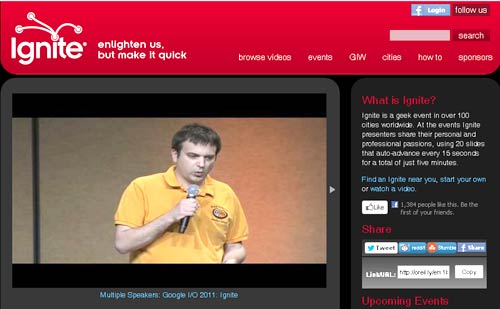
Sara: Ignite is a series of community events that offer a unique blend of networking, information, and fun. An Ignite event is an entertaining, high-energy evening of 5-minute presentations by community members who take to the stage to tell the world about their passions and obsessions. Each Ignite presenter speaks in front of 20 slides that auto-advance every 15 seconds–whether they’re ready or not. Presentations are eclectic, to say the least–folks have talked about everything from “The Best Way to Buy a Car” to “Hacking Chocolate” to “19th Century Pneumatic Tubes.” The Ignite motto, “Enlighten us, but make it quick,” captures the spirit of the event.
Ignite was started in Seattle in 2006, by Brady Forrest and Bre Pettis. They wanted to create a fun, thought-provoking event for the Seattle tech community that would combine interesting content and socializing/networking. It worked, word spread, and people from other cities asked if they could run their own Ignites. While Ignite was a personal project, Brady and Bre worked for O’Reilly Media, and when the requests got overwhelming, they gave Ignite a new home within O’Reilly.
Ignite events are run by volunteers, who register with O’Reilly and post their videos on Igniteshow.com. Ignites have happened in cities across the globe, on every continent except Antarctica. More than 2500 videos from those events (5 minutes each, of course) are online at Igniteshow.com.
Geetesh: How do you help speakers prepare for Ignite — also, is there a behind-the-scenes test run before the actual event?
Sara: Since each Ignite is run by a volunteer community leader, there’s no standard way to help speakers prepare. But typically, organizers send out guidelines to speakers. Some do hold a pre-event training session or run-through. Watching videos of other Ignite talks on igniteshow.com is a great way for speakers to prepare–you can see what works, and emulate that.
See Also:Master a Five Minute Talk: My Road to Ignite Chicago by Bess Gallanis
The views and opinions expressed in this blog are those of the authors and do not necessarily reflect the official policy or position of any other agency, organization, employer, or company.
Filed Under:
Interviews
Tagged as: Delivery, Interviews, Opinion, PowerPoint
Comments Off on Ignite: Conversation with Sara Winge
Applying a Motion Path animation to any PowerPoint slide object is as simple as applying any other animation effect (Entrance, Emphasis, or Exit effects), especially if you choose a Motion Path animation from within the Basic or Complex categories within the Motion Paths drop down gallery. However, if none of the Motion Path animations in the Basic or Complex categories suit your needs, or if you find it difficult to edit them, you can always opt to draw your own Motion Path by choosing any of the four options available within the Custom category. In this tutorial, we’ll show you the various Custom Motion Path animations available in PowerPoint 2011, and how you can use them to draw your own custom motion paths.

Learn how to draw a custom motion path in PowerPoint 2011 for Mac.
Filed Under:
PowerPoint 2011
Tagged as: Animation, Office for Mac, PowerPoint 2011, Tutorials
Comments Off on Learn PowerPoint 2011 for Mac: Drawing Custom Motion Paths

Rick Altman is a presentation consultant based out of Pleasanton, CA. Rick has been hosting end-user conferences since 1989, and is well known as the host of the annual Presentation Summit conference. He has a strong sense of the needs of the presentation community. Rick has authored 15 books on presentations and graphics, including Why Most PowerPoint Presentations Suck.
In this conversation, Rick discusses the tenth edition of his Presentation Summit conference.
Geetesh: The Presentation Summit celebrates its 10th birthday in Scottsdale, AZ this October. Did you ever think that you would get there when you started out? Tell us about the audience, the speakers, and the organizers.
Rick: I hosted a conference for Corel users for 15 years, so I knew it was possible. There are more PowerPoint users than Corel users, and their needs are more acute. So hey, we should be setting our sights on 20 years.
About the tenth incarnation of the Presentation Summit scheduled for Scottsdale AZ this October, I’m pleased to report that there are things that I can tell you and things that I definitely cannot tell you. Let’s start with what I can talk about.
I’m excited for the conference this year for three specific reasons. First, we have several new presenters to complement our traditional team. Our opening keynote speaker, Chris Bliss, is a comedian who comments on the role and value of humor in communication. He also is one of the most watched You Tube celebrities in history, thanks to his incredible juggling performance of 2006. In addition to Chris’s debut with us, Ken Molay shares his vast knowledge of webinar delivery and Kristin Thompson discusses her amazing memory techniques and how they can help presenters perform better in the moment.
Second, we are ushering in a new era of conference tools, and I’m quite enthused about that. We will offer a full-featured mobile conference app, so all smartphone and tablet users can access complete information about the conference, its schedule of seminars and events, presenter bios, exhibitors, evaluations, and Twitter feed. Not only will the information be more accessible, we won’t have to kill a tree to print a fat conference guidebook. The printed guide will be half the size, while the amount of information we provide will be about twice as much.

Finally, I am in love with the venue, the FireSky Resort. It is completely luxurious, has very large ballrooms, but only 200 guest rooms. That means that our conference will practically take over. The hotel’s normal October rate is $350/night, but we worked out a $179 rate for the conference.
Geetesh: Okay, so what can’t you tell us.
Rick: I am not allowed to tell you about the sneak previews for the next version of Office. There will be two, delivered by Microsoft MVPs and PowerPoint experts Echo Swinford and Troy Chollar. I have been assured by our contacts within the PowerPoint development team that the software will be available for preview by then.
Geetesh: It seems like yesterday when this series of conferences started in another Arizona city, Tucson – do you want to share some thoughts about your PowerPoint conferences over the years?
Rick: I remember at the debut conference in 2003 when we were showing sneak previews of Office 2003. We’ve come full circle!
When we began, we were all about PowerPoint, and not much else. It soon became apparent to us that proficiency with the software is a guarantee of very little in the demanding space of presentation. Knowing PowerPoint well carries no promise that you can craft an engaging message, design an evocative set of visuals, and tell a compelling story.
At a minimum, we needed to make sure we didn’t allow people to believe that learning the software would turn them into excellent presenters. Today it is our mission to cover the whole of the presentation experience – from message, through design, software technique, and delivery in all its forms.
The views and opinions expressed in this blog post or content are those of the authors or the interviewees and do not necessarily reflect the official policy or position of any other agency, organization, employer, or company.
Filed Under:
Interviews
Tagged as: Interviews, PowerPoint, Presentation Summit
Comments Off on Presentation Summit 2012: Conversation with Rick Altman
Microsoft and the Office logo are trademarks or registered trademarks of Microsoft Corporation in the United States and/or other countries.