
This is the print version of this page. All content is copyright Indezine.com 2000-2026.
Thoughts and impressions of happenings in the world of PowerPoint and presentations, continuously updated since 2003.
See Also:
PowerPoint and Presenting Notes
PowerPoint and Presenting Glossary
 Bob Boylan has been a presentation skills trainer of executives for 30 years. Bob has taught thousands of executives the secrets to making powerful and effective presentations. His 3-step method is an innovative approach to developing powerful presentations that’s quick, simple and effective. Bob lives with his wife Linda in Carbondale, Colorado where he enjoys life skiing, hiking, biking and photography, his second profession. Bob runs his site and a blog at Bob Boylan Enterprises.
In this conversation, Bob discusses Stop Being Predictable!, his new book.
etesh: Tell us about what prompted you to author Stop Being Predictable, and what is the most significant takeaway for a reader from your book?
Bob: I have made my profession for the last 30 years training executives how to present more effectively. My focus on Delivering Training that Takes has been my credo for over 30 years.
 Presenting is a skill. It is the ability to efficiently and effectively communicate your competence, experience and creative ideas in an interesting and compelling manner. Today’s business climate necessitates giving presentations all the time.
The presentations need to be on the money. Clear ideas backed up with relevant support data, presented crisply and with passion. When this happens, decisions are made. Action takes place.
My new book, Stop Being Predictable! is not about ideas to increase your skills. In the book are 14 tactics, not skill improvement ideas, which will make your presentations insanely effective!
The main reason I wrote this book is to give professional presenters tactics to easily generate changes in their current presentations to improve the out come of their presentation.
In effect, improve their closure!
The main takeaway from the book is you can use any one of the 14 tactics easily, and for little or no cost, and be on your way to a much better presentation outcome. In fact, I claim you can actually be insanely effective.
Geetesh: Can you share a tactic that can help presenters stand apart from a predictable pattern.
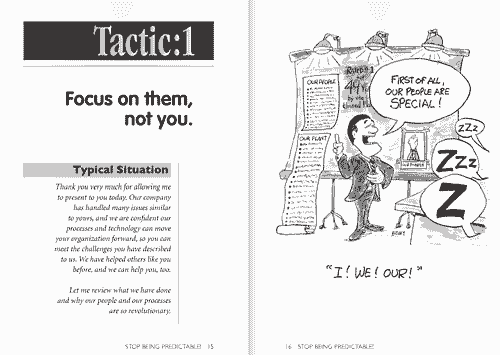
Bob: My web site has the first two tactics in full screen , preserving the book’s layout with cartoons — so it’s easy to read.
The views and opinions expressed in this blog post or content are those of the authors or the interviewees and do not necessarily reflect the official policy or position of any other agency, organization, employer, or company.
Filed Under:
Interviews
Tagged as: Books, Interviews, PowerPoint, Presentation Skills
Comments Off on Stop Being Predictable!: Conversation with Bob Boylan
Once you have inserted an organization chart (org chart) within PowerPoint 2011, you might need to change its layout. In org chart terms, layout refers to how subordinate levels in the hierarchy branch out from top to bottom — probably you want all subordinates flushed to the left, hanging to the right, or distributed evenly across a horizontal plane.
Learn how to change the layout of your organization chart in PowerPoint 2011 for Mac.
Filed Under:
PowerPoint 2011
Tagged as: Graphics, Org Chart, PowerPoint 2011, SmartArt, Tutorials
Comments Off on Learn PowerPoint 2011 for Mac: Change Layout of Organization Chart
After a photo slide show by Rick Altman, Wednesday morning at the Presentation Summit 2011 graduated to Nick Morgan‘s keynote session.
Nick started his session by stating that the only reason to give any speech has to be to change the world. He discussed working on a speech for the Governor of Virginia for a decennial commemoration of the Vietnam war. During his research, Nick found a book that contained poignant letters from soldiers at war. During the actual speech, the Governor threw away his papers and read letters from the book. The last letter he read was about a lieutenant who was writing to his daughter he had never seen, and he never lived to see her. In a way, the Governor that day did something to change the world.
Filed Under:
Events
Tagged as: Events, Nick Morgan, PowerPoint, Presentation Summit
Comments Off on Nick Morgan at the Presentation Summit 2011
Texture and picture fills for slide backgrounds have so much in common — in a previous tutorial we explored how you can use a texture filled slide background. While the same picture can be used for both a texture or picture fill, the main difference is how the results vary. While a picture fill spans the entire slide expanse, multiple tiles of the same picture form a texture fill.
Learn how to apply picture fills as slide backgrounds in PowerPoint 2010 for Windows.
Filed Under:
PowerPoint 2010
Tagged as: Background, PowerPoint 2010, Tutorials
Comments Off on Learn PowerPoint 2010: Picture Fills for Slide Backgrounds
Once you insert an organization chart in PowerPoint 2011, you might find that the shapes available are not sufficient for your requirements, and you may want to add some more shapes to your org chart. The default org chart that PowerPoint places has very few shapes — also you may need more hierarchy levels for the new shapes you want to add. Fortunately, you can make these additions and edits with just a click or two.
Learn how to add more shapes to an existing Organization Chart in PowerPoint 2011 for Mac.
Filed Under:
PowerPoint 2011
Tagged as: Graphics, Org Chart, PowerPoint 2011, SmartArt, Tutorials
Comments Off on Learn PowerPoint 2011 for Mac: Adding New Shapes to Existing Organization Charts
Microsoft and the Office logo are trademarks or registered trademarks of Microsoft Corporation in the United States and/or other countries.