
This is the print version of this page. All content is copyright Indezine.com 2000-2026.
Thoughts and impressions of happenings in the world of PowerPoint and presentations, continuously updated since 2003.
See Also:
PowerPoint and Presenting Notes
PowerPoint and Presenting Glossary
Do you want to temporarily install fonts to use them in PowerPoint or other programs? Our video tutorial on Font Loader will help. We also feature Thomas Häger, who discusses the new Heron add-in for PowerPoint that includes features that enable users to produce higher quality presentations in a shorter time. Dan Magill of Toastmasters International shows how you can use your voice to engage your audience when presenting online or in-person.
PowerPoint users for Windows versions can learn how to use subscripts and superscripts in their text. We then explore differences and similarities between Microsoft 365 and desktop versions of Microsoft Office, such as the newly released Office 2021. PowerPoint 365 for Windows users can learn more about Language options on the Status Bar. We also bring you quotes, press releases, and templates from the last few days.

Stay informed about updated tutorials and happenings related to PowerPoint and presenting.
Filed Under:
Ezine
Tagged as: Ezine, Indezine, News, PowerPoint
Comments Off on PowerPoint and Presenting News: January 18, 2022
Do you have a presentation that contains text that needs to be spell-checked in more than one language? Or do you and your client or colleague work with different localized versions of Microsoft PowerPoint? It may be that you use English (US) and color is a perfectly valid spelling, but someone else in another part of the world uses English (UK) and their spell checker suggests that the word color be changed to colour. Or if they use the French version of PowerPoint, then both spellings of color/colour would be flagged as incorrect. They use the term couleur. You first need to have proofing tools installed for all or any of the languages that you need to work within PowerPoint.
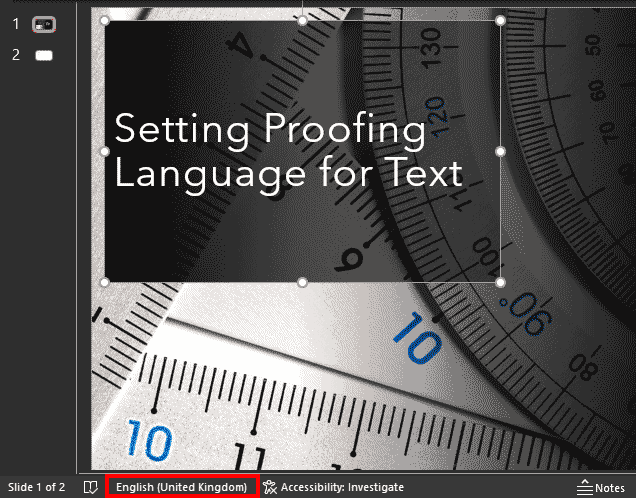
Learn how to set proofing language for selected text containers in PowerPoint 365 for Windows.
Filed Under:
PowerPoint 365
Tagged as: Microsoft Windows, Office 365, PowerPoint 365, Proofing, Spelling, Text, Tutorials
Comments Off on Setting Proofing Language for Text in PowerPoint 365 for Windows
By Dan Magill, Toastmasters International
I was watching The Wizard of Oz recently and I suddenly realized what a relief it was to be engrossed in a wildly entertaining movie classic, as opposed to sitting in front of my laptop screen, utterly bored by the latest online meeting.
Over the last couple of years, we’ve all been down the Yellow Brick Road of online meetings.
At first, it was fun. There were lie-ins and quizzes and bare feet – oh my!
However, as time went on, and screen time went up, most of us started to feel less over the rainbow and more Wizard of Zzzzzzzz(oom).

Image: Yay Images
Filed Under:
Guest Posts
Tagged as: Dan Magill, Guest Post, Presentations, Public Speaking, Toastmasters
Comments Off on How to Use Your Voice to Engage Your Audience When Presenting (Online or In-Person)
When you select any text container such as a text placeholder, shape, or text box in PowerPoint, then you may (or may not) see the language specified for the text container on the Status Bar. However it is quite possible that you may not be seeing any language specified on the Status Bar in PowerPoint 365 for Windows, and this can happen for one of two reasons.

Learn how to make the Language Option visible on the Status Bar in PowerPoint 365 for Windows.
Filed Under:
PowerPoint 365
Tagged as: Language, Microsoft Windows, Office 365, PowerPoint 365, Proofing, Spelling, Text, Tutorials
Comments Off on Language Options on the Status Bar in PowerPoint 365 for Windows

Thomas Häger is the managing partner and founder of Heron Consulting, a consulting company focused on operations strategy and supply chain. Heron Consulting has developed the Heron add-in for PowerPoint that includes features that enable users to produce higher quality presentations in a shorter time. Thomas Häger has a long background from Management Consulting with Accenture paired with experience from running Excellence in a corporate context, which forms the basis for the features in the Heron add-in for PowerPoint.
In this conversation, Thomas talks about this add-in.
Filed Under:
Interviews
Tagged as: Add-in, Charting, Heron, Interviews, Maps
Comments Off on Heron Add-in for PowerPoint: Conversation with Thomas Häger
Microsoft and the Office logo are trademarks or registered trademarks of Microsoft Corporation in the United States and/or other countries.