

CounterPoint takes the omnipresent symbol of today’s retail driven world. The counter display and merges it with a PowerPoint presentation so that you can create more interactive counter displays that entertain and inform while you wait for your turn.
In this Indezine exclusive, we have Kurt Dupont who heads PresentationPoint, creators of CounterPoint, DataPoint, and another amazing PowerPoint add-ins.
Geetesh: Tell us more about CounterPoint.
Kurt: Well, CounterPoint is our latest addition to our product range of dynamic presentations. We all know that number display (Now serving 34) in a shop or takeaway restaurant.
Boring and simple as it can only display a number from 1 to 99 and has no additional features. No additional information can be displayed and it is only used in peak times.
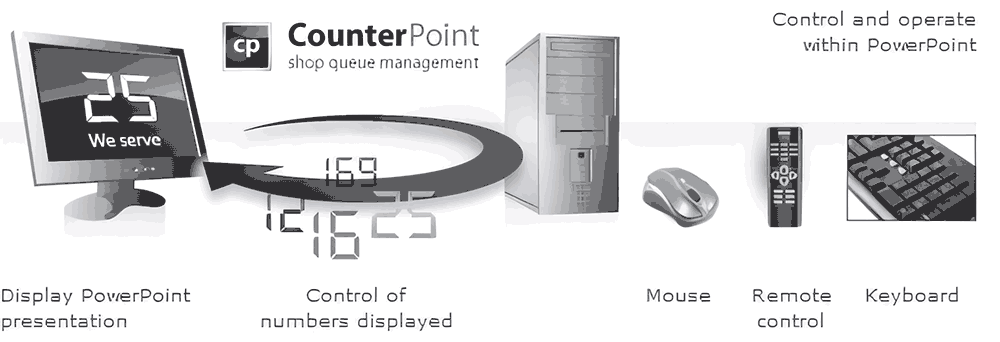
CounterPoint now offers that same functionality by using Microsoft PowerPoint. The big advantage here is that you can format your counter as you which and add general-purpose or advertising slides to the slide show.

You can now run a normal PowerPoint slide show with company and product information, promotions, etc, all combined with your counter. As soon as an employee presses the button of a mouse — this could also be a PowerPoint presenter remote control — a counter slide is shown, the running counter is incremented and a sound is played. After an idle time that you can configure, the counter slide is made invisible and the normal slide show continues. You can even use multiple service desks by sharing the common number.
Geetesh: Give us some case studies about organizations using CounterPoint.
Kurt: A trendy Belgian takeaway restaurant was looking for a counter display system with more functionality. The normal counter display they already had (costs EUR 400) was simply replaced by a normal PC with a 20″ TFT monitor. This was even an old computer that was not used anymore. CounterPoint was installed and the owner started playing with the slide show. She created a presentation of some 20 slides with meals and promotional information. At the end, a CounterPoint slide was added. Just as easy as that. Now the system is running continuously and serves as a counter display system in peak times.
The advantage that she saw was that they can better control the waiting queue in the restaurant and animate the customers with promotional information, which also leads to more sales.
At the end the customers are entertained and informed, the waiting queue is managed correctly (first in, first out), promotions are displayed and finally, the employees are better organized and more effective. And all of this with CounterPoint and a spare computer.
Related Posts
 Kurt Dupont is a solution provider who would go out of his way just to ensure he brings out the best when it comes to issues that have to deal ...
 Kurt Dupont is a solution provider who would go out of his way just to ensure he brings out the best when it comes to issues that has to deal w...
 Kurt Dupont is a solution provider who would go out of his way just to ensure he brings out the best when it comes to issues that has to deal w...
-
Kurt Dupont, based out of Belgium heads PresentationPoint, a company that creates several amazing PowerPoint add-ins. After hi...