

Kurt Dupont is a solution provider who would go out of his way just to ensure he brings out the best when it comes to issues that have to deal with data-driven presentations, data visualization, and digital signage software.
He started by working at airports worldwide to set up airport databases and flight information screens. This evolved to become the basis for PresentationPoint.
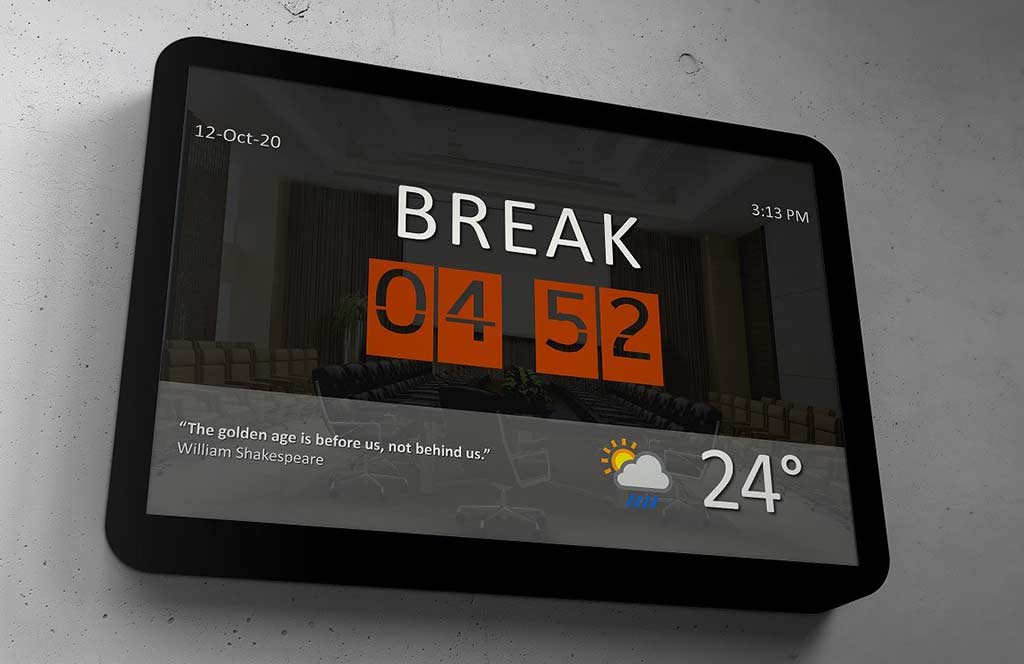
In this conversation, Kurt talks about BreakPoint, a new, free add-in for PowerPoint that lets you add countdowns, live clocks, weather information, and more in your slides.
Geetesh: Kurt, tell us more about BreakPoint. What can a PowerPoint user do with BreakPoint installed as an add-in?
Kurt: Sure, Geetesh. With BreakPoint, you can add 5 dynamic controls to your PowerPoint slides. A countdown, the current date, a live clock, a random inspirational quote, and real-time weather information.
The current date or clock is obvious. A countdown timer can be used to count down e.g. 10 minutes on the screen. The current outside temperature of your location and a weather icon can be shown. And optionally you can display a random quote from our 75,000+ quotes database, within a specific category.
Geetesh: What motivated you to create BreakPoint? Can you share your thoughts?
Kurt: Most PowerPoint slideshows are completely static and often used at meetings. Also at meetings, you have a break in between. Typically the presenter announces the break and everyone goes blind. Nobody knows how far the break is. BreakPoint changes this. With BreakPoint, you can bring your boring slide to life with a running countdown to the end of the break, and display more dynamic information.

Geetesh: How is BreakPoint similar to, and also different than your flagship offering, DataPoint?
Kurt: Both add-ins will bring your presentations to life by linking normal PowerPoint shapes to dynamic content. And the biggest difference with our DataPoint is that this BreakPoint add-in is free, but it gives you an idea of what a real-time slideshow or presentation could look like with our mature DataPoint add-in.
With DataPoint, you can connect to data sources and display more real-time information like KPIs, waiting queues, school announcements, flight information, and so much more.
BreakPoint uses technology that works on PowerPoint for Windows only. To get this free BreakPoint add-in, we are asking you to like and share some of our social media pages. More information can be found on our blog.
The views and opinions expressed in this blog post or content are those of the authors or the interviewees and do not necessarily reflect the official policy or position of any other agency, organization, employer, or company.
Related Posts
 Kurt Dupont is a solution provider who would go out of his way just to ensure he brings out the best when it comes to issues that have to deal ...
 Kurt Dupont is a solution provider who would go out of his way just to ensure he brings out the best when it comes to issues that have to deal ...
 Kurt Dupont is a solution provider who would go out of his way just to ensure he brings out the best when it comes to issues that has to deal w...
 Kurt Dupont is a solution provider who would go out of his way just to ensure he brings out the best when it comes to issues that has to deal w...