
This is the print version of this page. All content is copyright Indezine.com 2000-2026.
Thoughts and impressions of happenings in the world of PowerPoint and presentations, continuously updated since 2003.
See Also:
PowerPoint and Presenting Notes
PowerPoint and Presenting Glossary
A book now exists that even its author cannot fully understand, at least not in this new language it has been translated into. The Special Edition: Using Microsoft Office PowerPoint 2007 book has now been released in a Chinese edition.
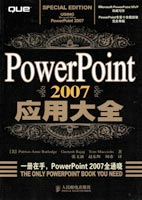
Chinese readers can now take advantage of all the detailed documentation and techniques in this book.
Filed Under:
Books
Tagged as: Books, PowerPoint 2007
Comments Off on Special Edition: Using Microsoft Office PowerPoint 2007, Now in Chinese

Terry Irwin is a consultant surgeon in Belfast, Northern Ireland, working for the National Health Service (NHS) at the Royal Victoria Hospital, the main regional center in Northern Ireland. His surgical specialty is colon and rectal surgery – always a good conversation-stopper when people ask him what he does. His response is that he repairs waste disposal systems! Terry is also a long-time PowerPoint user and co-author of a book on PowerPoint geared towards the design of medical presentations. In this conversation, Terry talks about the usage of PowerPoint in the medical industry, and his training sessions.
Geetesh: What are the specific areas of PowerPoint usage by the medical community, including doctors that set it apart from mainstream PowerPoint use?
Terry: PowerPoint is of course, the main method of supporting communication at medical meetings, training sessions, and in teaching students. It is pretty much universal. While in many ways it has much in common with presentation content in other arenas, there are some subtle and some more significant differences.
Most scientific presentations have to be balanced; there is no product to hype up or sell. Instead, the arguments for and against have to be presented, ideally with a clear conclusion. A major concern in clinical presentations is confidentiality. Much of the material centers around patient data, but we have to respect patients’ rights at the same time. That is not always easy.
Also, medicine is rich in digital data. Radiology and endoscopy systems can now save digitized output such as CT and MR scans, ECGs, colonoscopies, and keyhole (laparoscopic) surgery. Many people don’t realise that CT, ultrasound, and MR images are 3D and can be reconstructed in some very clever ways. They can also be exported as videos. Showing full-screen embedded video in a presentation is the holy grail of medical presentation at the minute and being able to overlay text and markers on top of the video without having to learn how to use video editing software will revolutionize medical presentations.
Geetesh: Tell us more about the type of PowerPoint training you provide.
Terry: Medical staff and students are really good at speaking and really bad at content design! I guess this is no surprise, since they are used to speaking one-to-one with patients, and their handwriting is terrible. Still, it drives me crazy that they cannot lay out slide content in a way that enhances their message, rather than distracting from it. I try to help with understanding basic concepts: legibility, color schemes, and correct use of graphics, tables, and artwork. I work hard at trying to eradicate those old PowerPoint annoyances of reading slides aloud, wordy slide content, and irritating animation. In addition, my main focus is on content delivery. No surprises — doctors are very clinical! They need to learn to tell a story, capture the attention of the audience, and communicate their message. This comes easily to sales teams but it is counter-intuitive for medics.
A favorite, and one that always goes down well, is to take a presentation from one of the audience members and do a makeover on it. This has unearthed some fantastic lessons. Two good examples are the X-ray images photographed on a light box with a digital camera. The resulting color image can be an enormous file. Reducing this by resizing it, cropping out the edges, and converting it to greyscale can reduce file size dramatically. A second classic was the beautiful pie chart that included a linked Excel spreadsheet containing three years of PhD research that had been left on a server at a meeting. So much for keeping your data safe from prying eyes!
I do a lot of one-to-one teaching with my own staff. After all, when they speak at meetings, they are representing me, so it had better be good. I also get invites to teach in some other departments at Queen’s University in Belfast. On top of that, I have been lucky enough to be asked to speak at meetings in places as far apart as Reykjavik, Prague, Athens, and Beijing! A highlight was an invitation to spend a week teaching PowerPoint in Dubai. As I write this, I am about to travel to Cuba and Barbados with my other passion – I am the honorary secretary of the Travelling Surgical Society of Great Britain and Northern Ireland. We will be doing a teaching session on communication skills in Barbados as part of this meeting. This will include two talks on presentations.
So, PowerPoint has been good to me. I have got to meet a lot of interesting people along the way, including my good friend and co-author Julie Terberg and of course Geetesh Bajaj!
The views and opinions expressed in this blog post or content are those of the authors or the interviewees and do not necessarily reflect the official policy or position of any other agency, organization, employer, or company.
Filed Under:
Interviews
Tagged as: Interviews, Medicine, PowerPoint, Terry Irwin, Training
Comments Off on PowerPoint in Medicine: Conversation with Terry Irwin

Joe Gustafson is the CEO and founder of Brainshark, Inc., founded the company in 1999 to help knowledge experts accelerate the flow of information to their audiences in a highly effective format. Under Joe’s leadership, Brainshark has become a leader in on-demand business communications and a successful Software-as-a-Service company. Joe has been instrumental in the development of Brainshark’s Channel Solution, which solves critical challenges for companies looking to increase channel revenue.
Geetesh: What is the Brainshark Channel Solution, and who is it geared to?
Joe: We’re excited to launch the Brainshark Channel Solution, encompassing new product capabilities and services that help technology suppliers/OEMs and their channel partners increase the reach and impact of their communications. Suppliers can equip their partners with Brainshark on-demand multimedia presentations, and then partners can use this content for their own sales and marketing outreach, as well as for training and certification. Best of all, everyone can tap into in-depth analytics from Brainshark, letting them measure the value of the communications they deliver.
Here’s a more in-depth look at how it all works. Through our Channel Solution, suppliers and their partners have access to their own unique and secure site with Brainshark content. Suppliers can create and publish Brainshark multimedia presentations – uploading PowerPoint presentations and other documents, and easily adding voice, video, attachments, interactivity, and more – and share this information with their global partner community.
Then, when channel partners – for example, distributors and resellers – log into their own sites, they have free access to content from all the suppliers they work with. As I mentioned, they can use the presentations to shore up their knowledge on supplier offerings or to bolster their own sales and demand generation activities. There are upgrade options for partners too, including the ability to add their own logo to presentations – or apply further personalization by adding their own voice-enriched intro and closing to pre-approved supplier presentations. Also, major distributors that want to create their own content and publish it to their own partner networks can license the full Brainshark Channel Solution.
Geetesh: Can you share some scenarios in which the Brainshark Channel Solution will help technology suppliers, partners, and end-users?
Joe: Sure. We’re looking forward to bringing the already-proven benefits of Brainshark to the tech channel – and think there’s a great opportunity to help suppliers and their channel partners streamline communications, improve productivity and ROI, and really cut through the communications clutter with high-impact material. Our current customers have realized impressive results with Brainshark – including reducing communication costs by 90 percent over previous methods, cutting training time in half, and increasing lead generation results by five to 10 times (and more).
We tend to discuss benefits of our Channel Solution as they pertain to two audiences: tech suppliers/ OEMs and their channel partners (such as distributors and resellers). For suppliers, there’s no question that they face limitations as they deliver critical information to their channel partners today, through vehicles including underutilized portals, cost-prohibitive travel, and webinars that partners can’t find time to attend. In fact, statistics show that 66 percent of webinar registrants don’t show up, 80 percent of marketing collateral is unused, and 90 percent of product knowledge is forgotten one month after training. Brainshark’s multimedia format, on the other hand, really makes content stand out from the pack; the on-demand delivery means it can be viewed and revisited anytime, and the incorporation of voice and multimedia makes the content both “sticky” and memorable. In terms of channel communications, Brainshark provides a cost-effective way for suppliers to reach all tiers of partners worldwide – helping them maintain mindshare and build tighter relationships.
In addition to differentiating their communications, suppliers also benefit from message consistency and control. For example, once they change the “master copy” of a presentation, this change is reflected everywhere that presentation exists in the channel, including in any personalized partner versions. In this way, they can keep content timely and relevant, and be of greater value to their partners. And, as I mentioned, the tracking abilities we offer are key – letting suppliers see which content their partners are using, and how effective that content is at capturing audience attention.
Partners realize significant benefits, too – a big one being the tracking information as well. The info they receive is on a more granular scale, allowing them to track individual viewing activity so they can qualify interest and prioritize follow-up. In addition, Brainshark’s multimedia format means that partners’ customers and prospects are much more likely to engage with the materials they receive. Also, as I mentioned, partners can use the Brainshark content available to them for their own training and certification – viewing the material at a time that’s convenient and doesn’t intrude on their day.
It’s worthwhile to mention, too, the benefits for individual customers and prospects, who can return back to the Brainshark presentations they receive at any time for more information, viewing them online – no downloads required – at their convenience. This can reduce the need to call a company for more info – and still leaves the viewer feeling that he/she has received personalized attention.
We’re looking forward to bringing these benefits to an even greater audience.
The views and opinions expressed in this blog post or content are those of the authors or the interviewees and do not necessarily reflect the official policy or position of any other agency, organization, employer, or company.
Filed Under:
Interviews
Tagged as: Brainshark, Interviews, Joe Gustafson, Online Presentations, PowerPoint
Comments Off on Brainshark Channel Solution: Conversation with Joe Gustafson

Pallav Nadhani is the co-founder and CTO of InfoSoft Global. He co-authored a book on combining the power of Flash and .NET called ‘Flash.NET’ at the age of 17 and has written several technical articles for international journals ever since. An MS in Computer Science from the University of Edinburgh, he is the founder and lead developer of FusionCharts, the industry’s leading Flash charting component.
In this conversation, Pallav talks about oomfo, an add-in for PowerPoint that adds animated and interactive charts.
Geetesh: What exactly is Oomfo, and how does it work within PowerPoint?
Pallav: oomfo is a charting add-in for Microsoft PowerPoint (2003, 2007, and 2010) that helps render animated and interactive charts within PowerPoint, all using a simple-to-use GUI. It is powered by FusionCharts Suite, which is the industry leader in Flash Charting.
oomfo allows you to import data from Excel, CSV, HTML tables, and many other data sources. You can use its smart GUI to enter data or convert data from various sources into a chart. The wide gamut of configuration options lets you configure the chart to look exactly like you want it to.
oomfo offers a variety of 2D and 3D chart types that are highly interactive. All charts support tool-tip. Pie and doughnut charts support dynamic rotation, slicing, and transformation from 2D to 3D. The True 3D chart supports dynamic camera angle rotation. Plus, there are business-oriented charts like waterfall/cascade charts which are not present in PowerPoint, as well as charts that let you visually drag-drop-n-change data during the course of your presentation. This is just perfect in scenarios like when you’re collectively trying to decide on sales projection for the next quarter.
Geetesh: How does Oomfo compare to PowerPoint’s native charts, and are they editable once inserted? Also, how do they work within the upcoming PowerPoint 2010 version?
Pallav: PowerPoint has always offered charts and graphs as the default. But then, there was only so much you could do with it. No matter how hard you tried, boring could never be beautiful. The need of the hour? To add some real oomph — oomfo. So, there you go! oomfo transforms mundane data into stunning visuals and adds the oomph quotient to your presentations. While at it, oomfo lets you edit and manipulate your data with incredible ease. It helps you captivate your audience in a unique way.
The charts are totally editable even after insertion. In fact, even when you export the charts to run on another machine (without oomfo), once oomfo is installed on that machine, you can edit those exported charts as well. Such is the flexibility and portability offered by oomfo. Additionally, you can also export the charts generated by oomfo within your slides as an image if you want to upload to sites like SlideShare.
We’re currently also working on enabling drill-down charts within PowerPoint. Say for example, you’ve a chart that shows yearly sales of three years (say 2007,2008, and 2009). Now, in a typical PowerPoint slide, if you were to show detailed data of the years 2007, 2008, and 2009, you’ll possibly add one slide per such chart. With oomfo, you can create linked charts (containing detailed data of 2007, 2008, and 2009) that show up in your presentation when a particular year is clicked in the main chart. This lets you build full dashboards and reporting within your PowerPoint slides without the need for your IT team. And this can be shared with anyone across the world.
oomfo works flawlessly with PowerPoint 2010 as well.
The views and opinions expressed in this blog post or content are those of the authors or the interviewees and do not necessarily reflect the official policy or position of any other agency, organization, employer, or company.
Filed Under:
Interviews
Tagged as: Add-in, Charting, Interviews, Pallav Nadhani, PowerPoint, PowerPoint 2007, PowerPoint 2010
Comments Off on oomfo: Conversation with Pallav Nadhani
In a previous tutorial we showed you how to download vector map files from the Microsoft Office website. In this tutorial, you’ll learn how to ungroup these map files. Our example looks at a map of the United States of America that also shows each individual state. Your map may be different, but the principles explained will be useful.

Learn how to ungroup a map in PowerPoint 2010 and 2007 for Windows.
Filed Under:
PowerPoint 2010
Tagged as: Maps, Office Online, PowerPoint 2007, PowerPoint 2010, Tutorials
Comments Off on Ungrouping Maps in PowerPoint 2010 and 2007 for Windows
Microsoft and the Office logo are trademarks or registered trademarks of Microsoft Corporation in the United States and/or other countries.