
This is the print version of this page. All content is copyright Indezine.com 2000-2026.
Thoughts and impressions of happenings in the world of PowerPoint and presentations, continuously updated since 2003.
See Also:
PowerPoint and Presenting Notes
PowerPoint and Presenting Glossary
AnimationFactory is a huge resource of visual content that we have known for a very long time now. Founded in 1996, the site now comprises over 500,000 animations, video backgrounds, PowerPoint templates, backdrops, web graphics, sound clips, Flash source files, etc. They have a dedicated team of on-house artists who create this content. Their media elements can be used in any kind of presentation.

Filed Under:
Clip Media
Tagged as: Animation, Clip Media, PowerPoint, Review, Templates
Comments Off on Animation Factory: The Indezine Review

Ebba Åsly Fåhraeus is VP of Sales Marketing Forms at Anoto, a leader of digital pen & paper technology. Anoto was founded in 1999 and is the pioneering leader of digital pen & paper technology, based in Lund, Sweden. Anoto technology optimizes paper-based processes by rapidly and reliably converting handwritten information from business forms into digital documents.
In this discussion, Ebba discusses the use of Anoto technology for PowerPoint usage.
Geetesh: Tell us about the Anoto product line-up, and which of the Anoto products work best with PowerPoint.
Ebba: Anoto is the pioneering leader of digital pen & paper technology. Anoto technology optimizes paper-based processes by rapidly and reliably converting handwritten information from business forms into digital documents.
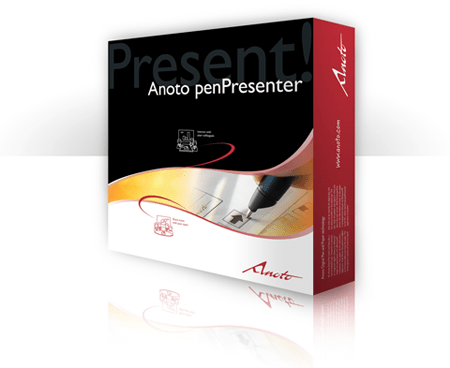
By far the most exciting product offered by Anoto is a PowerPoint add-in called Anoto penPresenter. It utilizes the Anoto digital pen and Bluetooth technology, enabling real-time collaboration during presentations. Users can make notes or sketch on their printed PowerPoint slides using an Anoto Digital Pen and instantly see them appear on their computer, projector, monitor, or flat-screen LCD screen. The slide can then be saved, printed, or e-mailed.
Geetesh: Can you share some scenarios in which PowerPoint users can benefit from the Anoto penPresenter?
Ebba: Anoto penPresenter allows users to have a more engaged audience in a meeting room environment and puts focus on the meeting itself.
Scenarios in which users can benefit include having to use an electronic whiteboard and not being able to easily transport it from room to room or floor to floor. They aren’t as portable as penPresenter.
Have you ever needed to transcribe notes for data entry after a meeting? Or have you ever brainstormed an idea on a whiteboard only to have it erased before anyone “took notes”?
Anoto penPresenter allows you to make notes and sketches on your PowerPoint slides with the Anoto Digital Pen and see the results instantly on the meeting room screen. Later on, they can easily be saved, printed, and emailed to the meeting room participants.
Most importantly, have you ever tried to do something to make your PowerPoint® slides more engaging? Anoto penPresenter enhances your slides in creative ways and you certainly won’t put people to sleep with them!
The views and opinions expressed in this blog post or content are those of the authors or the interviewees and do not necessarily reflect the official policy or position of any other agency, organization, employer, or company.
Filed Under:
Interviews
Tagged as: Add-in, Delivery, Hardware, Interviews, PowerPoint
Comments Off on Anoto penPresenter: Conversation with Ebba Åsly Fåhraeus

Andy Pope works in London, UK, developing in-house reporting systems. He uses VBA to automate Excel and PowerPoint. In his spare time, he frequents various Excel forums and maintains his own website on Excel charting. His contributions to the Excel community have resulted in him being awarded as a Microsoft Excel MVP since 2004.
In this discussion, Andy discusses the Chart Pattern Fills add-in for Excel 2007.
Geetesh: Andy, tell us more about your Chart Pattern Fills add-in for Excel 2007, and what motivated you to create this add-in?
Andy: I developed the add-in in response to posts by users who need the pattern fills feature that was depreciated in Excel 2007. Apparently, pattern fills are heavily used by those in academia. I was aware that, actually only the user interface for the feature had been removed, so I went about reconstructing the Patterns dialog. I enjoyed the challenge of creating a dialog that would dynamically reflect the user’s color choices, rather than just using static images.
It’s a totally free add-in and available on my site.

Geetesh: PowerPoint 2007 users also no longer have access to the pattern fills so will this add-in work for them too?
Andy: Unfortunately, not directly within PowerPoint. The porting of the add-in to PowerPoint is not currently possible. This is due to limitations in PowerPoint’s VBA Object Model and how the add-ins function works compared to those in Excel. As and when/if Microsoft makes appropriate changes, I will attempt to make a PowerPoint version.
In the meantime, for those wanting to use the add-in, you can create their chart in Excel, format it as required using the add-in, and then insert the saved file as an Object within PowerPoint.
See Also: Pattern Fills Add-in: Conversation with John Wilson
The views and opinions expressed in this blog post or content are those of the authors or the interviewees and do not necessarily reflect the official policy or position of any other agency, organization, employer, or company.
Filed Under:
Interviews
Tagged as: Add-in, Andy Pope, Charting, Excel, PowerPoint
 Design Science announced the new 6.5 release of MathType for Windows. Starting from this release, Design Science is positioning MathType as a universal editor for mathematical notation. There are no new PowerPoint-specific features, but here’s a list of the updates, provided by Bob Mathews of Design Science:
Up until now, MathType has been thought of mostly as a tool that works with Microsoft Word and PowerPoint. But it has always been much more than that. You can label graphs with equations, create equation images for websites, blogs, wikis, export equations to TeX or MathML, and much more. See Works With to see our MathType Interoperability Registry, which lists the many, many applications and websites MathType works with. More info here.
If you know the TeX typesetting language, you can type it directly into your Word document. When you are done, the TeX code will be converted to a MathType equation. [Bob’s note: This isn’t automatic. You can either click an icon on the toolbar or Ribbon or use the Alt keystroke.] The TeX Toggle keyboard shortcut allows you to toggle between TeX and MathType views of the equation.
Many of our customers like to use the keyboard. Now you can open an equation next to the insertion point using a keyboard shortcut. Together with our new TeX Toggle feature, you can now enter and edit equations completely from the keyboard without leaving Word.
As part of our “Equations Everywhere and Anywhere” effort, we have added new translators for many applications and websites.
Now you can import mathematics defined using MathML from the many applications that produce it. MathML code can be either in the new MathML Clipboard Format that is supported by a growing number of mathematical and scientific applications or plain text, such as from an XML editor, for example. The MathML can be imported via cut and paste or drag and drop.
Thank you so much, Bob!

Bob Mathews is the Director of Training for Design Science. A former military pilot, Bob came to Design Science in 1999 after teaching high school mathematics for several years. MathType from DesignScience is probably the foremost equation program available today — it integrates seamlessly with Microsoft Office programs including PowerPoint.
The views and opinions expressed in this blog post or content are those of the authors or the interviewees and do not necessarily reflect the official policy or position of any other agency, organization, employer, or company.
Filed Under:
Companion Programs
Tagged as: Bob Mathews, Education, Equations, MathType, PowerPoint
Comments Off on Design Science Releases MathType 6.5 for Windows
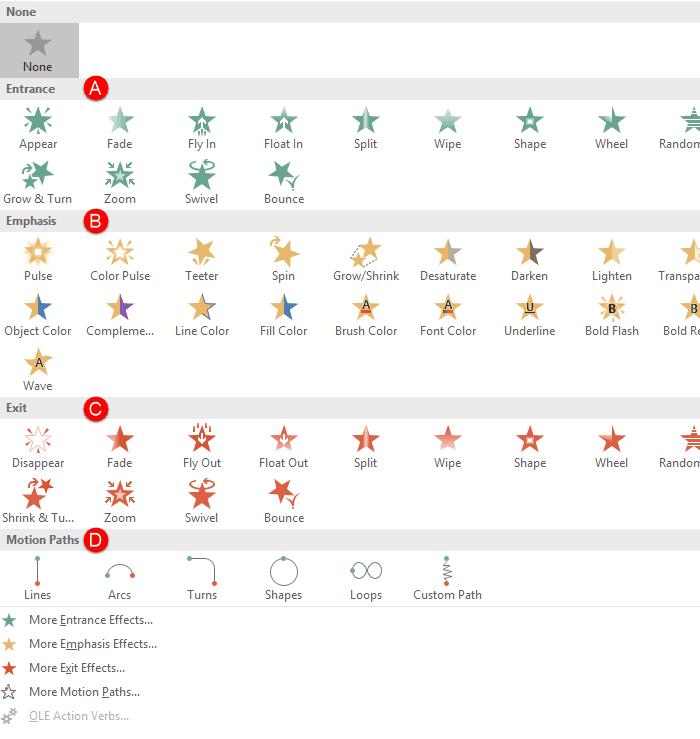
We put up three online presentations that show every animation effect for the entrance, emphasis, and exit animations in PowerPoint. Bookmark these pages as a reference!
Filed Under:
PowerPoint 2002, PowerPoint 2003, PowerPoint 2007
Tagged as: Animation, PowerPoint, PowerPoint 2002, PowerPoint 2003, PowerPoint 2007, Tutorials
Comments Off on Entrance, Emphasis, and Exit Animations in PowerPoint 2007, 2003, and 2002 for Windows
Microsoft and the Office logo are trademarks or registered trademarks of Microsoft Corporation in the United States and/or other countries.