
This is the print version of this page. All content is copyright Indezine.com 2000-2026.
Thoughts and impressions of happenings in the world of PowerPoint and presentations, continuously updated since 2003.
See Also:
PowerPoint and Presenting Notes
PowerPoint and Presenting Glossary
Ross Boucher, along with Tom Robinson and Francisco Tolmasky comprise the team at 280North, a company based in Cupertino, United States that creates the 280Slides online presentation program.

In this interview, Ross discusses how 280Slides evolved, the interface, and more.
Filed Under:
Interviews
Tagged as: 280slides, Interviews, Keynote, Online Presentations, PowerPoint
Comments Off on 280 Slides: The Ross Boucher Interview
Neuxpower announced the release of NXPowerLite 3.6, an update to their optimization program for Microsoft Office file formats.
Tommy Powell of Neuxpower says they’ve “made some big improvements to the optimization engine, resulting in a number of improvements. For example, many more EMF and WMF images can now be optimized and we’ve improved the way image sizes are detected, achieving even better quality on some files, and better compression on many more”.

Read the Indezine review of Neuxpower NXPowerLite 3.6.
Filed Under:
Add-ins
Tagged as: Add-in, NXPowerlite, PowerPoint, Review
Comments Off on Neuxpower Announces NXPowerLite 3.6
When you run Keynote for the first time (or when you run Pages or Numbers), you are asked to input the serial number of the product, as shown in Figure 1, below.
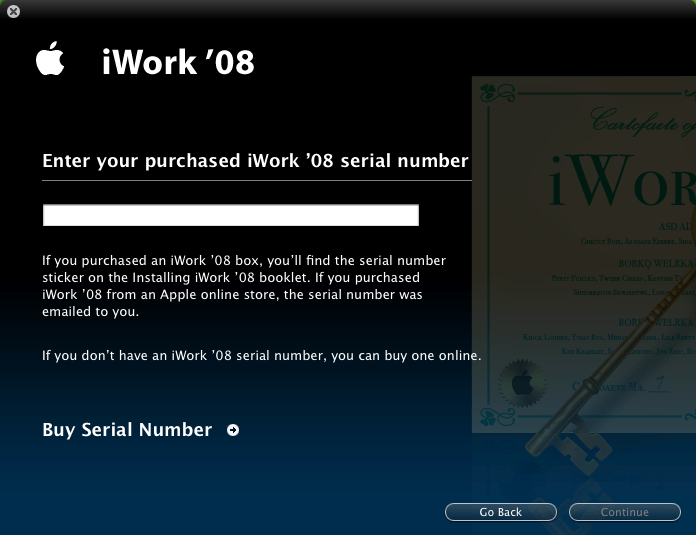
Figure 1: Enter your iWork serial
The serial number can be found within the packaging, typically on a sticker pasted on the Installing iWork booklet. If you bought the product at an online store without physical delivery, the serial number can be found in the subsequent email you received.
Type in the serial number including all the dashes, and click the Continue button. Thereafter, you’ll be asked to provide registration info, as shown in Figure 2, below. And yes, my email address really isn’t [email protected]!
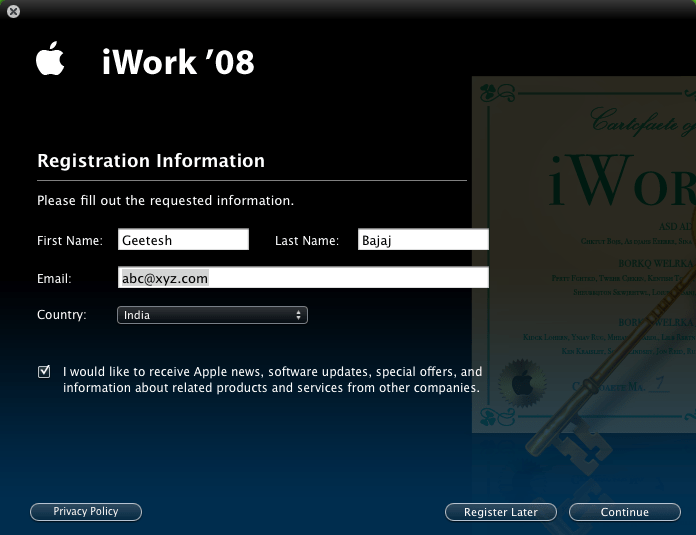
Figure 2: Send in your registration info to the folks at Apple
Thereafter, you’ll see a small Connecting window, which means your registration info is transmitted to Apple’s user database. Normally, this takes a few seconds, and you then see the Thank you window, as shown in Figure 3, below.

Figure 3: Your registration was successful
Thereafter, Keynote will launch. If there’s an update available at that time, you may be provided with an option to download it immediately.
Filed Under:
Keynote
Tagged as: Apple Mac OS X, iWork, Keynote
Comments Off on Running Keynote for the First Time
We all know that Apple CEO Steve Jobs is a great presenter who can inspire his audience. And while many soothsayers will predict the end of slideware, Steve Jobs knew that he needed a program that helped him deliver better presentations. So that’s how Keynote was born.
Initially, Keynote was used in Steve’s keynotes at MacWorld events. Then, the first version of Keynote was released by Apple in 2003.

Filed Under:
Keynote
Tagged as: Apple Mac OS X, iWork, Keynote, Steve Jobs
Comments Off on The Beginnings of Keynote
So, what is it about PowerPoint? We knew that question was bound to come up sooner or later and it’s best we answer this one now.
Yes, the site owner has authored several PowerPoint books and runs a PowerPoint-related site. We design presentations for high-end clients from our presentation design studio based in Hyderabad, India. And we use PowerPoint all the time, on both Windows and Mac.

So, why are we doing this series of posts on Apple Keynote? That’s because we use Macs. We have played with Keynote, and we think it’s a cool program. And to take a discussion route far removed from flame wars, we are so glad that Keynote exists. Keynote provides competition in the presentation program marketplace, and competition is good because it leads to huge improvements in both Keynote and PowerPoint.
However, it doesn’t take too long to notice that there isn’t too much content available on Keynote. There are not too many books, websites, or even sites with themes to buy or download. That’s why we created this corner on the web, to write some content on Apple Keynote.
Filed Under:
Keynote
Tagged as: Apple Mac OS X, iWork, Keynote
Comments Off on Now That There’s Keynote, What About PowerPoint?
Microsoft and the Office logo are trademarks or registered trademarks of Microsoft Corporation in the United States and/or other countries.