
This is the print version of this page. All content is copyright Indezine.com 2000-2026.
Thoughts and impressions of happenings in the world of PowerPoint and presentations, continuously updated since 2003.
See Also:
PowerPoint and Presenting Notes
PowerPoint and Presenting Glossary
If you followed our last post on the Keynote interface, you know there was nothing mentioned about an Outlining pane or something similar, and that’s something keenly observed by a PowerPoint user.
Well, there actually is a very similar Outline pane, and it’s where you would expect it to be! Yes, it’s in the same screen real estate as the Slide Navigator. Choose the View | Outline menu option, as shown in Figure 1, below.
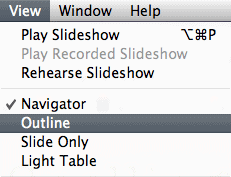
Figure 1: View Outline option
Doing so changes the left pane from the Slide Navigator to the Outline. You can see both views in Figure 2, below.
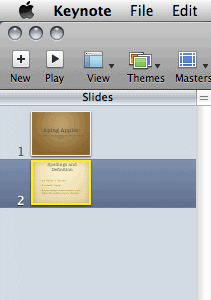

Figure 2: Slide Navigator view (left) and Outline view (right)
To change back from Outline view to Slide Navigator view, choose the View | Navigator menu option.
Filed Under:
Keynote
Tagged as: Apple Mac OS X, Interface, iWork, Keynote, Outline
Comments Off on Slide Navigator or Outline in Apple Keynote
The Apple Keynote interface is clean and simple, as shown in Figure 1, below.
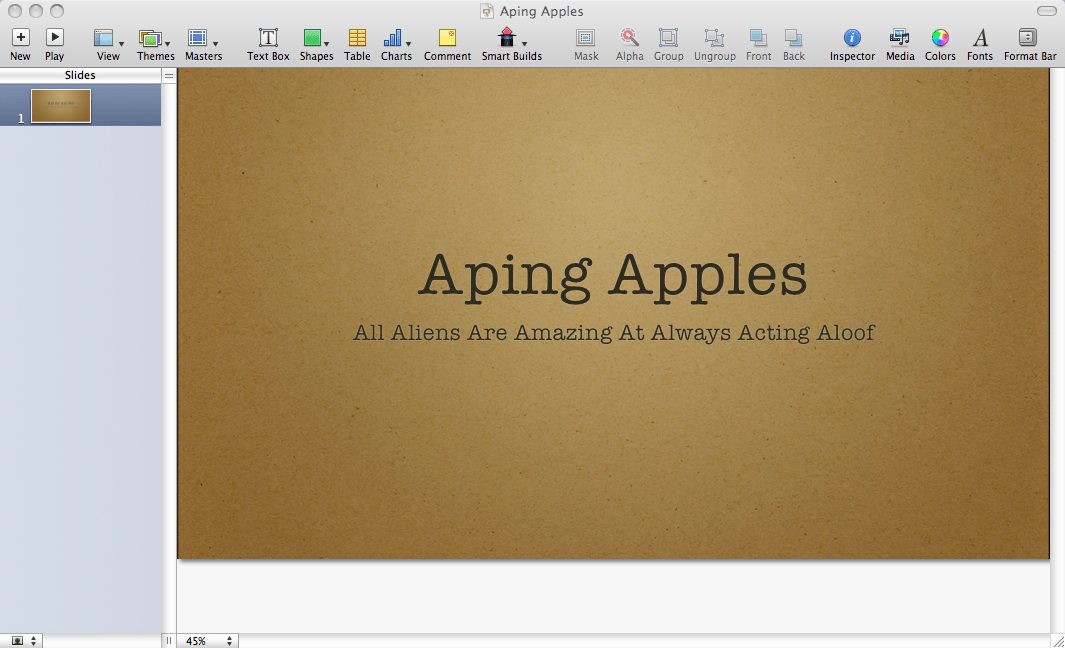
Figure 1: The Keynote interface
The interface comprises three (or four) visible areas:
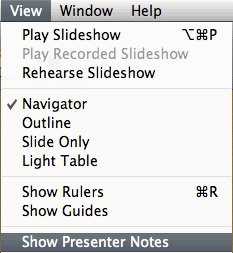
Figure 3, below, shows you the Keynote interface with Presenter Notes visible. Note that this is a toggle option. So, you can choose the same option repeatedly to alternate between viewed and hidden states of the Presenter Notes panel. With the Presenter Notes panel visible, this option will be View | Hide Presenter Notes.

Figure 3: Interface with Presenter Notes
You can also hide and view the toolbar in the same way. Choose the View | Hide (or Show) Toolbar option to do so.
In addition to the interface elements described above, you might also see the Ruler and one of four floating panels called Inspector, Media, Colors, and Fonts. Also, the Toolbar may have spawned an additional bar called the Format Bar right under itself. In subsequent posts, we’ll explain these and more interface elements.
Filed Under:
Keynote
Tagged as: Apple Mac OS X, Interface, iWork, Keynote
Comments Off on The Apple Keynote Interface
Although this topic is more of a Mac only thing, it’s also relevant if you are a Windows user of Microsoft Office and receive files from iWork users on the Mac who save to Microsoft Office file formats.
We read this article on the MacWorld site that goes into all the details of co-existing in a dual format/platform world, and understanding the pitfalls and precautions required. We must say that this is probably the best content we have seen on this particular topic, and it is must-read.

PowerPoint users will understand how Keynote imports and exports PowerPoint files, and that if there are any presentation notes in their original Keynote files, the exported PowerPoint format files won’t open in PowerPoint 2008 on the Mac although they should pose no problems in PowerPoint 2004 for the Mac, or PowerPoint 2007 for Windows! We’ve bookmarked the page. Read it here.
Filed Under:
Keynote
Tagged as: Cross Platform, iWork, Keynote, Office for Mac, PowerPoint
Comments Off on Working in a Microsoft Office-Apple iWork World
When you launch Keynote and choose a theme for your new presentation, or apply a new theme to an existing presentation, you can change the Slide Size of the presentation.
Now the Slide Size is actually almost the same as the resolution of your presentation and is related to the resolution capabilities of your monitor display and projector. This is not as geeky as it sounds. Just remember that the most common and safe resolution for all new projectors is 1024 x 768 pixels, so, if you never bother changing the slide size, Keynote will continue creating your presentations in this resolution. In fact, Keynote defaults to 1024 x 768 pixels. Just stay with the defaults until you get a little more Keynote-savvy.
Older projectors worked at only 800 x 600 pixels, and most of the higher-end projectors can support much higher resolutions. Of course, if you want to choose a Slide Size that’s different than 1024 x 768, you must have a compelling reason to do so. Maybe, you want to use a wide-screen aspect, or you have been asked to use a different slide size.
You can choose your Slide Size in the drop-down list of the same name, as shown in Figure 1, below.

Figure 1: Slide Size in Keynote
As you can see in Figure 1, above, Keynote provides you with five slide sizes for this particular theme (Harmony). On the other hand, look at Figure 2, below, and you’ll find that this theme (Blackboard) has only two slide sizes. This makes it obvious that all themes don’t have all slide sizes.
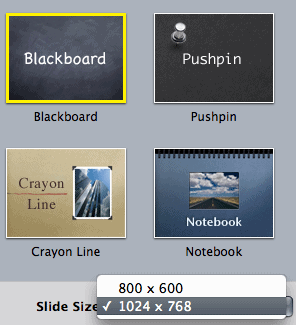
Figure 2: Slide Size in Keynote
You’ll find a more detailed explanation of slide sizes in Keynote on the Apple site.
Filed Under:
Keynote
Tagged as: Apple Mac OS X, iWork, Keynote, Resolution, Slide Size
Comments Off on Apple Keynote Slide Size (aka Resolution)
You can launch Keynote by double-clicking its icon in the Applications/iWork folder of the Finder. To learn how to access that icon, refer to this earlier post: Do I Already Have Apple Keynote?
However, that’s not how everybody launches Keynote! Look in your Dock and you’ll find an alias for Keynote there, as shown in Figure 1, below.

Figure 1: Keynote alias on the Dock
As you hover over all the aliases, you’ll see a tooltip that provides the name of the application the alias belongs to. Click the Keynote alias and the program should spin to life, asking you to choose a theme to create your first presentation, as shown in Figure 2, below.

Figure 2: Choose a Keynote theme to proceed
At this point, you have several choices:
As you can see, you still haven’t created a single slide in Keynote yet! We’ll teach you how you can do that after we explain the Keynote interface to you in the next few posts. As always, do send your feedback through the feedback page.
Filed Under:
Keynote
Tagged as: Apple Mac OS X, iWork, Keynote
Comments Off on Launching Apple Keynote
Microsoft and the Office logo are trademarks or registered trademarks of Microsoft Corporation in the United States and/or other countries.