
This is the print version of this page. All content is copyright Indezine.com 2000-2026.
Thoughts and impressions of happenings in the world of PowerPoint and presentations, continuously updated since 2003.
See Also:
PowerPoint and Presenting Notes
PowerPoint and Presenting Glossary

PPTshare is a line of PowerPoint add-ins including the new Desktop Slide Manager. In this Indezine exclusive, James Ontra who heads PPTshare discusses this new product that alternates between organizing and sharing your PowerPoint content. He also talks about future plans.
Geetesh: James, how did PPTshare Desktop evolve?
James: PPTshare Desktop Slide Library evolved from our clients’ need to better manage and control all of their disparate PowerPoint files, and to simplify video within PowerPoint. There’s a wealth of valuable content stored within hundreds of PowerPoints, and our clients needed a better way to tap that resource. Before, users, typically salespeople, wasted a lot of time hunting and pecking, copying and pasting, and recreating new presentations for every meeting. The PPTshare Desktop Slide Library consolidates all of a user’s PowerPoints and videos into one central location. And it automatically formats a video into a full-screen PowerPoint slide. It is the ‘go-to’ place where users can quickly find single slides and videos for making new presentations.
Our clients asked for some specific functionality, and we built it, using the Slide Library as a foundation.
With the user requests in mind, we created PPTshare
Geetesh: What do you plan to implement in the near future?
James: We will provide collaborative workspaces for creating, automating, managing, and distributing presentation files. The PPTshare Desktop Slide Library functionality will be extended to seamlessly work with the PPTshare online component. And other features, such as search, user groups, and tracking will be added soon.
The views and opinions expressed in this blog post or content are those of the authors or the interviewees and do not necessarily reflect the official policy or position of any other agency, organization, employer, or company.
Filed Under:
Interviews
Tagged as: Add-in, Interviews, James Ontra, PowerPoint, PPTShare
Comments Off on PPTShare: Conversation with James Ontra
The NewSoft WMS100 Image Wireless Projector Adaptor connects to any VGA-compatible projector. With the included software, called Presto, up to three computers can control a presentation and capture and display their own screens at any time.
The device itself ($280) looks like a walkie-talkie with an antenna on one side and a VGA/XVGA connection. It is compatible with three Wi-Fi standards (802.11a, b and g), and the software even enables slides to be exchanged among participants, bypassing the screen entirely.

Read more on the New York Times site.
Filed Under:
Hardware
Tagged as: Hardware, PowerPoint, Projector
Comments Off on Projector Adaptor from NewSoft

StandOut from Electric Rain does seem one of the most promising presentation programs in the recent past. In the decade that’s gone by, one presentation program after the other has gone to no man’s land: Astound, Lotus Freelance, Adobe Persuasion, Macromedia Action, and these are only a few of them. Microsoft’s PowerPoint has towered over all of them.
So that brings us back to StandOut. Can it make it where others haven’t been able to? Ironically, StandOut is a great example of showcasing Microsoft’s new technologies: Windows Vista, .NET 3, and Expression graphic programs. And Mike Soucie, CEO of Electric Rain does mention that there’s some sort of content exchange possible between PowerPoint and StandOut.
Filed Under:
Interviews
Tagged as: Interviews, Mike Soucie, PowerPoint, Standout
Comments Off on An Interview with Mike Soucie
This time, in a continuing series for PowerPoint beginners, we have put up a tutorial on inserting clip art in PowerPoint using the Clip Art task pane, found in PowerPoint 2002 and 2003.

Filed Under:
PowerPoint 2003
Tagged as: Clip Media, PowerPoint, Tutorials
Comments Off on Inserting Clip Art in PowerPoint
StandOut is the name of a soon-to-be-released presentation product from Electric Rain that uses Windows Vista’s graphic and multimedia abilities to good use.
Essentially, StandOut will be available in two versions: Designer and Presenter.
The Designer version takes advantage of Microsoft’s new Expression design tools so that designers can create a set of Design Kits (templates) that can be used to create presentations using the Presenter version.

The Presenter version is for non-designers such as typical office staff and presenters themselves who can create and edit presentations based on the Design Kits (templates) created with the Designer version.
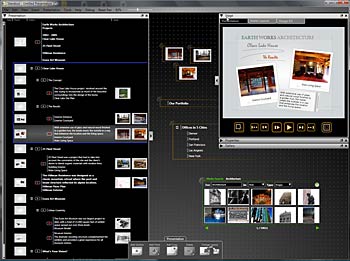
One of StandOut’s stellar features is the FlyPaper, a large digital bulletin board that can be used to store several types of content including graphics, documents, media, and PowerPoint presentations. These resources can then be organized, and also directly dragged into a StandOut presentation. Naturally, something of this sort will benefit from a large monitor (or probably a dual monitor).

StandOut allows import of Microsoft PowerPoint content, although this exchange of content will not work the other way around. Watch out for a detailed interview with Mike Soucie, President and CEO of Electric Rain soon, which we will announce on this blog.
Meanwhile, do check out the Electric Rain site for more info.
The views and opinions expressed in this blog post or content are those of the authors or the interviewees and do not necessarily reflect the official policy or position of any other agency, organization, employer, or company.
Filed Under:
Companion Programs
Tagged as: Companion, PowerPoint, Standout
Comments Off on Focus on StandOut
Microsoft and the Office logo are trademarks or registered trademarks of Microsoft Corporation in the United States and/or other countries.