
This is the print version of this page. All content is copyright Indezine.com 2000-2026.
Thoughts and impressions of happenings in the world of PowerPoint and presentations, continuously updated since 2003.
See Also:
PowerPoint and Presenting Notes
PowerPoint and Presenting Glossary

The Microsoft Office Specialist certification is an acclaimed, worldwide standard for Microsoft Office usage skills. A certification can help career prospects and provide promotions, not to speak about several other benefits that certified professionals receive. No wonder, there are many books dedicated to such certification curriculum.

Linda Johnson, who runs a premier Microsoft Office and computing site has authored a comprehensive guide on what you need to prepare for certification in Microsoft Excel 2003, both the Specialist and Expert levels.
Linda’s book, Microsoft Office Specialist: Excel 2003 Study Guide uses real-world scenarios to teach the full range of Excel 2003 skills you need. Check out the book here.
Recosoft’s PDF2Office 3 (Standard and Personal editions) claims to create editable PowerPoint presentations, Word documents, and several other formats from PDFs. Let’s admit that we were quite skeptical about this one. After all, we’ve lost count of how many people have asked about how they can create editable PowerPoint presentations from their PDFs. And maybe you are now wondering why anyone would want to create PowerPoints from their PDFs?
There are two reasons:
Filed Under:
Reviews
Tagged as: Companion, PDF, PDF to PowerPoint
Freepath is a great, new addition to my PowerPoint software collection. So why did I use the term “PowerPoint software collection”? That’s because many users just call Freepath a great PowerPoint alternative! That’s funny since Freepath has no way to create an outline, or print handouts! So without further distracting you about alternatives, let me tell you more about Freepath.
Freepath is a playlist program with a refreshingly, different approach:
 Play sound in your playlist – even DRM protected music that you bought from the iTunes store – you can actually drag them from iTunes to Freepath. And when a video with sound plays, you can continue to play another sound to provide realtime mixing although you can always turn off the sound files by pressing the “s” key on the keyboard.
That’s what I learned from my initial half-an-hour with Freepath – I’m in touch with Lou Douros, President of Grass Roots Software, who make Freepath.
We hope to do a full review soon. Meanwhile, you can download a free trial from their site (link no longer exists).
Filed Under:
Thoughts
Tagged as: Freepath, Lou Douros

Cliff Atkinson published a book last year called Beyond Bullet Points about how to combat PowerPoint fatigue: the deadening sameness of Microsoft Corp.’s commonly used presentation software.
The book caught the eye of W. Mark Lanier, a Houston-based trial lawyer. What happened next sounds like an episode of a ripped-from-the-headlines TV crime drama. Lanier, who was suing Merck & Co. on behalf of a man who died while taking the painkiller Vioxx, hired Atkinson as a consultant to help with his opening argument. The resulting 253-slide presentation was so mold-breaking — so the opposite of boring — that it was dubbed “CSI: PowerPoint.”
Read more on the Los Angeles Times site.
You can also read an earlier interview with Cliff Atkinson on the Indezine.com site.
Filed Under:
Thoughts
Tagged as: Books, Cliff Atkinson, Legal, Opinion
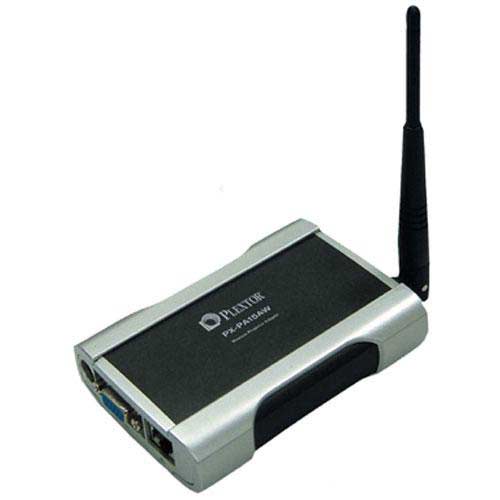
Plextor Corp., a developer and manufacturer of high-performance digital media equipment, announced the PX-PA15AW Wireless Projector Adapter. The new device uses wireless technology to enable users to broadcast Microsoft PowerPoint presentations from most Wi-Fi enabled computers to a VGA/XVGA projector incorporating the adapter.
The PX-PA15AW Wireless Projector Adapter utilizes Ethernet or Wireless LAN (WLAN) technology to receive, in real time, screen-captured images, graphics, and image content broadcast from most Wi-Fi enabled computers. Users can wirelessly share oversized image files, even PowerPoint files with embedded animation. High-performance algorithms detect the differential regions of the screen, allowing the system to present content at 15 frames-per-second on average for Wi-Fi IEEE 802.11a/b/g connectivity.
Microsoft and the Office logo are trademarks or registered trademarks of Microsoft Corporation in the United States and/or other countries.