
This is the print version of this page. All content is copyright Indezine.com 2000-2026.
Thoughts and impressions of happenings in the world of PowerPoint and presentations, continuously updated since 2003.
See Also:
PowerPoint and Presenting Notes
PowerPoint and Presenting Glossary
I just read an amazing article by Carmine Gallo on the BusinessWeek site and wanted to share this with you.
 Carmine says, The Apple CEO is well known for his electrifying presentations. Here are five tips to make your next talk just as mesmerizing–or close. Apple Computer, now celebrating 30 years of innovation, has revolutionized the way we use computers and listen to music. Now its charismatic co-founder, Steve Jobs, has transformed the corporate pitch. Anyone who has watched a Jobs keynote will tell you he is one of the most extraordinary speakers in Corporate America. Jobs learned a long time ago that a leader must be a company evangelist and brand spokesperson.
Carmine further adds, There is no better example of Jobs’ passion than the famous story of how he convinced John Sculley to lead Apple in the mid ’80s by asking him, “Do you want to sell sugared water all your life or do you want to change the world?” The former Pepsi executive chose the latter and, although the pairing ultimately failed to work out, it reflects Jobs’ sense of mission — a mission that he conveyed consistently in the early years of Apple and continues to today.
Filed Under:
Thoughts
Tagged as: Carmine Gallo, Presentation Skills, Steve Jobs
There has been plenty of news about how newer Macs will be able to run Microsoft Windows. Here are details from some news sources.
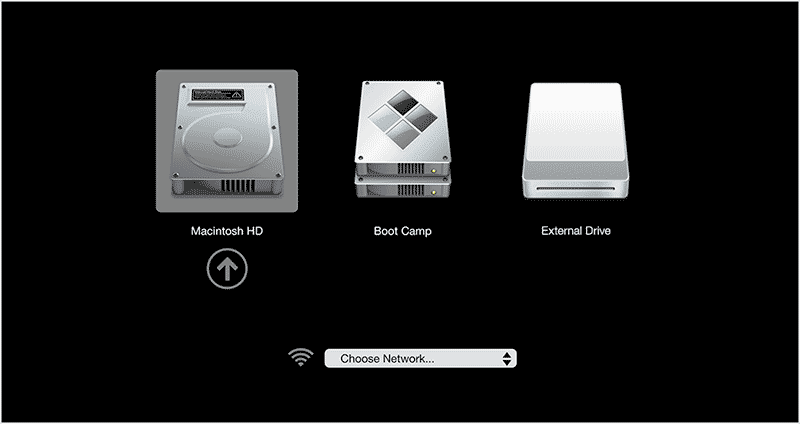
For the legions of diehard Apple fans, the announcement that some Mac computers would be able to run Windows was nothing short of earth shattering. “It’s huge news for the Mac community. It’s a real bombshell,” said author Leander Kahney. “Hell has frozen over, black is white, two plus two equals five, the whole fabric of the universe has been ripped open.”
Read more on the ABC News site.
After long imploring computer users to “think different” and defining the Macintosh as a lone bulwark against the Windows onslaught, Apple Computer has decided to open the gate, at least a bit. Two decades after the first Mac arrived, Apple said it would offer users of its latest models a simple way to run the Microsoft Windows operating system and its own. That means a single Apple computer will run programs written for either the Mac or Windows, though it will have to shut down one system to start the other.
Read more on The Times of India site.
Apple Computer’s surprise software release allowing the company’s newest Intel-based Macs to run Windows has put “virtualization” — an alternative, and arguably superior, method of achieving the same result — in the spotlight. Released Wednesday, Apple’s Boot Camp beta installs Microsoft’s OS in a partition on the hard drive, thus offering Mac users the option of booting up either with OS X or Windows XP. Virtualization, by contrast, allows Macs to run Windows and Mac OS X not just on the same machine, but at the same time, with only a slight drop in performance.
Read more on the Wired News site.
Apple’s decision to run Windows natively on the Mac through its Boot Camp project may be a landmark in the history of computing but its net effect on business IT buyers will be zip. The fact is that the Mac user and the PC user remain two tribes forced to coexist in one universe by unfathomable fate.
Read more on the Inquirer site.
Filed Under:
Thoughts
Tagged as: Mac OS, Microsoft Windows
If you are a PowerPoint creator such as a designer, teacher, or someone who creates PowerPoints in the office, you know that getting a good quality map into PowerPoint is not the easiest of things you can do. It might involve buying some expensive maps that come only in EPS or Adobe Illustrator formats. Again, these open only in Adobe Illustrator or any of the other few high-end graphic applications that are more oriented towards professional graphic designers rather than PowerPoint creators.
And even if you manage to go so far, you still need to get your maps into PowerPoint – for that you will need to export to a graphic file format that PowerPoint understands. And then you’ll discover that none of those maps can be easily edited using PowerPoint’s own tools. By this time, you probably give up the whole idea of using a map in your presentation!
That’s the reason I was so happy to see a collection of maps that were actually PowerPoint presentations.

Filed Under:
Clip Media
Tagged as: Education, Maps, Review
FlashSpring is giving away two licenses of its PowerPoint to Flash converter software. To take part in this giveaway, just fill in this giveaway form.

Filed Under:
Add-ins
Tagged as: Giveaway, iSpring, PowerPoint Flash
As Flash SWFs get more ubiquitous, there’s a need for a tool that helps you organize and reuse your content. InstantFX SE Flash Browser / Transformer is one such product – apart from being a Flash SWF browser, it also includes an internal Flash SWF library. In addition, it plugs into Microsoft Office applications like FrontPage and PowerPoint so that all these SWFs can be inserted into web pages or slides with one click.
In this review, we’ll explore the PowerPoint add-in option that allows you to browse and edit Flash clip art, SWFs saved on your system, and even SWFs that can be found in your browser cache!

Filed Under:
Companion Programs
Tagged as: Companion, Flash
Microsoft and the Office logo are trademarks or registered trademarks of Microsoft Corporation in the United States and/or other countries.