
This is the print version of this page. All content is copyright Indezine.com 2000-2026.
Thoughts and impressions of happenings in the world of PowerPoint and presentations, continuously updated since 2003.
See Also:
PowerPoint and Presenting Notes
PowerPoint and Presenting Glossary
Slide Master View is an important view within PowerPoint 2019 for Windows. Why? Because, if you make any changes or edits within this view, these modifications will influence all slides within your presentation. For example, if you want to make your company logo appear on all the slides, you will have to add the logo within the Slide Master. If you want the font size of your slide titles to be a little larger or smaller, then those edits also need to be made in the Slide Master.

Learn about Slide Master view in PowerPoint 2019 for Windows.
Filed Under:
PowerPoint 2019
Tagged as: Interface, Microsoft Windows, Office 2019, PowerPoint 2019, Slide Master View, Tutorials, View
Comments Off on Slide Master View in PowerPoint 2019 for Windows
We first feature Cliff Atkinson, who talks about the 4th edition of his best-selling book, Beyond Bullet Points. We also look at why and how you can convert text boxes to placeholders in PowerPoint.
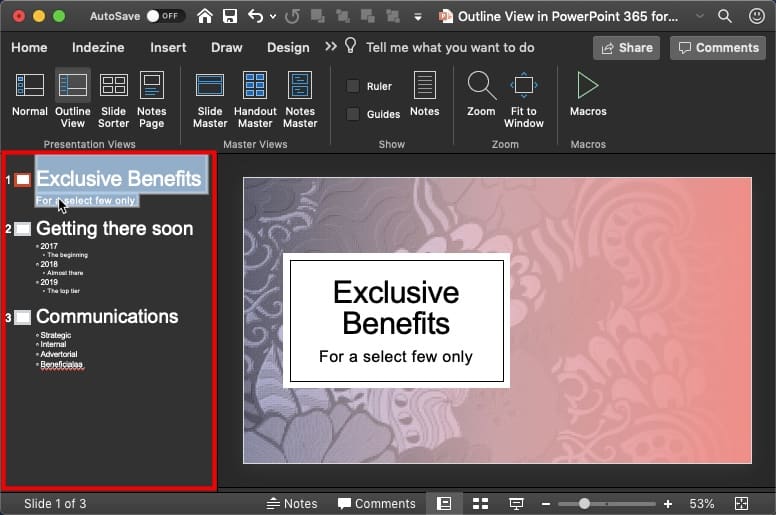
We then explore Notes Page View in PowerPoint 2019 for Windows, and in PowerPoint 365 for both Mac and Windows. We also look at Outline View in PowerPoint 365 for Mac and Reading View in PowerPoint 2019 for Windows. Also, make sure you do not miss the quotes, press releases, and templates featured in the last week.
Stay informed about updated tutorials and happenings related to PowerPoint and presenting.
Filed Under:
Ezine
Tagged as: Ezine, Indezine, News, PowerPoint
Comments Off on PowerPoint and Presenting News: January 14, 2020
The repertoire of various views available in PowerPoint 365 for Windows ranges from some views that you use all the time to others that you may have never bothered to explore. The latter category probably includes Reading view. Reading view is similar to Slide Show view in some ways because, in both views, the slide is shown in full-screen mode. However, in Reading view, you also see the PowerPoint title bar and the Status Bar at the top and bottom of the interface respectively.

Learn about the Reading View in PowerPoint 365 for Windows.
Filed Under:
PowerPoint 365
Tagged as: Microsoft Windows, Office 365, PowerPoint 365, Reading View, Tutorials, View
Comments Off on Reading View in PowerPoint 365 for Windows
The repertoire of various views available in PowerPoint 2019 for Windows ranges from some views that you use all the time to others that you may have never bothered to explore. The latter category probably includes Reading view.

Learn about the Reading View in PowerPoint 2019 for Windows.
Filed Under:
PowerPoint 2019
Tagged as: Microsoft Windows, Office 2019, PowerPoint 2019, Reading View, Tutorials, View
Comments Off on Reading View in PowerPoint 2019 for Windows
Notes Page view is one of nine views available in PowerPoint 365 for Mac. This view shows you how your printed notes pages will appear. First of all, the Notes page shows the speaker notes that you add to the Notes pane for each slide. Secondly, these speaker notes are visible in three distinct places within PowerPoint, depending upon the view you choose.

Learn about Notes Page view in PowerPoint 365 for Mac.
Filed Under:
PowerPoint 365
Tagged as: Mac, Notes Page, Office 365, Office for Mac, PowerPoint 365, PowerPoint for Mac, Tutorials, View
Comments Off on Notes Page View in PowerPoint 365 for Mac
Microsoft and the Office logo are trademarks or registered trademarks of Microsoft Corporation in the United States and/or other countries.