
This is the print version of this page. All content is copyright Indezine.com 2000-2026.
Thoughts and impressions of happenings in the world of PowerPoint and presentations, continuously updated since 2003.
See Also:
PowerPoint and Presenting Notes
PowerPoint and Presenting Glossary
In this issue, we look at how signage can make a big difference in your slides. Jerry Weissman says, “…if you are creating presentation graphics, treat the text in your slides as signage or headlines.” In another feature, Jerry talks about why use PowerPoint at all? He also explores why a picture is worth a thousand words. Also, we focus on the ongoing Outstanding Presentations Workshop series.
For PowerPoint 365 for Windows and Mac users, we bring the Add and Rename Ribbon Tabs and Reordering and Removing Ribbon Tabs tutorials. Plus, make sure you do not miss the quotes, press releases, and templates featured in the last week.

Stay informed about updated tutorials and happenings related to PowerPoint and presenting.
Filed Under:
Ezine
Tagged as: Ezine, Indezine, News, PowerPoint
Comments Off on PowerPoint and Presenting News: November 12, 2019
By Kurt Dupont
The number of businesses using digital signage screens to share information has expanded over the years. Administrators of restaurants, departure terminals, schools, colleges, and hospitals have adopted digital signage for a more effective method of disseminating information. The information they share is received with ease by guests or visitors upon arrival.
Digital signage is an electronic display that shows menus, information, advertising, and other forms of messages. It uses modern technologies like LED, LCD, or a plasma display. It can be used to display images, short videos, and words.
Upgrading to using digital signage will help your organization advertise their special offers to the public at a glimpse. It will also help to rid the boredom of your customers in the waiting room, by keeping them distracted with eye-catching adverts on display. The use of digital signage has expanded all over the globe; you may just be the only one left out.
Filed Under:
Guest Posts
Tagged as: Add-in, Digital Signage, Guest Post, Kurt Dupont, PowerPoint, PresentationPoint
Comments Off on Upgrade from Writing to Digital Signage
All Ribbon tabs in PowerPoint 2019 for Windows may have any number of buttons that represent commands but they are not scattered all over the tab area. In fact, they are all neatly arranged together in Groups. Each of these Groups has a name that describes what the commands within that Group do. For example, the Slide Show tab in the Ribbon has a group named Set Up, which contains all commands that help you set up your slide show, such as changing show settings, hiding slides, rehearsing and recording slide shows, etc. It is only sensible to imagine that you should use this Group concept while creating your own custom Ribbon tabs. In fact, PowerPoint will not let you add any command anywhere else other than within a custom Group.

Explore working with Custom Groups within Ribbon Tabs in PowerPoint 2019 for Windows.
Filed Under:
PowerPoint 365
Tagged as: Customizations, Mac, Office 365, Office for Mac, PowerPoint 365, PowerPoint for Mac, Ribbon, Tutorials
Comments Off on Working with Custom Groups in Ribbon Tabs in PowerPoint 2019 for Windows
The PowerPoint 365 for Windows interface sports the Ribbon, which is tabbed. Each of these tabs contains a set of commands. By default, PowerPoint contains several such tabs. These Ribbon tabs can be customized, and you can indeed add a new Ribbon tab as well. In fact, you may have more tabs in your PowerPoint 365 interface due to several reasons.
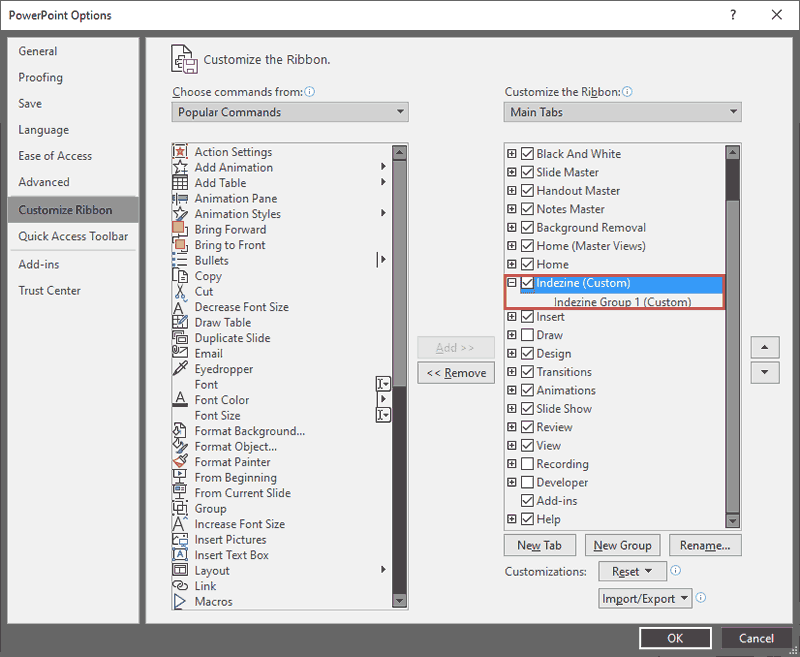
Learn how to reorder Ribbon tabs and remove the custom tabs in PowerPoint 365 for Windows.
Filed Under:
PowerPoint 365
Tagged as: Customizations, Microsoft Windows, Office 365, PowerPoint 365, Ribbon, Tutorials
Comments Off on Reordering and Removing Ribbon Tabs in PowerPoint 365 for Windows
The PowerPoint 365 for Mac interface sports the Ribbon, which is tabbed. Each of these tabs contains a set of commands. By default, PowerPoint contains several such tabs. These Ribbon tabs can be customized, and you can indeed add a new Ribbon tab as well. In fact, you may have more default tabs in your PowerPoint 365 for Mac interface due to several reasons.

Learn how to reorder Ribbon tabs and remove the custom tabs in PowerPoint 365 for Mac.
Filed Under:
PowerPoint 365
Tagged as: Customizations, Mac, Office 365, Office for Mac, PowerPoint 365, PowerPoint for Mac, Ribbon, Tutorials
Comments Off on Reordering and Removing Ribbon Tabs in PowerPoint 365 for Mac
Microsoft and the Office logo are trademarks or registered trademarks of Microsoft Corporation in the United States and/or other countries.