
This is the print version of this page. All content is copyright Indezine.com 2000-2026.
Thoughts and impressions of happenings in the world of PowerPoint and presentations, continuously updated since 2003.
See Also:
PowerPoint and Presenting Notes
PowerPoint and Presenting Glossary
We first feature AlexAnndra Ontra and James Ontra, who discuss how Presentation management increases productivity. We also have Jamie Garroch of BrightCarbon talk about how he ended up creating BrightSlide, which he terms a revolutionary PowerPoint add-in. The Outstanding Presentations Workshop webinar series from Ellen Finkelstein begins today, and we feature Tsufit, one of the speakers of this season.
PowerPoint 2019 for Windows users can learn more about customization in our Add and Rename Ribbon Tabs and Reordering and Removing Ribbon Tabs tutorials. PowerPoint 365 for Mac users can also learn about customization in our Changing Interface Color and Customize Quick Access Toolbar tutorials. Plus, make sure you do not miss the quotes, press releases, and templates featured in the last week.

Stay informed about updated tutorials and happenings related to PowerPoint and presenting.
Filed Under:
Ezine
Tagged as: Ezine, Indezine, News, PowerPoint
Comments Off on PowerPoint and Presenting News: November 5, 2019
The Ribbon that you see within the PowerPoint 365 for Mac user interface was designed to make all options easily accessible. To make more options available, you can add more tabs, rename them, and populate them with even more commands, as we will explore within this tutorial.
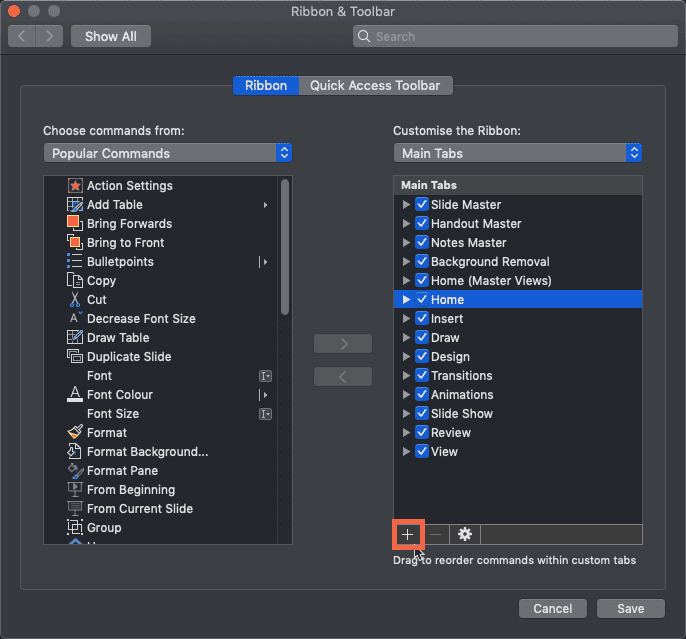
Learn to add and rename Ribbon tabs in PowerPoint 365 for Mac.
Filed Under:
PowerPoint 365
Tagged as: Customizations, Mac, Office 365, Office for Mac, PowerPoint 365, PowerPoint for Mac, Ribbon, Tutorials
Comments Off on Add and Rename Ribbon Tabs in PowerPoint 365 for Mac
The Ribbon that you see within the PowerPoint 365 for Windows user interface was designed to make all options easily accessible. To make more options available on the Ribbon, you can add more tabs, rename them, and populate them with even more commands, as we will explore within this tutorial.

Learn to add and rename Ribbon tabs in PowerPoint 365 for Windows.
Filed Under:
PowerPoint 365
Tagged as: Customizations, Microsoft Windows, Office 365, PowerPoint 365, Ribbon, Tutorials
Comments Off on Add and Rename Ribbon Tabs in PowerPoint 365 for Windows
The PowerPoint 2019 for Windows interface sports the Ribbon, which is tabbed. Each of these tabs contains a set of commands. By default, PowerPoint contains several such tabs. These Ribbon tabs can be customized, and you can indeed add a new Ribbon tab as well.

Learn how to reorder Ribbon tabs and remove the custom tabs in PowerPoint 2019 for Windows.
Filed Under:
PowerPoint 2019
Tagged as: Customizations, Microsoft Windows, Office 2019, PowerPoint 2019, Ribbon, Tutorials
Comments Off on Reordering and Removing Ribbon Tabs in PowerPoint 2019 for Windows
The Quick Access Toolbar or QAT is the only toolbar available in PowerPoint. This toolbar can be customized so that it contains your most-used commands, accessible to you with just a single click. Follow these steps to customize the QAT in PowerPoint 365 for Mac by adding your frequently used commands.

Learn how to customize the Quick Access Toolbar in PowerPoint 365 for Mac.
Filed Under:
PowerPoint 365
Tagged as: Customizations, Mac, Office 365, Office for Mac, PowerPoint 365, PowerPoint for Mac, QAT, Quick Access Toolbar, Tutorials
Comments Off on Customize Quick Access Toolbar in PowerPoint 365 for Mac
Microsoft and the Office logo are trademarks or registered trademarks of Microsoft Corporation in the United States and/or other countries.