
This is the print version of this page. All content is copyright Indezine.com 2000-2026.
Thoughts and impressions of happenings in the world of PowerPoint and presentations, continuously updated since 2003.
See Also:
PowerPoint and Presenting Notes
PowerPoint and Presenting Glossary
PowerPoint 365 for Mac’s work area below the Ribbon continues to be tri-paned. These three panes comprise the Slides Pane, the Slide Area, and the Notes Pane. The Slides Pane is the thin strip on the left side of the PowerPoint 365 for Mac interface that contains thumbnails of all your slides.

Learn about the Slides Pane in PowerPoint 365 for Mac.
Filed Under:
PowerPoint 365
Tagged as: Interface, Mac, Office 365, Office for Mac, PowerPoint 365, PowerPoint for Mac, Slides Pane, Tutorials
Comments Off on Slides Pane in PowerPoint 365 for Mac
PowerPoint 2019’s work area below the Ribbon continues to be tri-paned. These three panes comprise the Slides Pane, the Slide Area, and the Notes Pane. The Slides Pane is the thin strip on the left side of the PowerPoint 2019 interface that contains thumbnails of all your slides.

Learn about the Slides Pane in PowerPoint 2019 for Windows.
Filed Under:
PowerPoint 2019
Tagged as: Interface, Microsoft Windows, Office 2019, PowerPoint 2019, Slides Pane, Tutorials
Comments Off on Slides Pane in PowerPoint 2019 for Windows
Slide designers love making quick edits to their slide objects! Impressive slides, though, are created painstakingly—and this can be a slow process. Yes, both these observations seem to contradict each other! Yet, you can take your time playing around with different fill options to make slides look awesome, and then quickly make umpteen changes to modify the appearance of text. So you spend more time doing some tasks and save time doing others. PowerPoint 365 for Windows does provide most editing options to make these alterations within the Ribbon tabs, and you can also populate your Quick Access Toolbar with frequently used commands. Yet, all these tasks involve moving your cursor to the Ribbon, located above the Slide Area and back continuously. While this movement may not result in Carpal Tunnel Syndrome, it helps to know that PowerPoint 365 also includes the Mini Toolbar, a floating toolbar that spawns right next to the cursor, and it is also available instantly with a right-click!
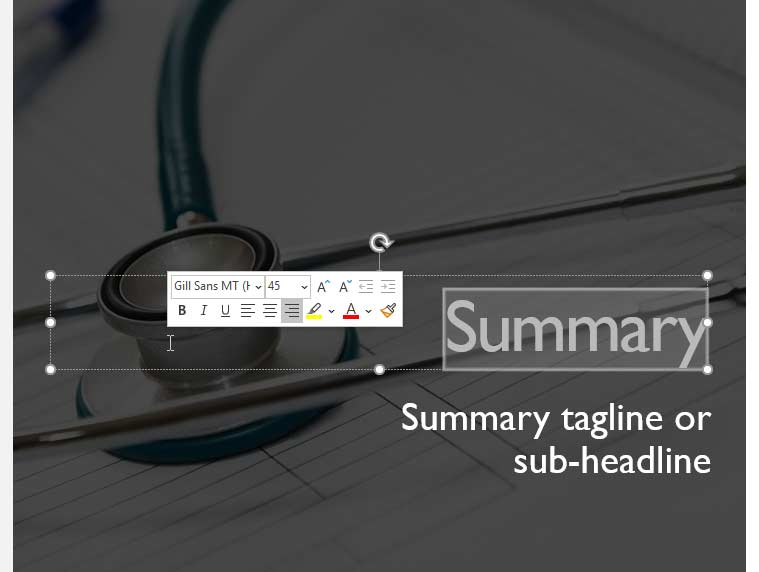
Learn about the Mini Toolbar in PowerPoint 365 for Windows.
Filed Under:
PowerPoint 365
Tagged as: Interface, Microsoft Windows, Mini Toolbar, Office 365, PowerPoint 365, Tutorials
Comments Off on Mini Toolbar in PowerPoint 365 for Windows
The Mini Toolbar is one of those important features that are not available yet on PowerPoint 365 for Mac. If you want to ask Microsoft to add this feature to PowerPoint 365 for Mac, you can visit the PowerPoint UserVoice site, and vote for this suggestion. Someone has already put up this suggestion, so do vote for this feature. Suggestions with more votes are implemented sooner than others.
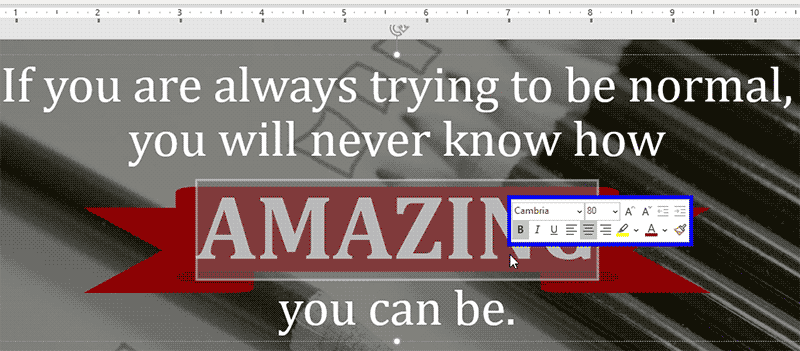
Learn about the Mini Toolbar in PowerPoint 365 for Mac.
Filed Under:
PowerPoint 365
Tagged as: Interface, Mac, Mini Toolbar, Office 365, Office for Mac, PowerPoint 365, PowerPoint for Mac, Tutorials
Comments Off on Mini Toolbar in PowerPoint 365 for Mac
Slide designers love making quick edits to their slide objects! Impressive slides, though, are created painstakingly—and this can be a slow process. Yes, both these observations seem to contradict each other! Yet, you can take your time playing around with different fill options to make slides look awesome, and then quickly make umpteen changes to modify the appearance of text. It helps to know that PowerPoint 2019 also includes the Mini Toolbar, a floating toolbar that spawns right next to the cursor, and it is also available instantly with a right-click!

Learn about the Mini Toolbar in PowerPoint 2019 for Windows.
Filed Under:
PowerPoint 2019
Tagged as: Interface, Microsoft Windows, Mini Toolbar, Office 2019, PowerPoint 2019, Tutorials
Comments Off on Mini Toolbar in PowerPoint 2019 for Windows
Microsoft and the Office logo are trademarks or registered trademarks of Microsoft Corporation in the United States and/or other countries.