
This is the print version of this page. All content is copyright Indezine.com 2000-2026.
Thoughts and impressions of happenings in the world of PowerPoint and presentations, continuously updated since 2003.
See Also:
PowerPoint and Presenting Notes
PowerPoint and Presenting Glossary
We first feature Emmanuel Gueritte of DialogLoop, who talks about their product, which “is an audience engagement and networking solution made to transform presentation into conversation.” We also feature speakers and sponsors from the upcoming Presentation Summit in San Antonio next month. This time, we bring you Kurt Dupont, John Korchok, and Jamie Garroch.
PowerPoint 2019 for Windows users can explore the Task Pane, and learn about the Format Task Panes. We also bring you Task Pane tutorials for PowerPoint 365 users, both on Windows and Mac. Plus, make sure you do not miss the quotes, press releases, and templates featured in the last week.

Stay informed about updated tutorials and happenings related to PowerPoint and presenting.
Filed Under:
Ezine
Tagged as: Ezine, Indezine, News, PowerPoint
Comments Off on PowerPoint and Presenting News: September 17, 2019
PowerPoint works with the concept of selection, and then action. And the action typically is to edit whatever you may have selected! For such editing, the Format Task pane in PowerPoint 365 for Mac can be indispensable. The Format Task pane aligns neatly within the interface in PowerPoint 365 for Mac, and you can now immediately see how your choices affect selected slide objects. The Format Task pane is often tabbed. This means that you can jump quickly between different elements of your slide object! In many ways thus, the Format Task pane is the single source where different style formatting options are consolidated in one place.

Learn about the Format Task Panes in PowerPoint 365 for Mac.
Filed Under:
PowerPoint 365
Tagged as: Interface, Mac, Office 365, Office for Mac, PowerPoint 365, PowerPoint for Mac, Task Pane, Tutorials
Comments Off on Format Task Panes in PowerPoint 365 for Mac
PowerPoint works with the concept of selection, and then action. And the action typically is to edit whatever you may have selected! For such editing, the Format Task pane in PowerPoint 365 for Windows can be indispensable. The Format Task pane aligns neatly with the right or left side of the PowerPoint interface, and you can now immediately see how your choices affect the selected slide objects. The Format Task pane is often tabbed. This means that you can jump quickly between different elements of your slide object! In many ways thus, the Format Task pane is the single source where different style formatting options are consolidated in one place.

Learn about the Format Task Panes in PowerPoint 365 for Windows.
Filed Under:
PowerPoint 365
Tagged as: Interface, Microsoft Windows, Office 365, PowerPoint 365, Task Pane, Tutorials
Comments Off on Format Task Panes in PowerPoint 365 for Windows
PowerPoint works with the concept of selection, and then action. And the action typically is to edit whatever you may have selected! For such editing, the Format Task pane in PowerPoint 2019 for Windows can be indispensable. The Format Task pane aligns neatly with the right or left side of the PowerPoint interface, and you can now immediately see how your choices affect the selected slide objects. The Format Task pane is often tabbed. This means that you can jump quickly between different elements of your slide object! In many ways thus, the Format Task pane is the single source where different style formatting options are consolidated in one place.
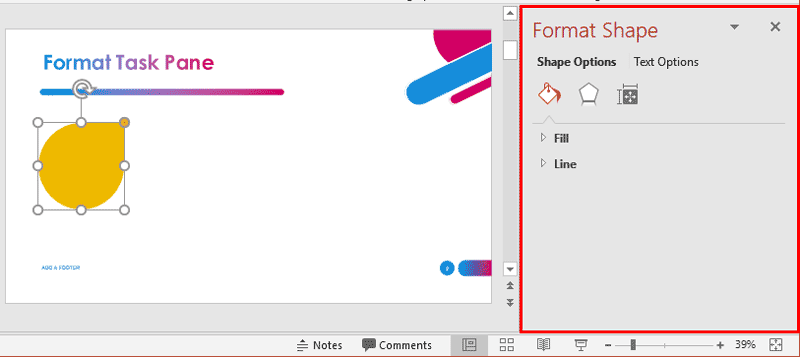
Learn about the Format Task Panes in PowerPoint 2019 for Windows.
Filed Under:
PowerPoint 2019
Tagged as: Interface, Microsoft Windows, Office 2019, PowerPoint 2019, Task Pane, Tutorials
Comments Off on Format Task Panes in PowerPoint 2019 for Windows

Jamie Garroch is a Technical Consultant at BrightCarbon, the specialist presentation and eLearning agency. He develops PowerPoint automation solutions and add-ins that enable presentation authors to work smarter. He also trains people to present more effectively using visuals and animated scenes that explain and reinforce key messages, which is supported by free resources and tips at their site.
In this conversation, Jamie talks about the Presentation Summit, being held in San Antonio, TX this year from October 6 to 9, 2019.
Filed Under:
Events
Tagged as: BrightCarbon, Events, Interviews, Jamie Garroch, Presentation Summit, San Antonio
Comments Off on Presentation Summit 2019: Conversation with Jamie Garroch
Microsoft and the Office logo are trademarks or registered trademarks of Microsoft Corporation in the United States and/or other countries.