
This is the print version of this page. All content is copyright Indezine.com 2000-2026.
Thoughts and impressions of happenings in the world of PowerPoint and presentations, continuously updated since 2003.
See Also:
PowerPoint and Presenting Notes
PowerPoint and Presenting Glossary

Bob Befus is a serial entrepreneur who has focused on the presentation needs of medical and pharmaceutical organizations for most of his career. He is a regulatory presentation expert and continues to work with leading pharmaceutical and biotech companies on critical presentation projects.
In 1996, Bob developed an interactive digital display software that enabled presenters to organize thousands of data slides and be able to locate and present them instantly during live Q&A. Since 1996, Bob has continued to develop and refine several presentation support technologies including SlideSource for SharePoint in 2010 and SlideSource.com in 2015.
In this interview, Bob discusses the new features in SlideSource.
Filed Under:
Interviews
Tagged as: Digital Asset Management, Interviews, Presentation Management, Robert Befus, Slide Management, SlideSource
Comments Off on New Features in SlideSource: Conversation with Robert Befus
Here’s a quick walkthrough of the PowerPoint 2019 for Windows interface. The PowerPoint 2019 interface is quite similar to the one in PowerPoint 2016 for Windows. PowerPoint 2019 for Windows opens with Backstage view. This view provides several ways to create your next presentation using a template or Theme. You can even open an existing file. Once you make choices in this view, you see the actual PowerPoint interface.
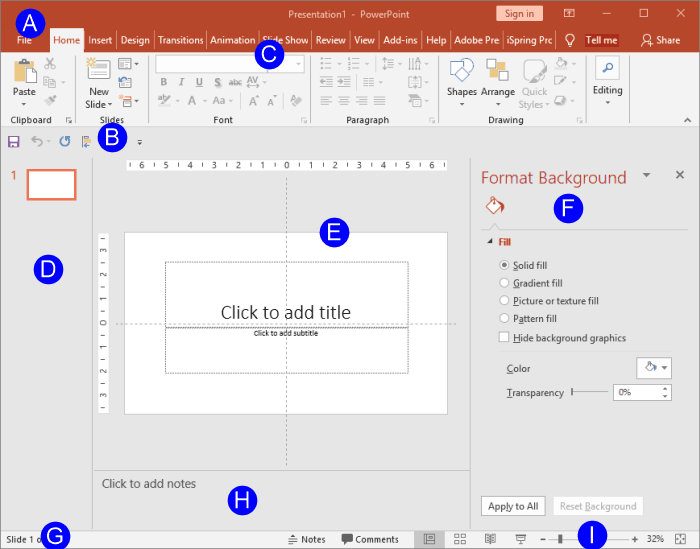
Explore the interface for PowerPoint 2019 for Windows.
Filed Under:
PowerPoint 2019
Tagged as: Interface, Microsoft Windows, Office 2019, PowerPoint 2019, Tutorials
Comments Off on Interface in PowerPoint 2019 for Windows
At times, you may want to change your default version of PowerPoint. This decision can be important for you if you have multiple versions of PowerPoint installed on your system. Typically the last version installed is the default version, but there are other ways to change the defaults, and all of them do not work all the time! Let us explore some options if you want to set PowerPoint 365 for Windows as your default version.

Change the default version on your computer to PowerPoint 365 for Windows.
Filed Under:
PowerPoint 365
Tagged as: Default, Microsoft Windows, Office 365, PowerPoint 365, Tutorials, Version
Comments Off on Set as Default Version in PowerPoint 365 for Windows
Before we begin, let us make it clear that this tutorial is primarily for those people who have more than one version of PowerPoint installed on their Mac. Additionally, they are not happy about the version that launches when they open a PowerPoint file. Or they may find that PowerPoint files open in another program even if they have PowerPoint installed. If any of these situations sound familiar to you, then this tutorial is for you.

Change the default version on your computer to PowerPoint 365 for Mac.
Filed Under:
PowerPoint 365
Tagged as: Default, Mac, Office 365, Office for Mac, PowerPoint 365, PowerPoint for Mac, Tutorials
Comments Off on Set as Default Version in PowerPoint 365 for Mac

A Microsoft PowerPoint MVP since 2000, Echo Swinford began her PowerPoint career in 1997. She holds a master's degree in new media from the Indiana University School of Informatics and is the owner of Echosvoice, a PowerPoint consulting firm specializing in custom template development, presentation creation, makeovers and cleanup, and training for large and small corporate clients. Echo has written and co-written five PowerPoint books, developed a number of video publications, and has a string of tech editing credits to her name. She is the President of the Presentation Guild, a not-for-profit trade association for the presentation industry.
In this conversation, Echo talks about the Presentation Summit, being held in San Antonio, TX this year from October 6 to 9, 2019.
Filed Under:
Events
Tagged as: Echo Swinford, Events, Interviews, Presentation Guild, Presentation Summit, San Antonio
Comments Off on Presentation Summit 2019: Conversation with Echo Swinford
Microsoft and the Office logo are trademarks or registered trademarks of Microsoft Corporation in the United States and/or other countries.