
This is the print version of this page. All content is copyright Indezine.com 2000-2026.
Thoughts and impressions of happenings in the world of PowerPoint and presentations, continuously updated since 2003.
See Also:
PowerPoint and Presenting Notes
PowerPoint and Presenting Glossary
When launched, PowerPoint 2019 for Windows typically opens with Backstage view. Click the New button to bring up the Presentation Gallery. This Presentation Gallery provides several ways to start your new presentation using a template, a Theme, or even a blank presentation.

Explore the Presentation Gallery in PowerPoint 2019 for Windows.
Filed Under:
PowerPoint 2019
Tagged as: Interface, Microsoft Windows, Office 2019, PowerPoint 2019, Presentation Gallery, Tutorials
Comments Off on Presentation Gallery in PowerPoint 2019 for Windows
We feature Echo Swinford this week in an interview, where she talks about her sessions at the upcoming Presentation Summit. She also talks about the Certification Presentation Specialists exam, being launched by the Presentation Guild, an industry body of presentation professionals.
PowerPoint users can learn about the CMYK color model, which they may only encounter if their slide content needs to be professionally printed. If you use PowerPoint 365 for Windows, we look at how you can locate if you indeed have this version installed, and how you can set it as the default version. We also explore the default version options, if you are using PowerPoint 365 for Mac. PowerPoint 2016 for Windows users will want to know this trick that lets you insert dummy text on your slides. And if that wasn’t enough for this week, make sure you do not miss the quotes, press releases, and templates released in the last week.

Stay informed about updated tutorials and happenings related to PowerPoint and presenting.
Filed Under:
Ezine
Tagged as: Ezine, Indezine, News, PowerPoint
Comments Off on PowerPoint and Presenting News: August 6, 2019
The Status Bar is a thin strip located at the bottom of the PowerPoint 365 for Mac interface. This area provides information about the active slide, and also provides several View options. To work with options in the Status Bar, you must have a presentation open in PowerPoint 365 for Mac, otherwise, the options within the Status Bar will be grayed out.

Learn about options available in the Status Bar within PowerPoint 365 for Mac.
Filed Under:
PowerPoint 365
Tagged as: Interface, Mac, Office 365, Office for Mac, PowerPoint 365, PowerPoint for Mac, Status Bar, Tutorials
Comments Off on Status Bar in PowerPoint 365 for Mac

Bob Befus is a serial entrepreneur who has focused on the presentation needs of medical and pharmaceutical organizations for most of his career. He is a regulatory presentation expert and continues to work with leading pharmaceutical and biotech companies on critical presentation projects.
In 1996, Bob developed an interactive digital display software that enabled presenters to organize thousands of data slides and be able to locate and present them instantly during live Q&A. Since 1996, Bob has continued to develop and refine several presentation support technologies including SlideSource for SharePoint in 2010 and SlideSource.com in 2015.
In this interview, Bob discusses the new features in SlideSource.
Filed Under:
Interviews
Tagged as: Digital Asset Management, Interviews, Presentation Management, Robert Befus, Slide Management, SlideSource
Comments Off on New Features in SlideSource: Conversation with Robert Befus
Here’s a quick walkthrough of the PowerPoint 2019 for Windows interface. The PowerPoint 2019 interface is quite similar to the one in PowerPoint 2016 for Windows. PowerPoint 2019 for Windows opens with Backstage view. This view provides several ways to create your next presentation using a template or Theme. You can even open an existing file. Once you make choices in this view, you see the actual PowerPoint interface.
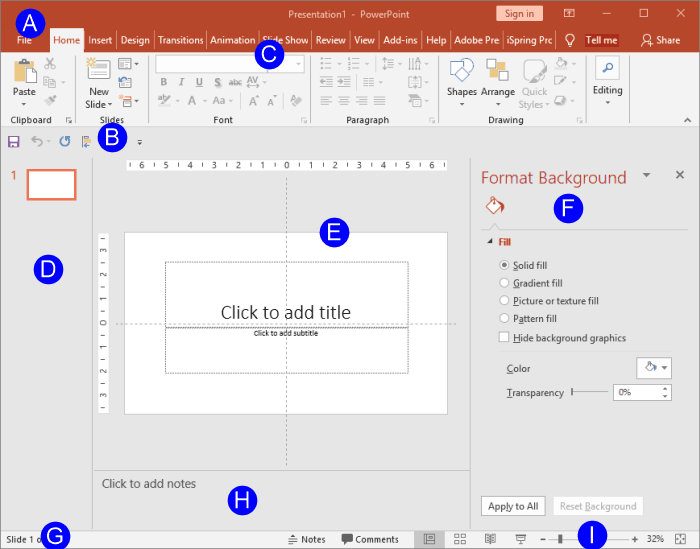
Explore the interface for PowerPoint 2019 for Windows.
Filed Under:
PowerPoint 2019
Tagged as: Interface, Microsoft Windows, Office 2019, PowerPoint 2019, Tutorials
Comments Off on Interface in PowerPoint 2019 for Windows
Microsoft and the Office logo are trademarks or registered trademarks of Microsoft Corporation in the United States and/or other countries.