
This is the print version of this page. All content is copyright Indezine.com 2000-2026.
Thoughts and impressions of happenings in the world of PowerPoint and presentations, continuously updated since 2003.
See Also:
PowerPoint and Presenting Notes
PowerPoint and Presenting Glossary

Alan Gurney has been working in the Marketing Team at Neuxpower since February 2017. His main responsibilities include email campaigns and automation, managing the company’s CRM database and e-commerce platform and content production. He lives in Streatham, South London, and has previously worked in marketing roles within the education and e-Learning sectors.
In this conversation, Alan talks about the new NXPowerLite Desktop 8 from Neuxpower.
Filed Under:
Interviews
Tagged as: Add-in, Alan Gurney, Compression, Interviews, Neuxpower, NXPowerlite
Comments Off on Neuxpower NXPowerLite Desktop 8: Conversation with Alan Gurney
Exit animation effects determine how animated slide objects leave the Slide Area. For example, a slide object can fade or fly out the screen area, or use any of the many other Exit animation effects available within PowerPoint. Typical Exit Effect animations include Disappear, in which an object just vanishes or Float Down, in which slide object mimics the setting sun. You can also apply Exit Effects to text objects so that words Spiral out of the slide. There are plenty of Exit Effect animations that PowerPoint provides. However, make sure you use animation sparingly to emphasize rather than to distract.

Explore Exit animation effects in PowerPoint 2016 for Windows.
You May Also Like:
Filed Under:
PowerPoint 2016
Tagged as: Animation, Microsoft Windows, Office 2016, PowerPoint 2016, Tutorials
Comments Off on Exit Animations in PowerPoint 2016 for Windows
Emphasis animation effects determine how the slide object calls attention to itself while it is on-the-slide. Entrance and Exit effect animations allow a slide object to enter or exit the Slide Area, whereas slide objects with Emphasis Effect animations are already there on the slide area before they start animating, and will be there even after they have finished animating.
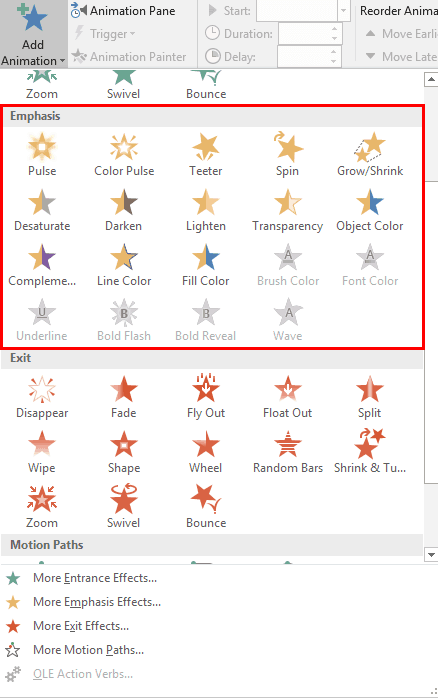
Explore Emphasis animation effects in PowerPoint 2016 for Windows.
You May Also Like:
Filed Under:
PowerPoint 2016
Tagged as: Animation, Microsoft Windows, Office 2016, PowerPoint 2016, Tutorials
Comments Off on Emphasis Animations in PowerPoint 2016 for Windows
Guides in PowerPoint allow you to position and snap your slide objects in place. For most professional slide designers, creating slides without guides would be very worrisome! When guides are enabled for the first time within PowerPoint, you can just see two guides. These guides are two dotted lines, one horizontal and the other vertical. They span to intersect exactly at the center of the slide.

Learn about viewing and hiding Guides in PowerPoint 2016 for Mac.
You May Also Like:
Filed Under:
PowerPoint 2016
Tagged as: Guides, Mac, Office 2016, Office for Mac, PowerPoint 2016, PowerPoint for Mac, Tutorials
Comments Off on Guides in PowerPoint 2016 for Mac
Among several types of animations that PowerPoint 2016 provides, Entrance effects are probably the most popular. By applying Entrance animation effects, you can make your slide objects appear on the slide almost magically! You make them appear in a fraction of a second, or get them to fly in from any direction. You can also do a zoom-in, or even better, just make it subtle with a simple fade-in. Whichever Entrance animation effect you choose, make sure to go for something that is in sync with the subject of your presentation. Most of the time, Appear, Fade, or Wipe effects work the best.
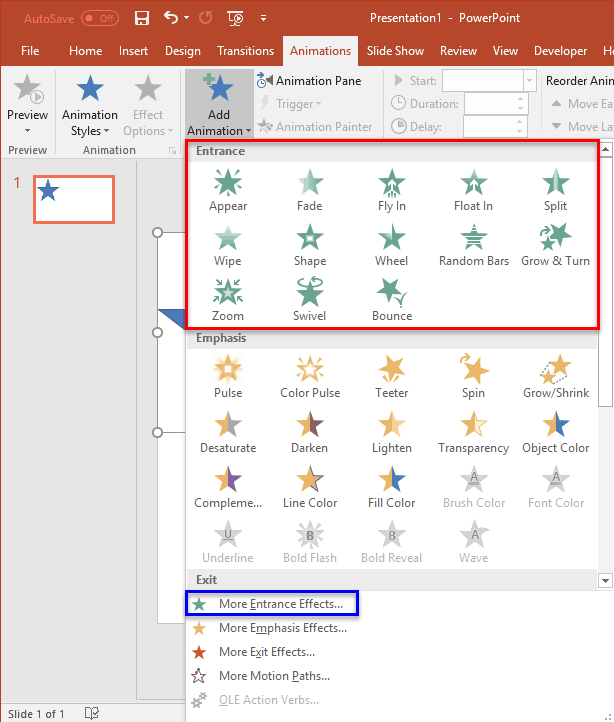
Explore Entrance animation effects in PowerPoint 2016 for Windows.
You May Also Like:
Filed Under:
PowerPoint 2016
Tagged as: Animation, Entrance Animation Effects, Office 2016, PowerPoint 2016, Tutorials
Comments Off on Entrance Animations in PowerPoint 2016 for Windows
Microsoft and the Office logo are trademarks or registered trademarks of Microsoft Corporation in the United States and/or other countries.