
This is the print version of this page. All content is copyright Indezine.com 2000-2026.
Thoughts and impressions of happenings in the world of PowerPoint and presentations, continuously updated since 2003.
See Also:
PowerPoint and Presenting Notes
PowerPoint and Presenting Glossary

Emma Bannister is passionate about presenting big, bold and beautiful ideas. She is the founder and CEO of Presentation Studio, APAC’s largest presentation communication agency, and author of the book Visual Thinking: How to transform the way you think, communicate, and influence with presentations. Emma is also a co-founder of Presentation Guru. As a master storyteller and highly sought-after creative, workshop facilitator and keynote speaker, Emma helps start-ups o global leaders.
In this conversation, Emma talks about her VisualStory® training, and also about her presentation agency, Presentation Studio.
Filed Under:
Interviews
Tagged as: Duarte Design, Emma Bannister, Interviews, PowerPoint, Presentation Skills, Training, VisualStory
Comments Off on VisualStory Training from Presentation Studio: Conversation with Emma Bannister
Slide Master view is an important view within PowerPoint 2016 for Mac. Because, if you make any changes or edits within this view, these modifications will influence all slides within your presentation. For example, if you want to make your company logo appear on all the slides, you will have to add the logo within the Slide Master. If you want the font size of your slide titles to be a little larger or smaller, then those edits also need to be made in the Slide Master.

Learn about Slide Master view in PowerPoint 2016 for Mac.
You May Also Like:
Views in PowerPoint 2016 for Mac
Normal View in PowerPoint 2016 for Mac
Outline View in PowerPoint 2016 for Mac
Slide Sorter View in PowerPoint 2016 for Mac
Outline Pane Options in PowerPoint 2016 for Mac
Filed Under:
PowerPoint 2016
Tagged as: Interface, Slide Master View, Tutorials, View
Comments Off on Slide Master View in PowerPoint 2016 for Mac
 Emilie Tanniou is Marketing Professional at Veodin, which is a German start-up developing productivity software. Veodin is a boutique software manufacturer focused on tools for consultants and professionals. Emilie has a background in marketing and project management. She is passionate about international marketing, customer relationship management, software and digital environment.
In this conversation, Emilie talks about the new Pick and Apply Shape Format option provided by SlideProof, a PowerPoint add-in from Veodin.
Filed Under:
Add-ins
Tagged as: Add-in, Emilie Tanniou, SlideProof, Veodin
Comments Off on Pick and Apply Shape Format in PowerPoint using SlideProof: Conversation with Emilie Tanniou
Are you stuck with a presentation that uses strange fonts? Or have you inherited slides where you need to change fonts globally? Fortunately, you don’t have to replace fonts, one at a time with each text box, placeholder, or shape. In this tutorial, we will explore how you can replace one font with another, in the entire presentation using PowerPoint 2013.
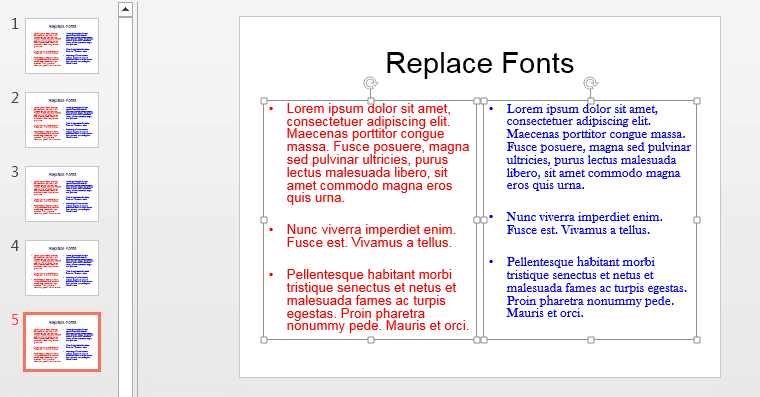
Replace one font with another across the entire presentation in PowerPoint 2013 for Windows.
You May Also Like:
Filed Under:
PowerPoint 2013
Tagged as: Fonts, Microsoft Windows, PowerPoint 2013, Replace Fonts, Text, Tutorials
Comments Off on Replace Fonts in PowerPoint 2013 for Windows
Did you know that you can create interactive, full-featured dashboards within PowerPoint? Kurt Dupont of PresentationPoint shares some amazing ideas that will help get you started. Jamie Garroch of YOUpresent has created a new PowerPoint add-in, freely available to Indezine readers that will let you add pattern fills with transparency in PowerPoint. And Chantal Bossé discusses passionately the work that she does to help train TED and TEDx speakers.
PowerPoint 2016 for Windows users can look at enabling the Developer tab of the Ribbon, and removing customizations from PCB files. We also explore the Handout Master, so that you can customize the appearance of your Handout pages. PowerPoint 2003 for Windows users can learn about Keyboard Sequences. PowerPoint 2016 for Mac users can learn about Notes Page View.
And if that wasn’t enough for this week, make sure you do not miss the quotes, press releases, and templates released in the last seven days.

Stay informed about updated tutorials and happenings related to PowerPoint and presenting.
Filed Under:
Ezine
Tagged as: Ezine, Indezine, News, PowerPoint
Comments Off on PowerPoint and Presenting News: February 6, 2018
Microsoft and the Office logo are trademarks or registered trademarks of Microsoft Corporation in the United States and/or other countries.