
This is the print version of this page. All content is copyright Indezine.com 2000-2026.
Thoughts and impressions of happenings in the world of PowerPoint and presentations, continuously updated since 2003.
See Also:
PowerPoint and Presenting Notes
PowerPoint and Presenting Glossary
Most of the time, you may work on a single slide in your PowerPoint presentation, but there are times when you want to copy, duplicate, reorder, or even delete a bunch of slides. It’s in scenarios like these that you will encounter PowerPoint 2016’s Slide Sorter view. Among the various views available in PowerPoint 2016 for Mac to play and edit your presentations, we have already covered both Normal view and Outline view. Although Slide Sorter view does not let you edit individual slide objects, it does let you work with the whole slide itself. Any edits made will influence one or more slides, depending upon your selection.
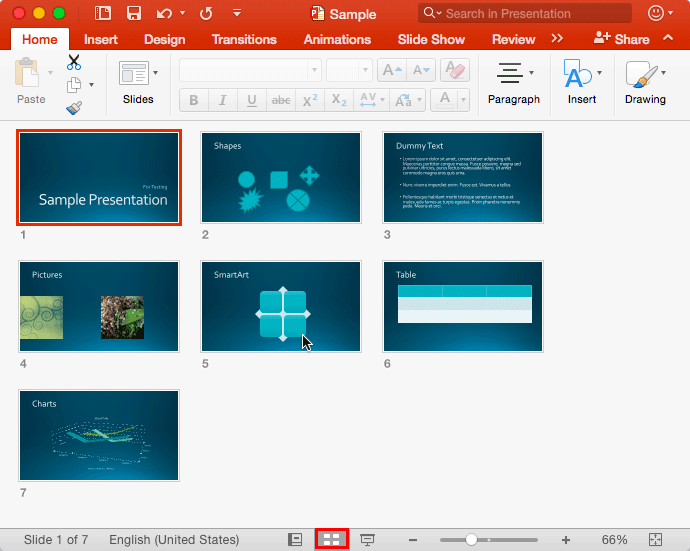
Learn about Slide Sorter view in PowerPoint 2016 for Mac.
Filed Under:
PowerPoint 2016
Tagged as: Mac, Office for Mac, PowerPoint 2016, Slide Sorter View, Tutorials
Comments Off on Slide Sorter View in PowerPoint 2016 for Mac
 Vanessa Van Edwards is lead investigator at the Science of People—a human behavior research lab. She is the national bestselling author of Captivate: The Science of Succeeding With People, which was chosen as one of Apple’s Most Anticipated Books of 2017. She writes a monthly column on the science of success for Entrepreneur Magazine and the Huffington Post. Her original research has been featured in Fast Company, Cosmopolitan, TIME, Forbes, INC and USA Today.
In this conversation, Vanessa talks about her new book, Captivate: The Science of Succeeding With People.
Filed Under:
Interviews
Tagged as: Body Language, Books, Interviews, Vanessa Van Edwards
Comments Off on Captivate: Conversation with Vanessa Van Edwards
Even though the Outline view is new for PowerPoint 2016 for Mac, it’s not absolutely new since you always had access to your presentation’s text outline through the Slides/Outline Pane on the left side of the PowerPoint interface. What’s changed though is that you no longer need to switch tabs within the Pane, as you would do in PowerPoint 2011. Now you just access the outline within a new view! The Outline view displays all the text contained within the title and text placeholders of your slides.

Learn about the Outline View within PowerPoint 2016 for Mac.
Filed Under:
PowerPoint 2016
Tagged as: Mac, Office for Mac, Outline, PowerPoint 2016, PowerPoint for Mac, Tutorials
Comments Off on Outline View in PowerPoint 2016 for Mac
Nolan Haims and Jamie Garroch had problems working while practicing slides, and to make work with their timings easier, they collaborated to create TalkTime, a PowerPoint add-in. Even better, they are giving away this add-in free. Read more what they have to say. On an unrelated front, can beatboxing help you master successful business communication? Well-known author Ally Yates thinks so and shares her findings in this exclusive post.
PowerPoint Online users can learn about embedding PowerPoint Online presentations, the Status bar, the Mini toolbar, and Editing view. PowerPoint 2016 for Windows users can learn about the Mini toolbar. Finally, do not miss the quotes, press releases, and templates of this week.

Stay informed about updated tutorials and happenings related to PowerPoint and presenting.
You May Also Like: Presentation Management: Why Executives are Starting to Care | Task Pane in PowerPoint 2016 for Windows | Medical Art PowerPoint Templates
Filed Under:
Ezine
Tagged as: Ezine, Indezine, News, PowerPoint
Comments Off on PowerPoint and Presenting News: November 7, 2017
Editing view in PowerPoint Online is comparable to Normal view in desktop versions of PowerPoint. Editing View is the most often used view other than PowerPoint Online’s default Reading view, which does not let you edit content. Within Editing View, PowerPoint displays one slide at a time in the Slide Area and shows PowerPoint’s typical tri-pane interface that also includes the Slides Pane and the Notes Pane.

Learn about the Editing view (Normal View) in PowerPoint for the Web.
You May Also Like: PowerPoint for the Web Tutorials | PowerPoint for the Web Interface | Presentation Gallery in PowerPoint for the Web
Filed Under:
PowerPoint for the Web
Tagged as: Interface, Normal View, PowerPoint for the Web, Tutorials
Comments Off on Editing View (Normal View) in PowerPoint for the Web
Microsoft and the Office logo are trademarks or registered trademarks of Microsoft Corporation in the United States and/or other countries.