
This is the print version of this page. All content is copyright Indezine.com 2000-2026.
Thoughts and impressions of happenings in the world of PowerPoint and presentations, continuously updated since 2003.
See Also:
PowerPoint and Presenting Notes
PowerPoint and Presenting Glossary
By Ally Yates
Business and Beatboxing. At face value, they don’t share any obvious similarities, yet there’s some commonality to be exploited.
Beatboxing uses the body like a versatile musical instrument, imitating a variety of sounds through the mouth, throat, tongue, lips, and voice. There’s a basic pattern to the art of beatboxing, and the resulting vocal percussion is diverse. What’s more, every element can be heard.

Image: Pixabay
Filed Under:
Guest Posts
Tagged as: Ally Yates, Business, Guest Post, Opinion
Comments Off on How Beatboxing Can Help Us Master Successful Business Communication
Slide designers love to make quick edits to their slide objects! Impressive slides, though, are created painstakingly and take so much time. For example, you may have to play around with different fill options to make your slides look awesome, or even make umpteen changes to how your slide text appears.
PowerPoint for the Web does provide extensive commands that allow edits; these command options are found within the Ribbon tabs. Yet, all these tasks involve moving your cursor to the Ribbon, located above the Slide Area and back continuously. While this movement may not result in Carpal Tunnel Syndrome, it helps to know that PowerPoint for the Web also includes the Mini Toolbar, a floating toolbar that spawns right next to the cursor, and it is also available instantly with a right-click!

Learn about the Mini Toolbar in PowerPoint for the Web.
Filed Under:
PowerPoint for the Web
Tagged as: Interface, PowerPoint for the Web, Tutorials
Comments Off on Mini Toolbar in PowerPoint for the Web
 Jamie Garroch is the founder of YOUpresent, a PowerPoint add-in and presentation design agency. YOUpresent provides a suite of off-the-shelf add-ins plus a custom add-in design service for organizations wishing to extend the functionality of PowerPoint or other Office apps. That can be anything from adding a single button to apply a corporate style, to a fully loaded ribbon with custom tools tuned to the organization’s workflow. Known as “extensibility,” Jamie is a passionate evangelist of this relatively unknown productivity feature of Microsoft Office.
 Nolan Haims has over 20 years of experience in the fields of visual communication, graphic and presentation design. He runs his own boutique consultancy that trains organizations to communicate more clearly and with fewer words. He speaks at national conferences, writes about visual storytelling at PresentYourStory.com, is a Microsoft PowerPoint MVP and is one of the hosts of The Presentation Podcast.
In this conversation, Jamie and Nolan talk about their new PowerPoint add-in, TalkTime.
Filed Under:
Interviews
Tagged as: Add-in, Interviews, Jamie Garroch, Narration, Nolan Haims, PowerPoint, Transitions
Comments Off on TalkTime for PowerPoint: Conversation with Jamie Garroch and Nolan Haims
PowerPoint for the Web may be only a web app that runs in your browser, but that hasn’t stopped Microsoft from making it so full-featured that it includes almost all interface elements typically found in desktop programs, including a Status bar! Let us explore both the Status Bar as a whole and individual options within this Status Bar. The Status Bar is a thin strip located at the bottom of the Interface in PowerPoint for the Web. This area provides information about the active slide and also provides several View options.
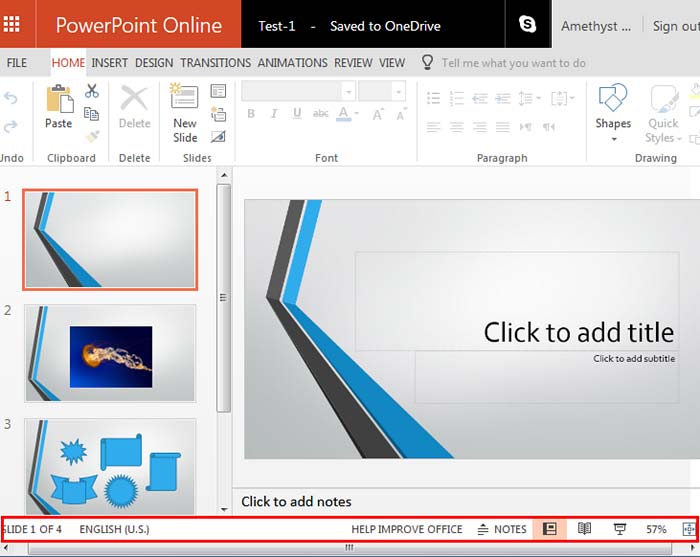
Learn about the options available on the Status Bar within PowerPoint for the Web.
Filed Under:
PowerPoint for the Web
Tagged as: Interface, PowerPoint for the Web, Status Bar, Tutorials
Comments Off on Status Bar in PowerPoint for the Web
Everyone has a bunch of slides that are forgotten from two or twenty years ago, and yet when we suddenly remember those slides, there’s no way to locate them. If this thought sounds familiar to you, do read AlexAnndra Ontra’s post on why executives are starting to care about presentation management. Sue Fish from Toastmasters talks about how you can get your Business Networking really wrong. She has discovered 7 ways to do so! Dr. Marcia Reynolds is back again with an exclusive conversation, where she speaks about her book, Outsmart Your Brain. We also look at Color Models in PowerPoint, and we also explore the RGB color model.
PowerPoint Online users can learn about uploading presentations, the Slide Area, the Info Pane in Backstage view, and Printing. PowerPoint 2016 for Windows users can learn about the Task Pane. Finally, do not miss the quotes, press releases, and templates of this week.
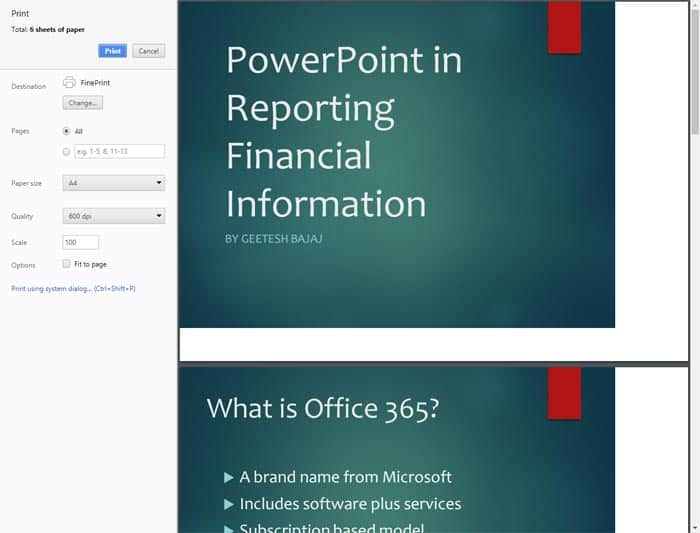
Stay informed about updated tutorials and happenings related to PowerPoint and presenting.
You May Also Like: Color: Luminosity in HSL | Color: Saturation in HSL | Color: Hue in HSL
Filed Under:
Ezine
Tagged as: Ezine, Indezine, News, PowerPoint
Comments Off on PowerPoint and Presenting News: October 31, 2017
Microsoft and the Office logo are trademarks or registered trademarks of Microsoft Corporation in the United States and/or other countries.