
This is the print version of this page. All content is copyright Indezine.com 2000-2026.
Thoughts and impressions of happenings in the world of PowerPoint and presentations, continuously updated since 2003.
See Also:
PowerPoint and Presenting Notes
PowerPoint and Presenting Glossary
When you select an inserted audio clip in PowerPoint 2016, you see two contextual Audio Tools tabs: Format and Playback. Once you explore the options within the Format tab, you’ll wonder why there are options to adjust, arrange, resize, and apply picture styles. Also, why does PowerPoint provide picture format options for an audio clip? That’s because an audio clip is represented by a sound icon. When you select the sound icon, the Player Controls bar is activated. Clearly, there’s so much to explore and learn.

Explore the Format tab for audio clips in PowerPoint 2016 for Windows.
Filed Under:
PowerPoint 2016
Tagged as: Audio, Microsoft Windows, Office 2016, PowerPoint 2016, Sounds, Tutorials
Comments Off on Format Tab for Audio Clips in PowerPoint 2016 for Windows
If you have seen some PowerPoint presentations that use the Morph transition, you must have realized that they are certainly not subtle. We look at using Morph in a more understated way with our Animating Faux Backgrounds with PowerPoint Morph tutorial. In an Indezine exclusive, we have a conversation with Dr. Stephanie Evergreen, who talks about her book, Presenting Data Effectively. For the upcoming Presentation Summit 2017, we feature four speakers, who talk about their sessions: Dr. Nick Morgan, Nolan Haims, Ken Molay, and Mike Parkinson.
PowerPoint 2016 for Windows users can learn about Audio Styles, adding and removing Bookmarks for audio clips, and fading audio. We also look at Save and Save As Options in Backstage View. We also explore the new Windows 10 Creators Update. Finally, do not miss the quotes, press releases, and templates of this week.
Filed Under:
Ezine
Tagged as: Ezine, News, PowerPoint
Comments Off on PowerPoint and Presenting News: August 15, 2017

Rick Altman has been hired by hundreds of companies, listened to by tens of thousands of professionals, and read by millions of people, all of whom seek better results with their presentation content and delivery. He covers the whole of the industry, from message crafting, through presentation design, slide creation, software technique, and delivery. He is the host of the Presentation Summit, now in its 15th season as the most prominent learning event for the presentation community. Away from the conference, he regularly leads private workshops within organizations.
In this conversation, Rick talks about his sessions at the upcoming Presentation Summit 2017 in Clearwater Beach, FL.
Filed Under:
Events
Tagged as: Events, Interviews, Presentation Summit, Rick Altman
Comments Off on Presentation Summit 2017: Conversation with Rick Altman

The average salesperson spends way too much time managing presentations of all sorts, including proposals, sales, training, and financial presentations. In this post, we’ll help you learn how your organization can streamline presentation management and reclaim thousands of hours—increasing your team’s effectiveness and boosting your bottom line.
Filed Under:
Guest Posts
Tagged as: AlexAnndra Ontra, Guest Post, Presentation Management, Shufflrr
Comments Off on Presentations Cost Salespeople 50+ Hours Every Month
Once you insert an audio clip into your presentation, you may find that it is too long, or there may be parts in the clip that you don’t want the audiences to hear. Or, maybe you just need a small bit to play, like the sound of that trumpet blowing! Although you can scrub the clip using the Player Controls bar to ascertain where you want the clip to begin and end, that option may become monotonous and inaccurate. Additionally, it also looks very unprofessional if you try scrubbing an audio clip right in front of your audience. Fortunately, PowerPoint’s Trim Audio option can make this easy for you. Follow these steps to explore how you can trim an audio clip right inside PowerPoint 2016.
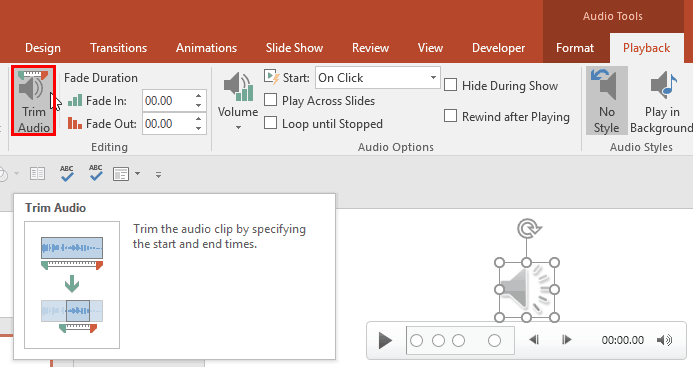
Learn to trim an audio clip in PowerPoint 2016 for Windows.
Filed Under:
PowerPoint 2016
Tagged as: Audio, Microsoft Windows, Office 2016, PowerPoint 2016, Sounds, Tutorials
Comments Off on Trim Audio Clips in PowerPoint 2016 for Windows
Microsoft and the Office logo are trademarks or registered trademarks of Microsoft Corporation in the United States and/or other countries.