
This is the print version of this page. All content is copyright Indezine.com 2000-2026.
Thoughts and impressions of happenings in the world of PowerPoint and presentations, continuously updated since 2003.
See Also:
PowerPoint and Presenting Notes
PowerPoint and Presenting Glossary
PowerPoint allows you to insert video and also online videos files within your presentation. One of the file formats that you can use for these video options is Flash SWF. However, these SWF clips may not play because of security settings. Fortunately, you can use the Developer tab of the Ribbon to insert Flash SWF movies.
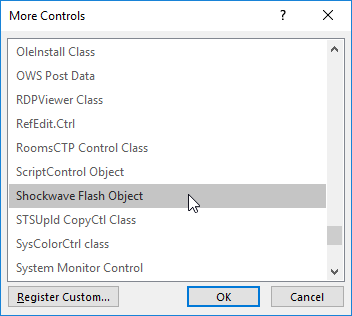
Learn how to insert Flash movie using Developer tab into PowerPoint 2016 for Windows.
Filed Under:
PowerPoint 2016
Tagged as: Developer, Office 2016, PowerPoint 2016, PowerPoint Flash, SWF, Tutorials
Comments Off on Insert Flash Movies into PowerPoint 2016 for Windows using the Developer Tab
Do you want to add a video clip to your PowerPoint slide so that it continues to play across subsequent slides? This means that when you move from one slide to another, the video continues playing without any interruption. In PowerPoint 2007, the Play Across Slides option was available within the interface. But in PowerPoint 2010 and later versions, this option is no longer available. However, there is a workaround to make a video play across slides, as explained in this tutorial.

Play a video clip across slides in PowerPoint 2016 for Windows.
Filed Under:
PowerPoint 2016
Tagged as: Microsoft Windows, Office 2016, PowerPoint 2016, Tutorials, Video
Comments Off on Playing Video Across Slides in PowerPoint 2016 for Windows
This is certainly a jumbo issue of the newsletter! And before we forget, remember that this is the last chance you have to get the Pslides lifetime offer. We also show you how you can create the perfect illusion of circular animations with straight-line animations alone! We also feature Kurt Dupont, who has a refreshing approach in his comparison of PowerPoint and Excel. We look at the important topic of Picture copyrights and feature Lior Student of Make a Point, who explains her concept of the message-centric slide. You can also learn about Papyrus, a font bundled with Microsoft Office. We then feature Margot Leitman who talks about her amazing new book, Long Story Short.
PowerPoint users of all versions can explore Line Charts. We also explore keyboard shortcuts for PowerPoint 2016 for Windows and also Inspect Document, Backstage View (New tab), Video Shapes, Fade Effects for Videos, and removing Video Bookmarks–all for the same version. Finally, do not miss the quotes, press releases, and templates of this week.
Filed Under:
Ezine
Tagged as: Ezine, News, PowerPoint
Comments Off on PowerPoint and Presenting News: July 25, 2017
By Ally Yates
Persuasion and influence are essential skills if you run a business – but unfortunately, many of us misunderstand what this means.
In a small study with 100 staff in a manufacturing business, the most common answer to the question: “What does influence or persuasion at work mean to you?”, an overwhelming 76 people answered: “Getting other people to do what I ask.” What this demonstrates is a lack of understanding of both the scope of persuasion and the opportunity for using different influencing strategies. It also illustrates the lamentable fact that most of us are convinced by our own sense of rightness and that our ideas are the best.
The academic research on influencing highlights as many as nine different styles. Most of us have a default style, one we feel most comfortable using. However, to be effective in our influencing, we need to be able to select the most appropriate style and execute it well.
The two most frequently used styles are Push and Pull. Each style is behaviorally distinctive and each is appropriate for different situations. The Push style goes like this:
Behaviorally speaking, the Push style is characterized by three specific verbal behaviors:
Proposing Content (suggesting an idea); Giving Information (providing the rationale); and Shutting Out (talking across others). The solution comes from the influencer, and it’s the influencer who does most of the talking.
Push style persuasion is the most commonly used and yet it’s only effective around half the time. Sometimes this is because we are apologetic or aggressive pushers. Another weakness is being a misjudged Pusher, where you reveal your solution early. In so doing, you underestimate the strength of resistance you will encounter. What seems clear and convincing to you fails to shift your audience. You may become frustrated and try another round of blinding your target with logic, either bludgeoning them into submission or leaving the encounter feeling exasperated. Either way, it’s a Win: Lose outcome at best.
Push works well in conditions where the influencer has positional authority. Other situations that call for Push include where you have the expertise, where there’s only one solution, where the decision has already been made, where decisions need to be made quickly, and when you can enforce compliance. Yet how often do you adopt a Push style when none of these conditions apply? No surprise then that your attempts at persuasion are less than successful and perhaps have unintended, negative consequences.
Pullers use three behaviors in particular: Seeking Proposals (e.g. How should we best do this?) Seeking Information (e.g. Who has the relevant experience?) and the rare but highly prized skill of Building – extending or developing a proposal made by another person. Building is used much less frequently than is warranted. This is usually because the persuader is much more interested in his own ideas and fails to harness the suggestions of others.
Take Peter for example – a middle manager in a multinational business. He needs to create a new direction for his team. He needs engagement so the Pull style is appropriate:
In this way, the level of commitment of the team increases in line with their engagement.
Pull style can also be effective when influencing upwards, where resistance is likely to be high when there’s more than one option when there are no time pressures, and where any movement is better than none. It’s also useful in fostering collaboration and in coaching others to use their resources. Pull might take a little longer but the rewards outweigh the costs.
If you think back to the last time you tried to influence someone and were unsuccessful, the likelihood is that you opted for the wrong style or perhaps it was the right style executed poorly. To be effective we need to be able to use both styles skilfully. Push and Pull styles of influencing have nothing to do with tone. You can Push in a thoughtful, low-key way and you can Pull in an intense manner. What differentiates each style is the behaviors involved.
Give some thought as to which style to use and why. When you’re operating as a Pusher, be clear about your proposal, give your reasons, and explain what’s in it for the other party. As a Puller, lead with questions, exercise your curiosity, believe that other people can have ideas that could be better than yours, and work with those ideas, gaining engagement as you go.


Ally Yates is the author of Utter Confidence: How what you say and do influences your effectiveness in business and an expert on Behaviour Analysis and the interactions that define us. She combines a deep understanding of people and how to achieve results, based on her many years’ experience working with large corporate clients around the world. Since 2000, Ally has been working as an independent consultant, facilitator, trainer, and coach. She has collaborated with international business schools and has received national and international training awards.
Ally’s approach is grounded in a sound understanding of theory, trends, and practice in learning and development, business development and leadership development. Clients value her insights, pragmatism, and influence. She is passionate about family, rugby union, travel, and learning.
The views and opinions expressed in this blog post or content are those of the authors or the interviewees and do not necessarily reflect the official policy or position of any other agency, organization, employer, or company.
You May Also Like: Business Thrives on Interaction: by Ally Yates
Filed Under:
Guest Posts
Tagged as: Ally Yates, Guest Post, Opinion
Comments Off on Are You a Pusher or a Puller?
After inserting a video clip into PowerPoint, you can play the clip with minute control over its volume, looping, rewinding, etc. Rather than create smaller tutorials that explore these options, we are exploring them all on this page. Before we do so, it’s important to understand that these abilities only exist so that you can use them when they are required, rather than using them just because they exist!

Explore advanced video options in PowerPoint 2016 for Windows.
Filed Under:
PowerPoint 2016
Tagged as: Microsoft Windows, Office 2016, PowerPoint 2016, Tutorials, Video
Comments Off on Advanced Video Options in PowerPoint 2016 for Windows
Microsoft and the Office logo are trademarks or registered trademarks of Microsoft Corporation in the United States and/or other countries.