
This is the print version of this page. All content is copyright Indezine.com 2000-2026.
Thoughts and impressions of happenings in the world of PowerPoint and presentations, continuously updated since 2003.
See Also:
PowerPoint and Presenting Notes
PowerPoint and Presenting Glossary
Unknown to many users, there are lesser known options within PowerPoint that can change your workflow, and make you work faster. Most of these preferences are to be found within the PowerPoint Options dialog box.
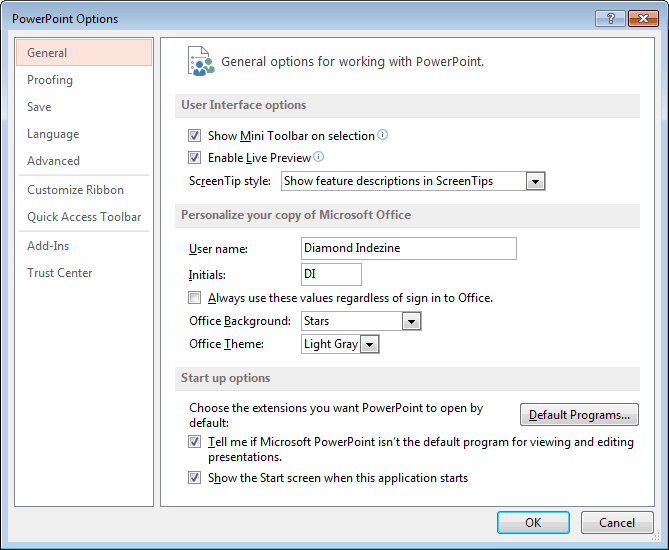
Learn about PowerPoint 2013’s Program Options that you can access from Backstage view.
Filed Under:
PowerPoint 2013
Tagged as: Backstage, Microsoft Windows, Office 2013, Options, PowerPoint 2013, Tutorials
Comments Off on Backstage View: Program Options in PowerPoint 2013 for Windows
Have you ever been in a situation where your presentation looked so awesome with some amazing typography, but when you opened the same presentation on another computer, the text looked positively terrible! This behavior may happen if the font you used is not available on the other computer. The best solution to this problem is to use safe fonts that are available on most computers, or you may also explore the option to embed fonts in your PowerPoint presentation.

Learn how to embed fonts in PowerPoint 2013 for Windows.
Filed Under:
PowerPoint 2013
Tagged as: Embed Fonts, Fonts, Microsoft Windows, Office 2013, PowerPoint 2013, Tutorials
Comments Off on Embed Fonts in PowerPoint 2013 for Windows
Each logged-in user has a default custom dictionary accessible within PowerPoint and other Microsoft Office programs called RoamingCustom.dic. Additionally, you can create and use many more custom dictionaries. Over time, your custom dictionaries may become a very useful resource, especially since any custom dictionary loaded is used by all the Office applications such as Word, Excel, PowerPoint, and Outlook. Let us assume that you have added several words to the custom dictionaries over the last 4 or 5 years, and now you need to move to a new computer.

Learn how to share custom dictionaries in PowerPoint 2016 for Windows.
Filed Under:
PowerPoint 2016
Tagged as: Dictionaries, Microsoft Windows, Office 2016, PowerPoint 2016, Proofing, Spelling, Tutorials
Comments Off on Sharing Custom Dictionaries in PowerPoint 2016 for Windows
The folks at Eyeful recently created their own version of the Beauty and the Beast tale, all within PowerPoint!
I reached out to Eyeful, and their Managing Director, Rob Bailey graciously responded.
Rob: For the past 12 years, Eyeful’s creative team of designers have worked in PowerPoint day in, day out, to bring our customers’ presentations to life in visually stunning ways.
It is this immersion in PowerPoint on a daily basis which means that our design team has an unparalleled knowledge of the capabilities of the software.
This knowledge is further enhanced through regular innovation sessions, in which our design team is unleashed to think completely out of the box and let their creative juices flow to push the software to its limits.
It was one such innovation session which led to one of our senior designers Lorna choosing Beauty and the Beast as inspiration to demonstrate just what can be achieved when PowerPoint is in the right hands.
I’ll let Lorna tell you more…
Geetesh: How satisfying is it to do something that steps beyond the limits using PowerPoint?
Lorna: I think as a company, we are always trying to push PowerPoint as far as we can, to prove to people that it isn’t just bullet points on slides. There’s so much potential for PowerPoint that remains untapped as it is always dismissed as quite restrictive. It’s really satisfying to make something that shows just what’s possible when you invest time and creative thinking into a presentation.
Geetesh: And what motivated you to choose Beauty and the Beast as a deck project?
Lorna: We were set the task of creating visuals to a piece of audio for an innovation piece. I’ve always loved Disney films and knew I wanted to create something that told a story and looked hand made. My original inspiration came from the opening sequence for Disney’s Mulan, where landscapes build across the screen in ink, and I wanted to create something similar but with a watercolor effect. The music and voiceover at the start of Beauty and the Beast are so atmospheric and seemed to fit really well with the watercolor style.

Thanks to Olivia Walsh of Eyeful, who made this feature happen!
 Having spent his early career in a variety of sales and marketing roles, Rob Bailey successfully transitioned into managing sales teams’ growth across a variety of industries before joining Eyeful Presentations as a senior consultant in 2011.
Over the past 5 years, Rob has developed a deep understanding of Eyeful’s proposition and people whilst managing a significant number of strategic Eyeful clients. In his new role as Managing Director, his passion for the business will further establish Eyeful’s position as the most innovative, exciting and influential consultancy in the presentation sector.
See Also: Eyeful Presentations, Brexit, and EU: Conversation with Rob Bailey
The views and opinions expressed in this blog post or content are those of the authors or the interviewees and do not necessarily reflect the official policy or position of any other agency, organization, employer, or company.
Filed Under:
Case Studies
Tagged as: Case Studies, Eyeful, Interviews, PowerPoint, Rob Bailey
Comments Off on Beauty and the Beast: Eyeful’s Adaptation in PowerPoint
There are so many different types of Microsoft Office out there that your head could spin. We explain all you need to know in simple terms in our Version and License of Microsoft PowerPoint and Office post. Taylor Ehlert of eLearning Brothers explores the creation of custom Themes in PowerPoint. And Adam Chapman presents his Ultimate Presentation Checklist poster.
In the Tutorials section, PowerPoint 2016 users can explore changing fills, lines, and effects in SmartArt graphics, creating and editing AutoCorrect entries, and loading and using custom dictionaries. For PowerPoint 2013 users, we look at General and Advanced Program options. Finally, do not miss the press releases and templates of this week.
Stay informed about updated tutorials and happenings.
Filed Under:
Ezine
Tagged as: Ezine, Indezine, News, PowerPoint
Comments Off on PowerPoint and Presenting News: April 11, 2017
Microsoft and the Office logo are trademarks or registered trademarks of Microsoft Corporation in the United States and/or other countries.