
This is the print version of this page. All content is copyright Indezine.com 2000-2026.
Thoughts and impressions of happenings in the world of PowerPoint and presentations, continuously updated since 2003.
See Also:
PowerPoint and Presenting Notes
PowerPoint and Presenting Glossary
A picture needs to be “corrected” when its appearance is too dark or too bright. You could end up with pictures that need correction if the lighting was not proper when you clicked the original picture. Additionally, you may also want to make some tonal changes to a picture so that it stands apart. In this tutorial, you will learn how to make corrections to inserted pictures regarding their brightness, sharpness, softness, and contrast values; all from within PowerPoint 2016 without having to use an external program.

Learn about the Correction option for pictures in PowerPoint 2016 for Windows.
Filed Under:
PowerPoint 2016
Tagged as: Graphics, Microsoft Windows, Office 2016, Pictures, PowerPoint 2016, Tutorials
Comments Off on Picture Corrections in PowerPoint 2016 for Windows

Rob Dysell is the CMO of Pickit. His job is to make sure that the perceived offer of the online service is always increasing and that sales are successful. Rob has worked for over 10 years in advertising, design, and digital marketing. Before working at Pickit, he ran the strategic department of the advertising Agency Acne in Stockholm. He has a mixed background: after graduating in social sciences, media & communication, he went on as a self-taught adventurer in the world of technical platforms.
In this conversation, Rob talks about Pickit’s Talk Like a Rosling collection.
Filed Under:
Clip Media
Tagged as: Clip Media, Graphics, Interviews, Pickit, Pictures, Rob Dysell
Comments Off on Talk Like a Rosling: Conversation with Rob Dysell
Saving a PowerPoint presentation as a PDF has its pros and cons. The biggest advantage is that recipients won’t be able to edit your slides, and you can embed fonts easily. An even better advantage is that you may use PDFs as a substitute for printing drafts or finished slides, thus saving so much paper. Disadvantages include that you cannot be entirely multimedia-friendly. Whatever your thoughts may be, PowerPoint makes it very easy to create PDFs.
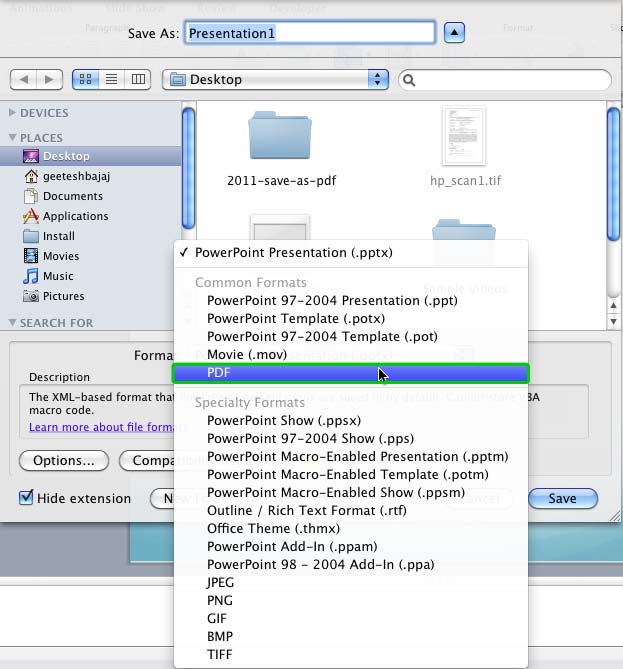
Create PDFs from your presentation slides in PowerPoint 2011 for Mac.
Filed Under:
PowerPoint 2011
Tagged as: Office 2011, PDF, PowerPoint 2011, PowerPoint for Mac, Tutorials
Comments Off on Save as PDF in PowerPoint 2011 for Mac
Do you want to remove a sky, a wall, any backdrop, or something else in a photograph so that the slide background shows through within those removed parts of the picture? The Remove Background option may be just what you need to remove the backdrop from an inserted picture.

Remove parts of your picture to end up with a transparent background in PowerPoint 2016 for Windows.
Filed Under:
PowerPoint 2016
Tagged as: Graphics, Microsoft Windows, Office 2016, Pictures, PowerPoint 2016, Tutorials
Comments Off on Remove Background from Pictures in PowerPoint 2016 for Windows
Kurt Dupont of PresentationPoint explains how their add-in DataPoint generates dynamic slides from a database. Additionally, he talks about a new feature integrating Bluetooth buttons. And then we have Tucker Hatfield, a long-time Program Manager at Microsoft who shares some hitherto untold stories about PowerPoint’s amazing Background Removal tool. We also feature celebrated author, Steve Bustin who talks about his book, The Authority Guide to Presenting and Public Speaking.
In the Tutorials section, PowerPoint 2016 users can learn about Picture Borders, Inserting/Linking Pictures, Cropping Pictures, and also Cropping Pictures to Shapes. PowerPoint 2013 users can explore PDF saving options. Finally, do not miss the new press releases and templates of this week.

Read Indezine’s PowerPoint and Presenting News.
Filed Under:
Ezine
Tagged as: Ezine, Indezine, News, PowerPoint
Comments Off on PowerPoint and Presenting News: December 20, 2016
Microsoft and the Office logo are trademarks or registered trademarks of Microsoft Corporation in the United States and/or other countries.