
This is the print version of this page. All content is copyright Indezine.com 2000-2026.
Thoughts and impressions of happenings in the world of PowerPoint and presentations, continuously updated since 2003.
See Also:
PowerPoint and Presenting Notes
PowerPoint and Presenting Glossary

Tuesday’s keynote at the Presentation Summit was delivered by Mike Parkinson of Billion Dollar Graphics.
Mike’s keynote topic was “Listen, Learn, Share, Succeed”. He started with a video directed by Brock Mitchell of Shot at the Dark about a young man who had to decide to let his mother go and live every moment of the remaining time he had with her. This awesome video was the beginning of a learning session.
Mike explained that real stories are felt, not heard. He also emphasized that emotions bring change.
He then asked people with children within the audience to raise their hands. And then he asked about their friends who had no children, especially those who freely give them advice about how to bring up their children! They don’t have a clue, and yet choose to provide advice that is not required. Presentations are the same — what gives anyone the right to tell others how to present, emphasized Mike.
Emotions can be happy and sad — if we create milestones for all the happy and sad moments in our life, and create a lifeline, then how would that be? Mike actually created an amazing lifeline that looked like a line chart — only this was not a line chart but a lifeline of Mike’s life!
For this lifeline though, Mike shared so much about himself. There were poignant moments, sad times, rough days, relationship issues, violent happenings, weird and wacky experiences, and he also shared amazing changes, life-changing moments, successful results, and good relationships.

The reason why Mike shared his lifeline with us was that personal experiences can benefit professional challenges. He said that advice confuses fact with opinion.
When human beings give advice, they use the word “you” much more often than the word “I”. And that’s the reason why we should beware of the word “you”, especially when people are giving advice without any experiences to back that up. Advice should be based on experience, and that would imply that more of “I” needs to be in the advice than just “you”.
He then asked the audience to find someone they have known for a brief time. So everyone found someone they did not know too well, and conversed with them.
Mike then asked them to converse following these guidelines in 15 minutes:

At the end of the 15 minutes, members of the audience felt that the limitation on using the word “you” made a difference.
Mike said, “Experience trumps advice”. He also said that when someone gives advice, ask them for an example. And when you are the one giving advice, think that you are not the expert — and you can only share what you have learned through experience.
He then showed a video of a very young Steve Jobs who said that it was almost never that a person he called did not help him — and remember this was from the days when Steve Jobs was not “the” Steve Jobs.
Mike ended with his own quote, “In my experiences, we have a mastermind. If we want, we can find solutions. Our solutions are sitting right next to us.”
The views and opinions expressed in this blog post or content are those of the authors or the interviewees and do not necessarily reflect the official policy or position of any other agency, organization, employer, or company.
Filed Under:
Events
Tagged as: Mike Parkinson, PowerPoint, Presentation Summit
Comments Off on Mike Parkinson at the Presentation Summit 2014
We bring you two exclusive products this time – a new set of Irregular Shapes, plus a set of fall themed leaf shapes. Both these sets of shapes are PowerPoint native. PowerPoint 2013 users can learn about Pictures and Video.
And don’t miss the new discussions and templates of this week!

Read Indezine’s PowerPoint and Presenting News.
Filed Under:
Ezine
Tagged as: Ezine, Indezine, News, PowerPoint
Comments Off on PowerPoint and Presenting News: October 14, 2014
Once you add Bookmark(s) to an audio clip, you may want to edit or remove the Bookmark altogether. In PowerPoint you can’t edit a Bookmark — for example, you cannot change the time position of your Bookmark from 30 seconds to 28 seconds. To achieve this change, you have to delete the earlier Bookmark, and then add a new Bookmark on the time position that you want.
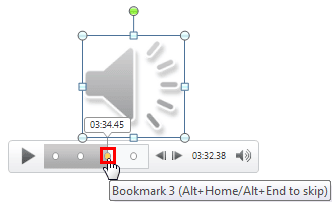
Learn to remove bookmarks from audio clips in PowerPoint 2013 for Windows.
Filed Under:
PowerPoint 2013
Tagged as: PowerPoint 2013, Sounds, Tutorials
Comments Off on Remove Bookmarks from Audio Clips in PowerPoint 2013 for Windows

This year’s Presentation Summit at San Diego began with a keynote from Nolan Haims. After careers in theatre and the circus, Nolan Haims moved into the world of presentation, designing presentations for Fortune 500 CEOs, leading financial institutions and all the major television networks. Nolan was the Presentation Director for Edelman, the world’s largest independent PR company. He writes about visual communication at PresentYourStory.
Rick Altman, the host of the Presentation Summit introduced Nolan as an authority on simplicity. Nolan’s topic for the keynote of course was Simplicity. Simplicity is a “simple” word, but what Nolan tried to explain was more profound. He said that “simplicity is important because audiences remember whatever is simple enough to remember!”
Nolan started by comparing two famous movies: Star Wars and The Phantom Menace. The audience agreed that the former was a better movie, and Nolan emphasized that this was because Star Wars had so much simplicity, and comparatively, The Phantom Menace had complexity. Nolan added that “simplicity has a guarantee that it will always succeed.” He also added that “simplicity in slides can be achieved by deciding what we need to remove.”

Nolan then discussed his background about how he belongs to a family of designers, and how he is the only person in the family who is not formally trained in design. In his earlier days, he just started using Adobe Illustrator and ended up creating something simple. He then encountered “heavy” graphics with bevels, 3D effects, etc. that were quite a rage in those days. This led Nolan to create the type of extreme graphics that were anything but simple!
At this point, Nolan realized that his clients, although impressed were not selling design, so they had no need to use such an extreme form of design. Instead, they were selling products! So that made Nolan ponder whether it would be better selling products with stories and simplicity rather than with extreme design? This realization led Nolan to the main topic of his keynote, that being: Simplicity Works.
Nolan then discussed 4 arguments for simplicity:
Nolan showed samples of text heavy design content — and what was clear was that in text-heavy ad content, there was little that differentiated one product from another (competitor’s) product.

On the other hand, less text content with open white space made the ads stand apart more, and created better brand identity. The Volkswagen ad for the Beetle was shown as an example.

Nolan then showed the famous Afghanistan Spaghetti slide that shows how complexity can altogether remove clarity of thought. Another example Nolan showed was the complex slides presented by Bill Gates years ago — and then he compared them with Bill’s recent slides which were so much clearer.
Nolan then looked at how you can create content that makes your slides stand out.

He shared three ideas to make your slides stand apart.
First of all, he suggested using charts that are more visual, and less chart-like. An example he used to reiterate this point was by creating a fish chart. So what’s a fish chart? That’s just a bar chart that uses fishes rather than bars!

Nolan then compared slides with car bumper stickers — he suggested we compare every slide we create with a bumper sticker — this approach will help create better slides.

And then he suggested we use just a single header to represent text on a slide — and use a simple visual for the rest of the slide.

Nolan then suggested creating slide content that was “sticky”.

He looked at logos of companies such as Nike, Target, and National Geographic — even without the names mentioned, the logos were simple enough to be sticky (identified) in the minds of the audience.
And then he looked at logos with just text such as Reebok and Kohl’s and discussed why those logos with just-text did not work as well as the just-visual logos. To prove his point, Nolan asked everyone in the audience to think of “beer”. And no one though about the words, “beer”, but they all thought about visuals of beer. That’s the reason why visuals make our slides more sticky, and more easy to remember.
Another way of making slides more sticky is to use iconography and insert simple one-color line-art graphics. He also mentioned that iconography is one of those rare cases through which adding something to a slide can make it simpler.
Nolan then showed some samples of iconography.
The most important thing is that simplicity indeed makes money. Nolan talked about the song, Yesterday, which has made so much money. Nolan asked the audience to listen to the simplicity of the music and the lyrics.

He then compared his two favorite food chains, Panera Bread and Chipotle. He discussed which of these are doing better? And the reason why they are doing better is because of the same factor, simplicity. Whereas Panera has increased sales by 200%, Chipotle has seen sales increase 600% in the same time. Nolan said that’s because Chipotle’s menus are so much simpler than Panera’s.

Nolan added that “a confused mind always says no.” He then added that “the paradox of choice is real.”
To prove this, Nolan spoke about a supermarket chain that allowed testing of 24 jam flavors — after testing, only 3% of customers bought those jams. Comparatively, with only 6 jam choices available the next day, 30% bought those jams. This explains that lesser choices (simplicity) can make more money.

Nolan added that “one should show people content simple enough that lets them write you a check.”
Beyond these 4 elements, Nolan added that there is also a 5th element, and that element is difficulty.

He then explored the new Twitter logo, which is essentially full of circles. He also explored the new Microsoft logo, which was created from geometry.
Nolan then put up a quote by Antoine de Saint-Exupery (the author of The Little Prince):
“A designer knows he has achieved perfection not when there is nothing left to add but when there is nothing left to taker away.”
Nolan also showed a hotel key-card from a Washington DC hotel that had so little content on the card’s surface — and lots of awesome white space. Also in Washington DC, Nolan spoke of the simple monuments here that create a more moving impact because of their simplicity. An example of such a monument is the Vietnam Veterans Memorial.
The designer of this monument, Maya Lin said:
“It almost seemed to simple, too little…
I toyed with adding some large flat slabs that would appear to lead into the memorial, but they did not belong. The image was so simple that anything added to it began to detract from it.”
Nolan then concluded with some thoughts to help you become a better designer:

It’s easy to send off something via email — don’t do that! Present your work well, even if that means you need to make a phone call.
Tell your clients why you did what you did — and why you used fewer colors, fewer slides, etc. Tell them why simplicity works.
It’s not about graphic designs and special effects, it’s all about achieving your goal with simplicity. Simplicity makes things cleaner.
The views and opinions expressed in this blog post or content are those of the authors or the interviewees and do not necessarily reflect the official policy or position of any other agency, organization, employer, or company.
Filed Under:
Events
Tagged as: Events, Interviews, Nolan Haims, PowerPoint, Presentation Summit, Sessions
Comments Off on Nolan Haims at the Presentation Summit 2014
One of the very important abilities in PowerPoint 2013 relates to you being able to play your audio files from a certain point within the clip. To do so, you need to use the Bookmarks feature. Bookmarks in PowerPoint are similar to the conventional bookmarks you place within the pages of a book you read. In the same way that you can easily access a particular page with the help of a bookmark, the Bookmark option within an audio clip becomes an indicator of the position you want to play the clip from.

Learn how to add Bookmarks to audio clips in PowerPoint 2013 for Windows.
Filed Under:
PowerPoint 2013
Tagged as: PowerPoint 2013, Sounds, Tutorials
Comments Off on Learn PowerPoint 2013 for Windows: Add Bookmarks for Audio Clips
Microsoft and the Office logo are trademarks or registered trademarks of Microsoft Corporation in the United States and/or other countries.