
This is the print version of this page. All content is copyright Indezine.com 2000-2026.
Thoughts and impressions of happenings in the world of PowerPoint and presentations, continuously updated since 2003.
See Also:
PowerPoint and Presenting Notes
PowerPoint and Presenting Glossary
Drawing a simple straight, point to point line in PowerPoint 2013 is a piece of cake. Now, in this tutorial we’ll move on further to show you how you can draw a curved line. With curved lines, you can create both open and closed shapes. Follow these steps to draw a curved edged triangle using the Curve shape tool.

Learn how to draw a curved line in PowerPoint 2013 for Windows.
Filed Under:
PowerPoint 2013
Tagged as: PowerPoint 2013, Shapes, Tutorials
Comments Off on Learn PowerPoint 2013 for Windows: Drawing Curved Lines
We all use tables in our slides all the time to present numeric data in an organized way so that the audience can easily comprehend or compare values and understand trends. Sometimes tables may even work as containers for quotations or even messages. It’s quite easy to insert a new table — yet there’s more than one way to do this simple task. Which option you choose to insert a table in PowerPoint 2013 depends upon whether your slide contains a Content placeholder or not.

Learn how to insert a table in PowerPoint 2013 for Windows.
Filed Under:
PowerPoint 2013
Tagged as: PowerPoint 2013, Tables, Tutorials
Comments Off on Learn PowerPoint 2013 for Windows: Insert Tables
Text can make so much difference to your shapes — add some text to a rectangle and it becomes an info-graphic! There can be any number of other reasons to insert text within a shape — and inserting or editing text within a shape using PowerPoint 2013 on a touch device such as Microsoft Surface is as easy as doing the same on the desktop version of PowerPoint 2013. In this tutorial, we’ll show you how you can insert and edit the text within a shape while using PowerPoint 2013 on a touch device such as the Surface.
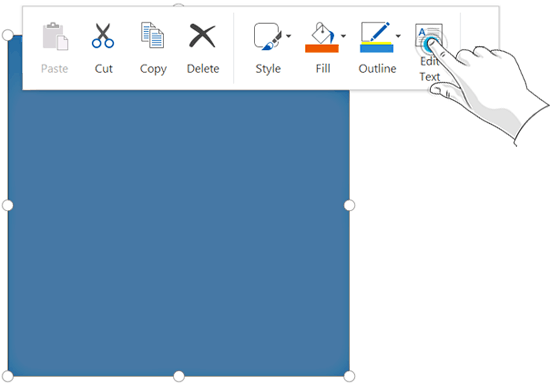
Learn how to add and select text within shapes in PowerPoint 2013 on a touch device.
Filed Under:
PowerPoint 2013
Tagged as: PowerPoint 2013, PowerPoint Touch, Tutorials
Comments Off on PowerPoint 2013 on Touch: Add and Select Text within Shapes
PowerPoint is primarily considered a slide program within which you can bring in text, graphics, multimedia, animation, etc. to deliver your message or story. Working with PowerPoint, you will discover an amazing repertoire of tools that you can use to create awesome slides. Beyond being a tool to create slides, PowerPoint is also a great drawing program with tools and options that rival top end graphic programs. This introductory tutorial shows you how to draw a simple line on the slide.
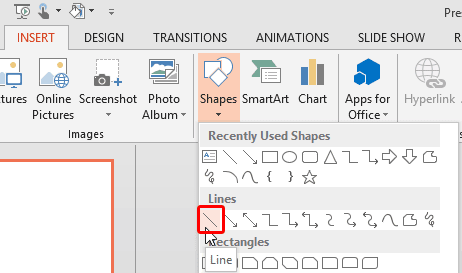
Learn how to draw a line in PowerPoint 2013 for Windows.
Filed Under:
PowerPoint 2013
Tagged as: PowerPoint 2013, Shapes, Tutorials
Comments Off on Learn PowerPoint 2013 for Windows: Drawing Lines
If any two programs were meant to work together in the Microsoft Office suite, they have to be Excel and PowerPoint. Almost everyone who works with Excel has to use PowerPoint to present data and charts to an audience, or even create their business reports in PowerPoint. On the other hand, all PowerPoint charts are essentially created by Excel, even if many of you may not be aware of this fact.

Learn about the best practices for working together with Excel and PowerPoint.
Filed Under:
Excel
Tagged as: Excel, PowerPoint, Tutorials
Comments Off on Guidelines: Using Excel and PowerPoint Together
Microsoft and the Office logo are trademarks or registered trademarks of Microsoft Corporation in the United States and/or other countries.