
This is the print version of this page. All content is copyright Indezine.com 2000-2026.
Thoughts and impressions of happenings in the world of PowerPoint and presentations, continuously updated since 2003.
See Also:
PowerPoint and Presenting Notes
PowerPoint and Presenting Glossary
On a touch device such as Micosoft’s Surface tablets, you may not have access to a regular keyboard and mouse. Everything happens with a tap or a slide or some other gesture. Unlike the desktop versions of Office programs, the touch versions have a floatie — this is a floating toolbar that contains options that are relevant to the tapped object. There are various floatie iterations — the one you see is dependent on the tapped slide object. Other than the Shape floatie and the Picture floatie, there’s also the Text floatie that we explore in this tutorial. Tap on any selected text to see the Text floatie.

Explore various options within the text floatie in PowerPoint 2013 on a touch device.
Filed Under:
PowerPoint 2013
Tagged as: PowerPoint 2013, PowerPoint Touch, Tutorials
Comments Off on PowerPoint 2013 on Touch: Text Floatie

Carmine Gallo is a communication coach for the world’s most admired brands. He has helped transform the storytelling culture at Intel, Coca-Cola, LinkedIn, Chevron, and many others. He is an Emmy award-winning journalist, Forbes .com columnist, and popular keynote speaker on the topic of leadership and communication.
In this conversation, Carmine discusses his new book, Talk Like TED: The 9 Public-Speaking Secrets of the World’s Top Minds.
Geetesh: Your new book, Talk Like TED talks about how anyone can deliver TED-like presentations. What made you notice these characteristics that set some presentations apart from the others?
 Carmine: The annual TED conference and the smaller, independent TEDx events have raised the bar on presentation excellence.
TED is now the gold standard by which many presenters are measured. Like it or not, you’re being compared to TED. I studied 500 TED talks (150 hours’ worth), interviewed the most popular TED speakers, and also dived into the neuroscience of persuasion. I discovered 9 qualities that all successful TED talks share.
What I’m most excited about is the fact that anyone can incorporate these techniques into their very next pitch or presentation, even if they never set foot on a TED stage.
Geetesh: You have reiterated that you don’t need to be a TED speaker to benefit from the ideas within this book. So why use TED as an example – tell us more.
Carmine: Think about what an amazing resource we have at our fingertips! Thanks to broadband Internet connections and TED.com, we can now view thousands of the world’s greatest presentations on computers and mobile devices. There is no better learning tool to help transform your presentation skills. You can turn to TED.com to see speakers tell powerful stories and to watch beautifully designed presentations that take PowerPoint to a new level.

You May Also Like: Carmine Gallo on Indezine

The views and opinions expressed in this blog post or content are those of the authors or the interviewees and do not necessarily reflect the official policy or position of any other agency, organization, employer, or company.
Filed Under:
Interviews
Tagged as: Books, Carmine Gallo, Delivery, Interviews, Presentation Skills, TED
Comments Off on Talk Like TED: Conversation with Carmine Gallo
Just inserting Action Buttons on your slide is not sufficient — you need to apply hyperlinks to them so that they have some function. You have already learnt how to insert Action Buttons. In this tutorial we’ll learn more detailed techniques on working with Action Buttons. Each Action Button has a default action associated — this typically is a hyperlink to some other slide in your presentation. You can change this link, or even add another link such as a link to your web site, another document, and more. In this tutorial, you will learn how to add or change the hyperlinks for Action Buttons.
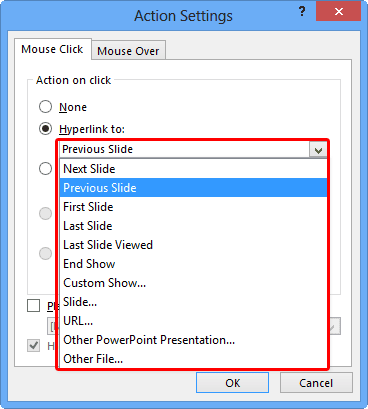
Explore options to add and edit hyperlinks for Action Buttons in PowerPoint 2013 for Windows.
Filed Under:
PowerPoint 2013
Tagged as: PowerPoint 2013, Shapes, Tutorials
Comments Off on Learn PowerPoint 2013 for Windows: Hyperlinks for Action Buttons
You might have come across slides that look plainly bad. One look at such a slide , and it really doesn’t matter whether the content is great or not. You just feel like looking away from it! Also, some visually loud slides can ensure that audiences concentrate more on the horrors presented by the look of the slide rather than the content. You might end up with such slides even with no fault of yours, because someone else designed them for you?

Learn how to reset your slide formatting with one click in PowerPoint 2011 for Mac.
Filed Under:
PowerPoint 2011
Tagged as: Office for Mac, PowerPoint 2011, Tutorials
Comments Off on Learn PowerPoint 2011 for Mac: Reset Slide
In this issue, we bring you ready-to-use Countdown Timers for PowerPoint, and also Visual Resume templates. We also look at a different type of callout: a hand drawn callout. We then explore more features that PowerPoint provides on Touch devices such as the Microsoft Surface.
PowerPoint 2013 for Windows users can learn about rotating text 180 degrees, and how you can work with Action Buttons. PowerPoint 2011 for Mac users can learn about ascertaining the length of a diagonal line, and changing a diagonal line to a perfectly straight horizontal or vertical line. Also learn about rotating text 180 degrees on the Mac versions of PowerPoint.
And finally, do not miss the new discussions and templates of this week!

Read Indezine’s PowerPoint and Presenting News.
Filed Under:
Ezine
Tagged as: Ezine, Indezine, News, PowerPoint
Comments Off on PowerPoint and Presenting News: February 25, 2014
Microsoft and the Office logo are trademarks or registered trademarks of Microsoft Corporation in the United States and/or other countries.