
This is the print version of this page. All content is copyright Indezine.com 2000-2026.
Thoughts and impressions of happenings in the world of PowerPoint and presentations, continuously updated since 2003.
See Also:
PowerPoint and Presenting Notes
PowerPoint and Presenting Glossary
In this issue, we bring you a review of Flevy Tools, a free add-in that lets you create all sorts of diagrams within PowerPoint. We also get you some free Thanksgiving themed clip art. PowerPoint 2013 for Windows users can learn about using transparency with all sorts of fills. Additionally, we explore shape outlines, and their weight (thickness)and dash attributes. PowerPoint 2011 for Mac users can explore Chart Gridlines. And finally, do not miss the new discussions and templates of this week!

Read Indezine’s PowerPoint and Presenting News.
Filed Under:
Ezine
Tagged as: Ezine, Indezine, News, PowerPoint
Comments Off on PowerPoint and Presenting News: November 19, 2013
Whenever you insert a new shape into a PowerPoint slide, you can see that it is filled with a solid color and has an outline by default (this may differ depending on the Theme applied to your presentation). You can remove the fill of the shape as well as the outline. In this tutorial, we’ll learn how to remove an outline from a shape so that it only includes a fill without any outline. Whatever you do, make sure that you either remove the fill or the outline because if you remove both, then your shape will no longer be visible.

Remove the outline from any shape in PowerPoint 2013 for Windows.
Filed Under:
PowerPoint 2013
Tagged as: Lines, PowerPoint 2013, Shapes, Tutorials
Comments Off on No Line for Shapes in PowerPoint 2013 for Windows
PowerPoint 2013 provides plenty of options to format Shape Outlines — this tutorial explores an attribute that’s rarely associated with shape outlines but can provide a surprisingly different look, especially when applied to lines that are thicker in weight. This attribute, Gradient Outlines is not accessible from the Shape Outline gallery in the Ribbon but directly from the Format Shape Task Pane that we will explore later in this page.
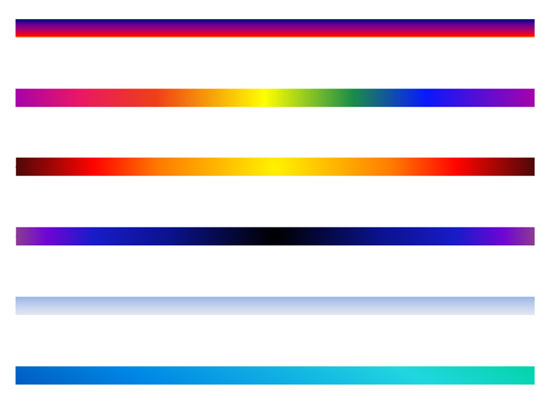
Learn how to apply gradients to outlines in PowerPoint 2013 for Windows.
Filed Under:
PowerPoint 2013
Tagged as: Lines, PowerPoint 2013, Shapes, Tutorials
Comments Off on Learn PowerPoint 2013 for Windows: Gradient Outlines
PowerPoint provides two types of shapes: open and close shapes. Shapes, such as rectangles, circles, etc. are closed shapes. Regular line shapes, such as straight lines, curves, scribbles, etc. are open shapes. Arrowheads can be added only to open shapes. That’s because an arrow needs a pronounced, visible beginning and end.

Learn how to format arrowheads for line shapes in PowerPoint 2013 for Windows.
Filed Under:
PowerPoint 2013
Tagged as: Lines, PowerPoint 2013, Shapes, Tutorials
Comments Off on Learn PowerPoint 2013 for Windows: Formatting Arrowheads
These Thanksgiving for PowerPoint are ready to use clip-art graphics that you can use within your presentation slides. These graphics are available in black and white colors — both variations are contained within a separate sample presentation you can download. Just copy the clip art graphic you like and paste into another PowerPoint slide, or even a Word document or Excel worksheet. Additionally, these Thanksgiving graphics are vector shapes, so you can easily edit them within your Microsoft Office program.

Download and use these graphics.
Filed Under:
Presentation Bank
Tagged as: Graphics, PowerPoint
Comments Off on Thanksgiving Clip Arts for PowerPoint
Microsoft and the Office logo are trademarks or registered trademarks of Microsoft Corporation in the United States and/or other countries.