
This is the print version of this page. All content is copyright Indezine.com 2000-2026.
Thoughts and impressions of happenings in the world of PowerPoint and presentations, continuously updated since 2003.
See Also:
PowerPoint and Presenting Notes
PowerPoint and Presenting Glossary
In this issue, we show you how you can install Microsoft’s Office Mobile on your iPhone — or even an iPad or iPod Touch. Yes, Office Mobile does include the mobile version of PowerPoint. Reviews and reactions to this app have been severely critical to very positive — critical because you need an Office 365 subscription to use it; positive because it’s snappy and maintains the fidelity of your Office documents. We bring you the last set of our Pushpin series — also now all Pushpin series are available as a single download! PowerPoint 2013 users will learn more about two most under-utilized yet powerful views — Outline and Slide Sorter. And PowerPoint 2011 for Mac users can explore many ways in which they can customize their Slide Masters.

Read Indezine’s PowerPoint and Presenting News.
Filed Under:
Ezine
Tagged as: Ezine, Indezine, News, PowerPoint
Comments Off on PowerPoint and Presenting News: June 25, 2013
You can add a new Slide Master to your presentation — you can also duplicate the existing Slide Master. You can then format it to change its look by applying a Background Style, add a custom background, add new Slide Layouts, etc. But why would you do all these tasks in the first place? There needs to be a compelling reason to do so.

Learn how to apply Slide Masters to individual slides in PowerPoint 2011 for Mac.
Filed Under:
PowerPoint 2011
Tagged as: Office for Mac, PowerPoint 2011, Templates, Tutorials
Comments Off on Learn PowerPoint 2011 for Mac: Applying Slide Masters to Individual Slides
The Notes Page is one of ten views available in PowerPoint 2013, this shows you how your printed notes will appear — in this tutorial, we’ll explore this specific view for Notes Pages and learn about the benefits of this view. The Notes page shows the speaker notes that you add within the Notes pane for each individual slide. These speaker notes are visible in three distinct places within PowerPoint, depending upon the view you choose.
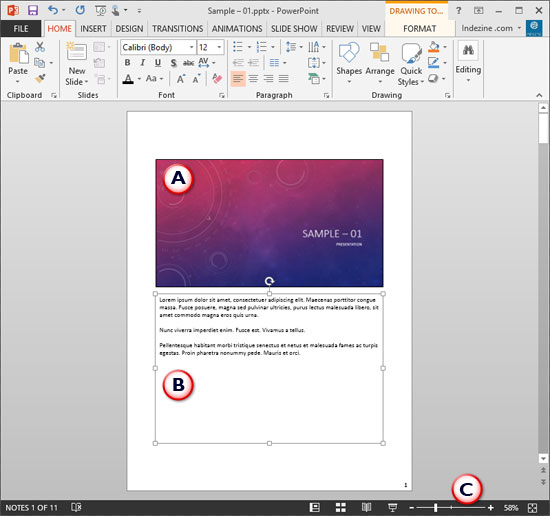
Learn about Notes Page view in PowerPoint 2013 for Windows.
Filed Under:
PowerPoint 2013
Tagged as: PowerPoint 2013, Tutorials
Comments Off on Learn PowerPoint 2013 for Windows: Notes Page View
OK, you have an iOS device and you visit the Apple App Store to download Office Mobile – but then you run into problems. You can either not find Office Mobile at all – or you are not allowed to install it. Why does that happen, and what can you do – here are some guidelines to get you started.

Find out why Office Mobile won’t install on your iOS device.
Filed Under:
PowerPoint for iOS
Tagged as: iPad, iPhone, Office 365, Office Mobile, PowerPoint, Tutorials
Comments Off on Office Mobile: Apple App Store Does Not Let Me Install?
Adding a pin to your picture or shape on a slide just emulates the way you “pin” something onto a board. These digital pushpin graphics work the same way so that your picture, shape, or anything else appears as if it has been “pinned”! This tenth set of pushpin graphics in 5 colors has been added to our existing collection of pushpin graphics on your slides! All pushpin graphics are contained within the presentation you will download – all you need to do is copy the pushpin you need and then paste it on the edges of pictures or shapes within your presentation slides.

Download and use these pushpins in your slides.
Filed Under:
Presentation Bank
Tagged as: Design, Graphics, PowerPoint, Presentation Samples
Comments Off on Handmade Slides: Pushpins for PowerPoint – 10
Microsoft and the Office logo are trademarks or registered trademarks of Microsoft Corporation in the United States and/or other countries.