
This is the print version of this page. All content is copyright Indezine.com 2000-2026.
Thoughts and impressions of happenings in the world of PowerPoint and presentations, continuously updated since 2003.
See Also:
PowerPoint and Presenting Notes
PowerPoint and Presenting Glossary
Do you have a picture somewhere that’s been with you for years — and you have the perfect opportunity to use it in next week’s big presentation? And then you just realize that you have no clue about where this picture came from? Did you buy it from a stock photo site, was it a free picture from some other site, is it even part of any Creative Commons license that allows you to use it legally? Or worse — did you just get this from Google’s Images Search? We know — this is a very strange scenario to be in — you don’t know if that picture can be used without breaking some law — and the last thing you want to do is start searching for an alternative picture that can be legally used. The solution to this problem is actually quite simpler than it sounds — just use Google’s image source search!

Learn about Google’s amazing reverse search for pictures.
Filed Under:
Pictures and Visuals
Tagged as: Copyrights, Google, Graphics, Pictures, PowerPoint, Tutorials
Comments Off on Google’s Image Source Search
Handouts are documents you can print from within PowerPoint that include slide representations from your presentation — you can opt to include as many as 9 slides on each Handout page. Of course with 9 slides on a page, your slides will look more like thumbnails. You can also choose to print just one slide on every handout page — then your Handout pages will look like individual slides printed on a page.

Learn about the Handout Master view in PowerPoint 2013 for Windows.
Filed Under:
PowerPoint 2013
Tagged as: PowerPoint 2013, Tutorials
Comments Off on Learn PowerPoint 2013 for Windows: Handout Master View
When you insert Slide Numbers on your slides, you may discover that the location of the Slide Number changes depending upon the active Theme of your presentation. Some Themes (or templates) may display the Slide Number at the bottom right — with other Themes, it may be located at the top right, or even the bottom center. As you can observe, the location of the Slide Number may seem to be influenced by the Theme or template — and that’s almost true. However it’s only the Slide Master within your Theme or template that’s influences the position of your Slide Numbers.
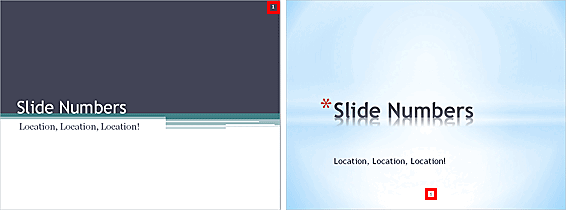
Learn how to change the location of slide numbers in PowerPoint 2011 for Mac.
Filed Under:
PowerPoint 2011
Tagged as: Office for Mac, PowerPoint 2011, Templates, Tutorials
Comments Off on Learn PowerPoint 2011 for Mac: Changing Location of Slide Numbers
We all know that you need to buy the versions of Office that you run on your computer – such as Office 2013 for Windows or even Office 2011 for Mac. But as you explored in our Install Office Mobile on an iPhone (or iOS Device) tutorial, you paid nothing on the Apple App Store to download and install Office for Mobile – so does that make it a free app? The answer is not as simple as a generic Yes or No!

Is Microsoft’s Office Mobile a free app for iOS devices?
Filed Under:
Microsoft Office
Tagged as: iPad, iPhone, Office 365, Office Mobile, PowerPoint, Tutorials
Comments Off on Is Microsoft’s Office Mobile for iOS a Free App?
The repertoire of various views available in PowerPoint 2013 for Windows ranges from some views that you use all the time to others that you may have never bothered to explore. The latter category probably includes Reading view. Reading view is similar to Slide Show view in some ways because in both views, the slide is shown in full screen mode. However, in Reading view you also see the PowerPoint title bar and the Status Bar at the top and bottom of the interface respectively. Additionally, you can also view the Windows task bar at the bottom of the screen.

Learn about Reading view in PowerPoint 2013 for Windows.
Filed Under:
PowerPoint 2013
Tagged as: PowerPoint 2013, Tutorials
Comments Off on Learn PowerPoint 2013 for Windows: Reading View
Microsoft and the Office logo are trademarks or registered trademarks of Microsoft Corporation in the United States and/or other countries.