
This is the print version of this page. All content is copyright Indezine.com 2000-2026.
Thoughts and impressions of happenings in the world of PowerPoint and presentations, continuously updated since 2003.
See Also:
PowerPoint and Presenting Notes
PowerPoint and Presenting Glossary
Did you know that in social encounters women smile 87 percent of the time versus 67 percent for men, and that women are 26 percent more likely to return smiles from the opposite sex?
These are just a few statistics from The Definitive Book of Body Language by Allan and Barbara Pease (who also wrote Why Men Don’t Listen and Women Can’t Read Maps).

Image: Yay Images
Filed Under:
Guest Posts
Tagged as: Claudyne Wilder, Guest Post, Opinion, PowerPoint
Comments Off on When is Smiling Appropriate to the Audience?
In this issue, we first look at Google’s fantastic reverse image search, and how indispensable this option can be when you want to be sure about the copyright status of any pictures you use in your slides. We continue our series about PowerPoint (Office) Mobile on iOS devices. Right now, everyone seems to think that Microsoft’s Office offering for iOS is too little and too late — and the fact is that you cannot install it on more than half of the iOS devices and even then it’s an expensive app although the actual download is free! Sounds confusing and contradicting? Yes — it is — our coverage will make you understand these complex topics in plain English. In our tutorial series, PowerPoint for Windows users can learn about views. We cover Notes Page, Reading, and Handout Master views. PowerPoint 2011 for Mac users will explore more about Slide Masters. And finally, do look at discussions and templates of this week!

Read Indezine’s PowerPoint and Presenting News.
Filed Under:
Ezine
Tagged as: Ezine, Indezine, News, PowerPoint
Comments Off on PowerPoint and Presenting News: July 2, 2013
Each slide in your PowerPoint deck can have some notes associated with it — and these are placed in the Notes pane area. Do you want to print all these slide notes? Yes, you can — however very few people realize that you can print these notes in the form of a properly structured Notes Page. This might be among the least used PowerPoint options — but this certainly is among the most useful ones! Incidentally, even the small number of people who print Notes pages never realize that the look of their printed Notes pages can be modified within the Notes Master. Any changes you make within the Notes Master view affects the look within Notes Page view, and the layout of printed Notes pages.

Learn about Notes Master view in PowerPoint 2013 for Windows.
Filed Under:
PowerPoint 2013
Tagged as: PowerPoint 2013, Tutorials
Comments Off on Learn PowerPoint 2013 for Windows: Notes Master View
In a presentation with plenty of slides, it’s quite easy to locate a specific slide as long as you know the sequence of your slide deck. You can see which slide number an active slide is within both Normal and Slide Sorter views. However, the same requirement becomes a challenge during Slide Show view, especially if you also want your audience to be able to see the slide numbers. To do so, you must enable slide numbers on the slides — here are the steps required to do so in PowerPoint 2011 for Mac.

Learn how to add Slide Numbers on slides and Masters in PowerPoint 2011 for Mac.
Filed Under:
PowerPoint 2011
Tagged as: Office for Mac, PowerPoint 2011, Templates, Tutorials
Comments Off on Learn PowerPoint 2011 for Mac: Working with Slide Numbers
These “map pin” graphics are already placed in PowerPoint slides – just copy the pins and then paste within your own slides that already contain a map. It’s so easy now to highlight a location on your map! Other than maps, you can also use these map pins like regular push pins so that a picture, shape, or anything else appears as if it has been pushed onto a surface, board, or wall with a pin!
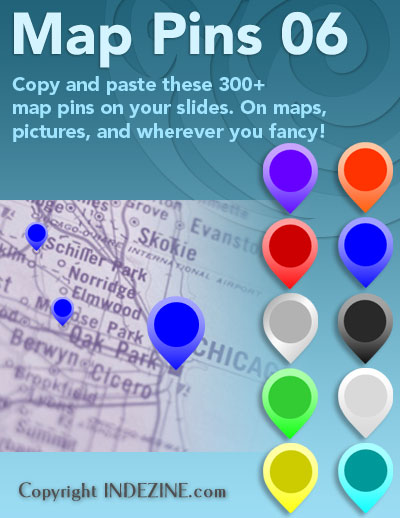
Download and use these map pins in your slides.
Filed Under:
Presentation Bank
Tagged as: Design, Graphics, PowerPoint, Presentation Samples
Comments Off on Handmade Slides: Map Pins for PowerPoint – 06
Microsoft and the Office logo are trademarks or registered trademarks of Microsoft Corporation in the United States and/or other countries.